
OpenBot: Agents, Routines and Practical Workflows
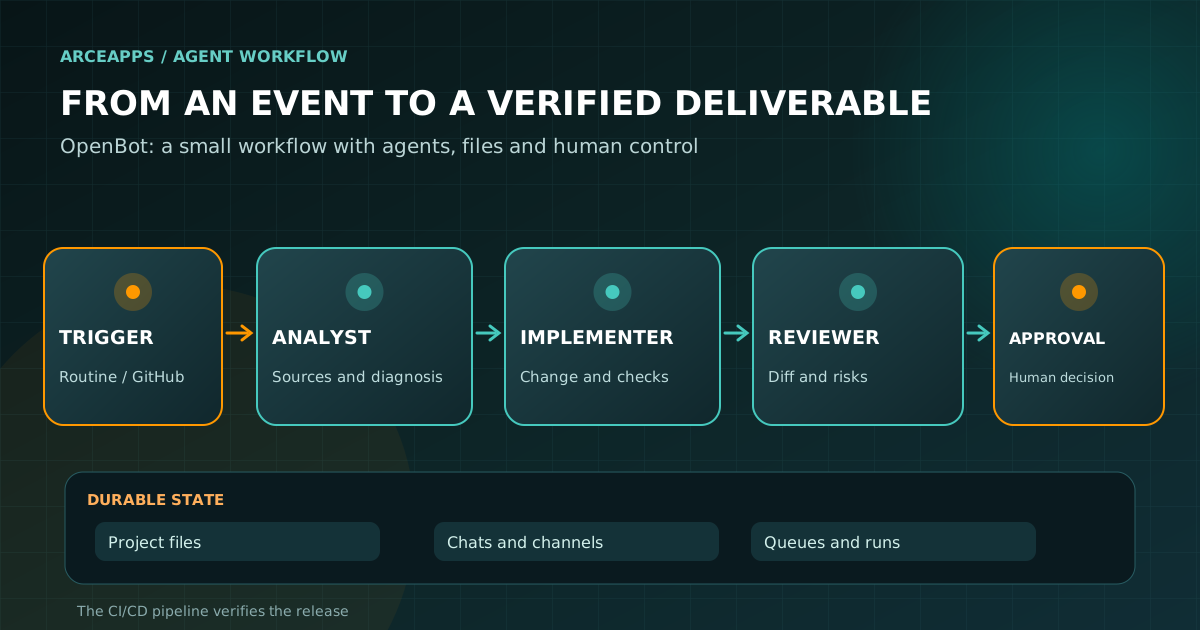
Table of Contents
The first time you put three coding agents in one app, it is easy to feel as though you have assembled a productive team. You have not. You have three capable tools that can edit files and potentially triple your coordination mistakes. OpenBot becomes interesting when you stop treating its agents as chat windows and start treating them as processes with context, ownership and explicit completion rules.
OpenBot brings Codex, Claude Code, Gemini, Grok, OpenCode and other engines into a persistent workspace. Each agent can have its own identity, instructions and folder. Agents can communicate in shared channels, queue work, participate in multi-step workflows and be supervised from a phone or browser while the execution host is reachable.
This article is the follow-up to OpenBot vs MausBot: the new era of AI assistants, where I compared both projects, their licenses and five practical tasks. I also previously looked at OpenBot, Hermes and Paperclip through the lens of proactive agents. Here, I want to go deeper into one small, checkable system rather than producing another broad comparison.
Features and commands were cross-checked against public documentation available on November 19, 2026. The setup patterns are proposals you can reproduce; they are not measurements from a personally tested installation. This is openbot.run, backed by nightly-labs/openbot, not CopilotKit’s unrelated project with the same name at open.bot.
OpenBot is a workspace, not another model
OpenBot does not replace the underlying foundation models or every capability of the agent tools you already use. It runs existing AI clients inside a layer of identity, saved state, tools, messaging, task management and automation.
This distinction helps when something goes wrong. A poor diagnosis by Codex is not necessarily an OpenBot orchestration bug. A task that never reaches a reviewer may be a problem with a channel, queue or workflow configuration. Lost conversational context after changing models may reflect different provider session semantics rather than deleted files.
The documentation places OpenBot’s primary state, including SQLite records and working files, on the host computer or server. Calls to model providers can still transmit prompts and tool results remotely. Local-first is a data-ownership model, not a promise that all inference is offline.
In earlier ArceApps articles I explored persistent memory for AI agents and multi-provider coding workflows. OpenBot provides a tangible place to organize some of those ideas. Its most useful promise is continuity: the agent you configured yesterday can still have its name, files and instructions tomorrow.
There is one condition: you must design the work so that continuity actually helps. A chaotic saved transcript is still chaotic.
Three decisions before installing anything
First, decide where work will run. OpenBot has desktop installations for macOS, Windows and Linux. For always-on tasks, the project also documents self-hosted Linux servers, Docker and hosted options. Your choice determines which disk stores the state, which system identity executes commands, and what happens when the computer sleeps.
Second, choose the operating-system account. An agent with terminal access may exercise whatever capabilities its process and provider runtime allow. On a trial machine, I would choose a non-administrator account with a disposable repository and no production deployment credentials. Granting broad machine privileges for convenience defeats the purpose of setting careful agent rules.
Third, decide which engine to connect first. Do not start with eight integrations. If you already use Claude Code, start there. If your work is organized around Codex, connect Codex. If you are invested in OpenCode, review OpenBot’s integration with it. Add additional engines only when you have a specific reason to use them.
Read the official first-agent and permission guide and privacy documentation before accepting the first-launch access request. Documented versions can run agents with broad authority after initial consent. The onboarding decision is part of your security architecture, not merely a welcome screen.
Your first agent should have a boring job
Download the app from the official OpenBot site, select the installer for your platform and follow the provider setup prompts. Confirm that the selected CLI can authenticate with the account you actually intend to use. A model being visible in a picker is not proof that a particular subscription or account can call it.
Create a narrowly focused agent, perhaps Issue Analyst, pointed at a test project. Its first job should be to read relevant code and logs and explain a reproducible bug without changing the repository.
A suitable initial prompt might be:
Read the failing test and the file under test. Explain where the expected behavior diverges from the observed behavior. Save a short diagnosis with the paths you inspected and two plausible fixes. Do not change the repository yet.
Then check the result outside the conversation. Does the diagnosis exist as a file? Did the agent identify actual code and test evidence? Does it separate observed facts from speculation? Did it run unnecessary commands? These questions reveal access and context problems while their consequences are still small.
Only when that succeeds would I introduce an implementation agent or reviewer. A collection of agent avatars is not an architecture. Clear responsibilities and independently checkable outputs are.
Write role instructions as contracts
An effective agent profile needs a purpose, scope, inputs, output and stop conditions. It does not need several pages of motivational prose. A developer agent should know which files it may change, what evidence counts as completion and when to request human input.
An Implementer profile might say:
Work only on the assigned branch and project directory. Inspect existing behavior before editing. Make the smallest change that satisfies the requirement. Return the diff, checks you actually ran and any known limitations. Do not publish or merge without explicit authorization.
A Reviewer might use a different contract:
Review the diff against the original requirement and available checks. Look for regressions, edge cases, security concerns and unrelated edits. Give concrete observations with file and line references when possible. Do not silently repair the implementation unless asked.
The point is that the two outputs are different. The implementer provides a change and evidence. The reviewer provides independent criticism and a list of unresolved issues. Asking both to “make the project better” removes precisely the separation we wanted.
A Research agent can be a useful third role when work repeatedly needs external documentation. But each handoff costs time and context. Add agents when the separation improves control or quality, not as a hobby in itself.
The contract should also specify what happens if evidence is missing. A blocked task is a valid outcome. Inventing a test result is not.
Workspace, saved chat and memory do different jobs
A workspace holds files. A conversation explains the discussion. Memory attempts to retain useful facts. These are not interchangeable, even though an app can display them together.
For meaningful tasks I would keep simple artifacts: the agreed brief, a short decision log, source references and the final result. In research, the result may be a sourced report. In software work, the result is usually a diff plus tests. The conversation is useful audit context, but it should not be the only location where the agreed requirements live.
OpenBot can preserve an agent’s name and workspace while changing its AI provider. However, the workspace guide warns that the new model does not automatically receive the entire earlier conversation. Selected context may be passed and more history can be retrieved, but not every provider-specific detail survives.
I would therefore use an explicit continuation request:
Read this task’s brief and decision log before doing anything else. Confirm the current branch and commit, list which checks remain unfinished, and propose the smallest next step. Do not mark an earlier verification as complete unless you can point to its actual result.
That single habit prevents many “but I thought we had already decided” loops. It also makes the project portable if you later leave OpenBot for another client.
Not every solo project needs a vector memory database. Good filenames, source links and a reliable repository often deliver most of the value with much less complexity.
Channels: one owner, multiple contributors
An OpenBot channel gives multiple agents a shared conversation. One agent owns the task at a time and passes ownership explicitly. That is the central coordination rule I would lean on.
Imagine a small development issue moving through these stages:
- A person supplies the requirement, failing behavior and acceptance criteria.
- Analyst examines the evidence and requests the Implementer’s work.
- Implementer creates a focused change on a branch.
- Reviewer inspects the diff and asks for a correction if necessary.
- The person inspects the finished work and decides whether a pull request or merge is appropriate.
This sequence is a proposed way of using channels, not an assertion that OpenBot automatically executes every step in this order without configuration. In particular, the channel’s conceptual owner should be reflected in actual file and repository permissions. An agent saying “you own the task now” does not revoke another process’s operating-system access.
Do not ask three agents to modify the same source file simultaneously unless you have intentionally designed a conflict-resolution process. Parallelism is helpful for independent investigation or review; it is hazardous when ownership of an output is ambiguous.
A channel is also not the same thing as a workflow. Channels are good for collaborative, evolving tasks. A workflow captures an established sequence you expect to repeat with defined transitions and checkpoints.
Routines: the smallest useful automation
OpenBot routines are recurring instructions that run at scheduled times. That makes them useful for triage, status reports and periodic research. It does not turn them into a transaction processor with exactly-once delivery guarantees.
A first routine could belong to the Issue Analyst:
Review recent failures and changes that have not yet been summarized. If there is nothing new, finish without inventing a problem. If a regression appears, report the exact commit or run ID, the relevant failure, an evidence-based hypothesis and the next check. Do not change code or open a pull request automatically.
The “nothing new” case matters. A routine that must always find an issue eventually becomes a machine for generating false urgency. Useful assistants should sometimes have nothing to report.
OpenBot documents schedule-based routines and webhook-based triggers. Their reliability depends on the instance that runs them. If the host machine is shut down, a routine does not keep working through wishful thinking. For unattended operation, review the hosted or self-hosted arrangements, network availability, trigger delivery and restart behavior.
I would retain a run identifier and short outcome for each execution. An attempted run and a completed run are different events. When there is an error, the log should make that distinction visible.
For tasks whose timing or uniqueness is safety-critical, keep deterministic orchestration where it belongs: a conventional scheduler, transaction store or CI system.
Workflows: turn a prompt into an inspectable process
OpenBot’s workflow editor can connect agent steps, model steps and human approval. The official workflow guide uses the example of preparing a release brief and adding an Approval step before sharing it. That simple checkpoint is more useful than a large diagram full of unnamed agents.
I would begin with three steps: prepare → review → approve. Once that works reliably, add scheduled or event triggers, conditional steps and integration with publishing systems.
For a technical blog, the process might look like this:
| Step | Owner | Input | Output and criterion |
|---|---|---|---|
| 1. Research | Research agent | Topic and primary sources | Brief with URLs, dates and unknowns |
| 2. Draft | Writer agent | Approved brief | Markdown, frontmatter and references |
| 3. Verify | Reviewer agent | Draft and schema | Evidence-backed issue list or PASS |
| 4. Approve | Human | Files and diff | Explicit publishing decision |
| 5. Publish | Existing CI/CD | Reviewed commit | Successful build and checked live page |
The key abstraction is not “several models chatting.” It is a chain of artifacts that can be inspected. Each output has an identifiable role and the next step can fail honestly when it is missing.
If a project already has GitHub Actions that run tests, there is little value in teaching an agent to reproduce all of those checks every time. Use CI for deterministic verification and an agent for work that actually requires judgment.
Recent OpenBot releases also document GitHub-related workflow triggers. Their exact behavior depends on the installed version, authorized repositories and provider configuration. Check the changelog when the interface does not match an example.
Worked design: a bug fix that cannot skip review
Suppose a change to Astro frontmatter causes a generated route to disappear. The objective is not maximum autonomy. It is a smaller amount of repetitive work while keeping control of what reaches production.
First, a GitHub event or manual instruction tells Analyst which run or commit failed. Analyst reads the evidence and saves a concise report. It separates observations from hypotheses and makes no source-code changes.
Second, Implementer receives the diagnosis, acceptance criteria and a dedicated branch. It examines existing conventions, reuses the relevant code, makes a minimal correction and saves a diff. It may perform checks that CI cannot cover well, but should not waste time recreating all existing automated validations without a reason.
Third, Reviewer checks the change against the original requirement. It looks for an unnecessary exception, a hidden regression, a broken internal link or code outside the task’s scope. If something is wrong, it returns specific evidence to the implementer. If nothing obvious is wrong, it reports exactly what it reviewed rather than declaring universal correctness.
Fourth, the authorized human or release procedure determines whether the PR can merge after the relevant CI is green. Deployment remains the responsibility of the existing pipeline. Then we check that the real public page serves the expected version. “Merged” and “deployed and verified” are distinct states.
OpenBot’s benefit is not that every step is exclusive to OpenBot. It is that agents, handoffs, saved files and process controls can be coordinated from one workspace, while Git and CI remain the authoritative records of shipped code.
A surprisingly useful feature: the local CLI
OpenBot has a documented Local scripts API and openbot-cli. A script running on the same host as OpenBot can send an agent a task, wait for its reply, start a routine, inspect delivery status and handle certain questions or approvals.
This capability is disabled by default and must be enabled per agent under Permissions → Local scripts. It should not be treated as a public endpoint that anyone on the Internet can invoke.
The reference includes a macOS CLI location and example commands:
alias openbot-cli='node "/Applications/OpenBot.app/Contents/Resources/cli/openbot-cli.mjs"'

# List the agents that permit local scripts
openbot-cli list

# Send work and wait for the result
openbot-cli run "Ada" "Run the tests and tell me what failed" --wait

# Supply a task file and ask for JSON output
openbot-cli run "Ada" - --wait --json < task.md
The alias above is macOS-specific. Linux and Windows have different installation paths, documented next to the examples. The CLI script requires Node 18 or later. I would not present these commands as having been tested on all platforms.
The API has several important semantics. Without —wait, a run can return when the message has been queued, not completed. With —wait, a timeout stops the wait but does not stop the agent’s task. The CLI documents different exit codes for success, failure, awaiting human input, timeout and an unavailable host.
For retrying automation, the documented —id option supplies a message retry key. That is an important tool for avoiding duplicate work when a job runner sends the same event more than once. It does not magically guarantee exactly-once side effects in GitHub or any other downstream service.
The local listener runs on loopback and uses a bearer token stored in files with restricted permissions. Exposing it through an improvised public tunnel would create a security problem rather than a convenient automation feature.
Putting Codex, Claude and OpenCode under one roof
The idea of multiple providers is valuable only if it preserves their differences. Codex and Claude Code have their own tools, sessions, models and permission behavior. OpenCode and other ACP-compatible agents offer another integration path. OpenBot also advertises OpenAI-compatible endpoints and local-model services such as Ollama and LM Studio.
I would not build a system where every agent can arbitrarily call every other agent. Instead, choose a default engine per responsibility. A bounded research pass might use a less expensive model. A difficult code change could justify a stronger coding engine. A reviewer should examine the actual artifact instead of blindly inheriting the implementer’s confidence.
Changing providers does not transfer every internal session detail. Different engines may expose different tools or ways of resuming work. That is why the task brief, source files and commit history matter. If the agent’s engine changes mid-task, ask it to reconstruct the current state from durable artifacts and explicitly confirm what remains unfinished.
Choosing a model should be downstream of choosing a task. For an indie developer, an integration that can safely edit the correct branch is often more useful than a model that scores a little higher on a generic benchmark but cannot access the working environment.
A provider picker is not a substitute for a design of permissions, tasks and results.
The hard truth about permissions
OpenBot’s getting-started guide and privacy file document a powerful default: after initial consent, agents may run commands, alter files, use the network and control the browser without a fresh confirmation for every action.
This power enables useful automation, but it also demands care. The Workspace only setting for compatible providers limits writes to allowed folders; by itself it does not prevent reading files elsewhere or using the network. An agent’s user account, mounted volumes, system policies and container boundaries remain relevant.
Any material obtained from external websites should be treated as untrusted input. A README can include instructions designed to trick an agent into running destructive commands. An issue comment can contain text that tries to override the task. The fact that the text reached the model through a tool does not make it authoritative.
I would give Research read access and network access where needed, but no production deployment key. Implementer gets access to a working branch, not the secrets used for releases. Reviewer sees the diff and checks, not every credential. Publisher has a tightly scoped deploy mechanism and nothing that authorizes rewriting unrelated source history.
A single all-powerful agent is easy to configure. It is also an unusually large blast radius for a misunderstanding.
Running OpenBot on a server: when and how
Desktop mode is sufficient for occasional experiments. When a routine must run while a laptop is closed, you need a persistent host. OpenBot documents installation on Ubuntu servers and an official Docker image.
The Docker documentation includes a Compose setup:
curl -fsSLO https://raw.githubusercontent.com/nightly-labs/openbot/main/docker/compose.yaml
curl -fsSLO https://raw.githubusercontent.com/nightly-labs/openbot/main/docker/seccomp.json
docker compose up -d
docker compose exec openbot openbot login
Those commands are quoted from official documentation, not a report of my own successful deployment. Inspect downloaded scripts and Compose files, review their pinned versions where appropriate, and verify host requirements before executing them. Never mount your entire home directory or the Docker socket into an agent container merely to make a demo work.
One warning in the official docs is especially important: agents in the same OpenBot container can read other agents’ files and processes under the shared user. The container provides a boundary against the host, but does not automatically isolate every agent from every other agent. Keep agents with incompatible secrets in different isolation domains.
The documentation also warns about host networking. It can improve connectivity in some environments but removes network separation and can expose local host services to processes inside the container. Use it only when you understand the security implications.
For a headless Ubuntu host, read the separate self-hosted server guide. It covers installation, login and connecting clients. Operating your own server also means handling backups, updates, disk pressure and incident recovery.
The hosted option can reduce operational work, but you still need to map where your data lives and which providers see it. “Hosted” is a deployment choice, not a substitute for reading the permission model.
Mobile clients: supervision, not distributed execution
OpenBot provides iOS, Android and web clients that connect to an active OpenBot host. This is particularly useful when agents are waiting for a decision, or when a scheduled task completes while you are away from the computer.
The mobile device does not become the owner of every agent process and working folder. Those remain on the selected host. If the host is asleep, unreachable or signed out, the phone cannot make the inaccessible processes continue merely by opening the app.
This is why I would design approval messages to be understandable on a small screen. A good approval names the intended action, its target file or service, the relevant check and the risk of proceeding. “Continue?” without context is a poor safety control no matter how polished the UI looks.
Check client and server version compatibility, connection behavior and device revocation in the official documentation. Remote access introduces its own trust boundary, even if the application uses a convenient pairing procedure.
A genuinely useful assistant can wait for its owner without looping uselessly or generating extra model calls. Mobility should improve oversight rather than weaken it.
Cost, limits and inevitable failure modes
Multiple providers do not imply infinite capacity. Subscription quotas still apply. API endpoints may incur additional usage charges. Hosted servers and third-party services may cost money, and self-hosting uses your hardware and maintenance time.
More agents can also mean more tokens. Each handoff may require context. A reviewer costs additional inference. Poorly designed routines can repeat the same task on every wake-up, and duplicated webhook events can create duplicated side effects.
For a first pilot, record the run count, outcomes, failed approvals, provider errors and the actual human effort avoided. That is more meaningful than admiring a workflow dashboard full of green boxes whose work nobody checked.
Plan explicitly for edge cases: provider unavailable, host restart, two agents editing the same file, expired credentials, duplicate events, denied approvals, output without evidence and model quota exhaustion. Every case should have an understandable transition: retry within bounds, block, ask for input, roll back or fail clearly.
A capable assistant is not one that always has an answer. It is one that makes its uncertainty and operational state visible.
If your workflow depends on a critical external action, keep the authoritative record in the underlying application. An assistant’s successful chat message does not prove a payment, GitHub merge or deployment happened.
A practical acceptance checklist
Before I would call an OpenBot setup ready for regular use, I would expect all of these to be true:
- Every agent has a named responsibility and a testable output.
- Persistent work has an explicit brief and file location, not just remembered conversation fragments.
- File, terminal, browser and app permissions match the principle of least privilege.
- Shared channels have one task owner and visible handoffs.
- Scheduled routines accept “nothing new” as a correct result.
- Workflows require human approval for consequential external actions.
- Git and CI remain authoritative for code changes and tests.
- The process has a plan for duplicates, interruptions, quota failures and host recovery.
- Research and implementation agents cannot access production publishing credentials.
- Important files and decisions survive a model switch or a future migration away from the platform.
You do not need all the moving parts on day one. Start with a narrowly defined agent, add a reviewer when there is a real reason, and automate only a sequence that already works manually.
That approach may not produce an impressive screenshot of seventeen agents, but it is far more likely to produce a maintainable tool.
Lessons: fewer assistants, better contracts
OpenBot’s appeal is the idea that people and agents share work that still exists tomorrow. Identity, channels, queues, routines and workflows give a shape to what would otherwise be scattered conversations. The provider picker matters, but the durable coordination model matters much more.
The trade-off is that a unified interface can hide differences between engines, permission levels and storage locations. The same request may behave differently under Codex and Claude. Local files can coexist with remote API calls. A workspace is not necessarily a sandbox. And three confident “done” messages do not replace a passing test and a reviewed diff.
I would start with a small analyst → implementer → reviewer loop, put the final decision in the developer’s hands and keep existing CI responsible for deterministic checks. A routine comes next if there is genuinely repeatable work. Event triggers, a server and external app integrations can wait until that loop proves useful.
One final practical point: current OpenBot versions use the PolyForm Noncommercial license. Personal exploration and source access do not automatically grant every form of commercial deployment. Check the license and obtain the appropriate rights for commercial use.
Sources and related articles
- OpenBot official website.
- nightly-labs/openbot GitHub repository, including license and releases.
- Getting started and the access model.
- From a task to a finished workflow.
- Workspace files versus chat history.
- Local scripts API and openbot-cli.
- Self-hosted Linux servers and Docker installation.
- OpenBot privacy documentation and changelog.
- On ArceApps: OpenBot vs MausBot, OpenBot vs Hermes vs Paperclip and cross-provider agent orchestration.
The next step is not another agent
If the first reaction to this guide is “I need seven more assistants,” we probably have not yet identified the first valuable job. Choose one recurring frustration, give it a checkable outcome and try a limited version. Once it works, repeat it. Once it works again, turn it into a routine or workflow.
That is the assistant era I care about: not endless agents chatting to prove they are busy, but agents that work within clear boundaries, leave inspectable files and decisions, and know when to hand control back.
The technology is starting to support that. Designing the process remains our job.
You might also be interested in

DeepSeek Harness vs OpenCode, Codex and Claude Code: head to head
Honest comparison of DeepSeek Harness (dsh), OpenCode, Codex CLI and Claude Code. Philosophy, plugin model, sandbox, ecosystem and who wins each in 2026.
Codex Agent Router: Orchestrating External Agents
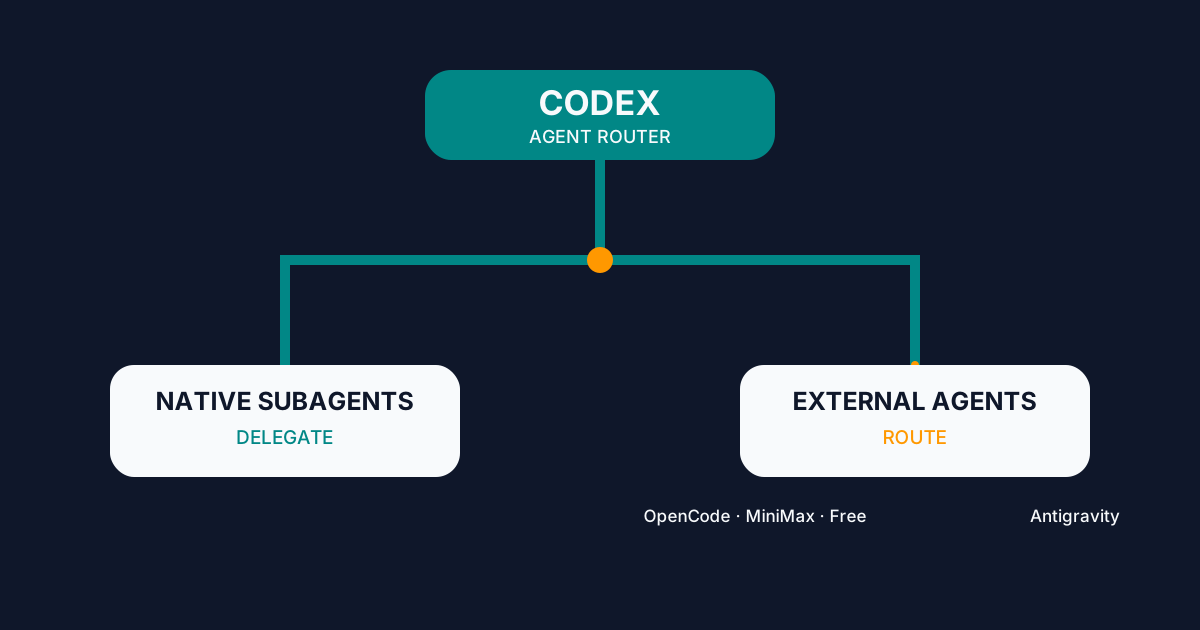
Configure Codex Agent Router to delegate to native subagents or route work to OpenCode, MiniMax, Big Pickle, and Antigravity from one interface.

AI CLI Grand Final: The Absolute Terminal Champion of 2026
The Grand Final of the AI CLI 2026 tournament. We compare OpenCode, OpenAI Codex, Claude Code, and Hermes Agent to find the ultimate champion for indie developers.