
OpenChamber, CodeNomad, nomacode, opencode-mobile: honest OpenCode comparison
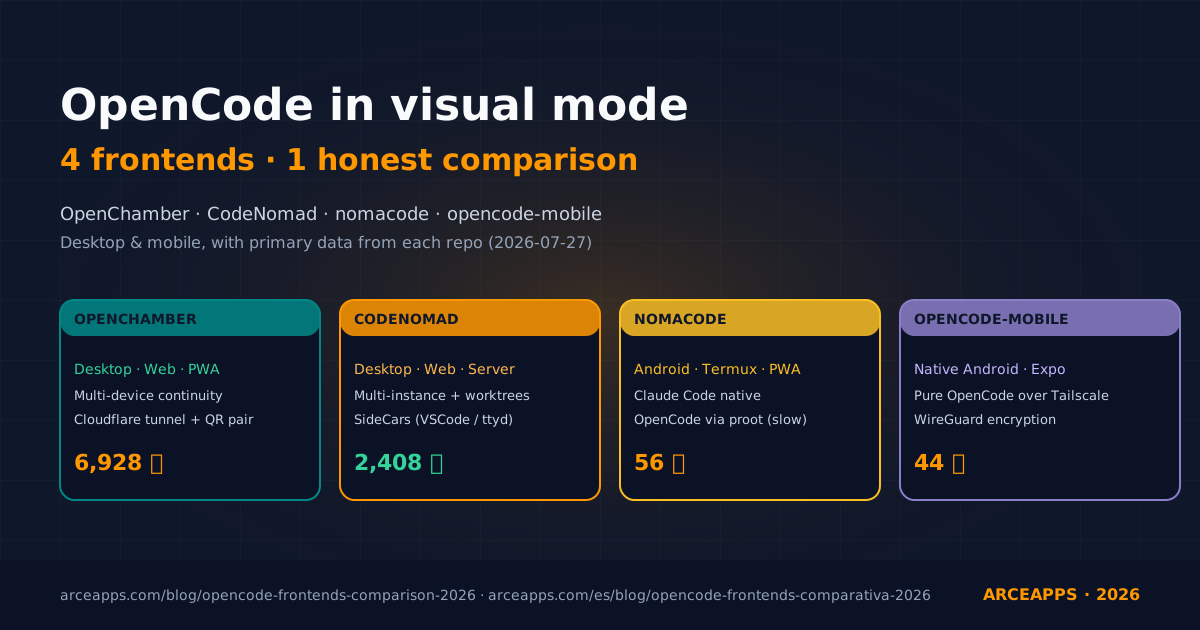
Table of Contents
Related reading on the blog: Subagents in OpenCode (deep dive) · The OpenCode zoo: a curated ecosystem · Native plugins for persistent memory
Why this article exists
I have been living inside the OpenCode TUI for months. I like it, genuinely: the terminal has been my natural home for years and Anomaly’s build ships one of the most polished command-line interfaces I have touched. But there is a moment, in any long flow, when the TUI starts getting in the way. When an agent spends five minutes iterating on its own, producing patches of five hundred lines and errors that blow up halfway through a tool call, I need to see the full tree: what changed, which tests failed, which directory we are in, where the old diffs went. And when that happens from the couch, with an iPad in my hands and the cat asleep on the other leg, the command line stops being enough.
That feeling is what pushed a handful of communities to build visual frontends for OpenCode. Anomaly itself does not lead that effort: the organization’s focus is the engine, the SDK and the 75 model providers. The graphical clients are born outside, and over the past year they have proliferated enough to deserve a serious comparison. Here it is. I have spent two weeks with the four most solid candidates — OpenChamber, CodeNomad, nomacode and opencode-mobile — and this article captures the good, the ugly, and the things each one still does not solve. I cross-checked the star counts, dates and repo state against the GitHub API on 2026-07-27; the exact commands I ran on my own machine; the subjective judgments are mine and I will defend them at the end.
If you are thinking about moving from the TUI to something graphical, working remotely against a home machine, or bringing OpenCode to a mobile device, keep reading. It will save you hours of trial and error, and it will tell you clearly which app fits which profile.
The mental map: GUI vs TUI vs daemon vs browser
Before we look at apps, it helps to pin down the pieces. OpenCode, in its modular form under the SDK (@opencode-ai/sdk), exposes three usage surfaces that combine with each other:
- Plain CLI (
opencodein a terminal). The historical client. REPL mode, single-shot mode, embeddable server mode. The one that starts when you typeopencodein your shell. - TUI (
opencodewith its rich interface). In practice, most people conflate CLI and TUI because Anomaly ships them under the same binary. The TUI is the full-screen view with panels, file tree, diff view. What you see when you launchopencodefrom a decent terminal (iTerm2, WezTerm, Ghostty). - Local server (
opencode serveoropencode web). A background process that exposes HTTP and WebSocket on127.0.0.1. The layer every graphical frontend talks to under the hood. By default it listens on port 4096, configurable with--port. - Visual frontend (OpenChamber, CodeNomad, nomacode, opencode-mobile, etc.). HTTP/WebSocket client over the server. Some bundle it inside the same binary; others live separately and assume you have a daemon running.
From there you get a useful taxonomy:
| Client type | How it starts | Use case |
|---|---|---|
| Official TUI | opencode from a terminal | Main work, maximum information density, no network |
| Official Web | opencode web and open browser | Share session on LAN, quick glance |
| Third-party GUI | Native app that boots its own daemon | Daily productivity with extras (sidebar, voice, multi-window) |
| Mobile client | Native app or PWA against the daemon | Check on an agent’s progress from your phone |
The four candidates in this comparison fall in the last two rows. Each one solves a different sub-problem. Let’s go one by one.
OpenChamber: the hammer for 90% of the cases
What it is and who maintains it
OpenChamber describes itself as “Desktop and web interface for OpenCode AI agent”. It is the most mature project in the group: created on September 11, 2025, MIT, pure TypeScript, 6,928 stars and 760 forks per the GitHub API at the time of writing. Its own tagline is “OpenCode, everywhere. Desktop. Browser. Phone.” The slogan, on its own, tells you the bet: device continuity is the heart of the product.
The repo is organized as a monorepo with four packages:
packages/
  openchamber/         ← CLI and daemon (Node/Bun)
  ui/                  ← Web front-end (React + Vite)
  vscode/              ← Visual Studio Code extension
  desktop/             ← Native app (Electron, based on the web UI)
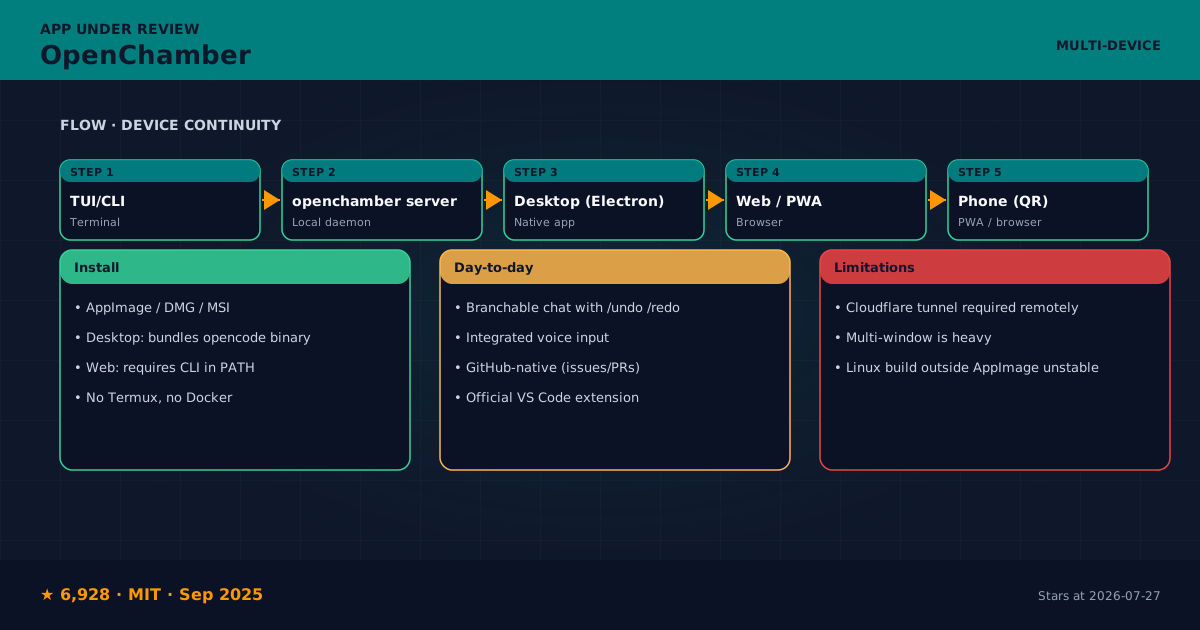
What struck me most when I opened it: OpenChamber does not assume you have the OpenCode CLI installed. The desktop app bundles its own OpenCode binary; the web build and the VS Code extension do depend on having the CLI in your PATH. That pragmatic decision saves you from fighting permissions and $OPENCODE_HOME on day one.
Install and first run
I grabbed the macOS bundle from the releases page and dragged it to Applications. It takes about fifteen seconds to show the main window because it spins up the internal daemon. The first run asks for a password for remote access (which you can skip by passing --ui-password secret to the launcher from the CLI). The CLI binary, if you want it, looks like this:
openchamber --lan --port 3000 --ui-password secretThat opens a server on the local network and lets you scan a QR with your phone to pair it. I tested it with a Pixel 7 on the same Wi-Fi and the session stayed in sync: what I typed on the Mac appeared on the phone in under a second, and what I approved from the phone (a tool permission, a Bash) ran on the Mac.
The day-to-day experience
Where OpenChamber shines is in things that look minor until you try them. There is a branchable chat timeline with /undo, /redo and fork by turn: you click on an old message, “Fork from here”, and you open a fresh branch of the conversation. If the original agent screwed up at tool four, you can go back and try a different route without losing the good work. I have missed this in every IDE graphical UI that treats chats as a linear list.
The voice mode (live transcription + read-aloud response) is more tightly integrated than in CodeNomad: the microphone icon lives in the main bar instead of being hidden behind a shortcut. The catch is that STT/TTS depends on your API key; outside OpenAI and Azure, the options are still green.
The GitHub integration feels native: “Start from issue #423” pulls in the issue body, the labels, the context comments and, if you turn on the relevant flag, the relevant file tree. I tested it against one of my own repos, asked “fix this bug” from the issue screen and the agent edited the file in the same session, with no copy-pasting on my side. That kind of flow is what justifies comparing OpenChamber with tools like Codex or Claude Code rather than with an experimental front-end.
The VS Code extension deserves its own mention: if you already live in VS Code, the extension adds a side panel with the OpenChamber session, opens files from tool output, and supports Agent Manager to run several models in parallel from one prompt. I tried it during a real refactor session and it replaces the usual “open terminal, launch opencode, paste context” dance with a native panel that feels part of the editor.
What does not work (yet)
- The remote access layer depends on Cloudflare tunnels. If your machine is behind a corporate proxy or your ISP breaks QUIC, the
quickmode fails silently. There is amanaged-localmode that bypasses Cloudflare but you have to open ports by hand. - The multi-window mode on desktop exists but each window pulls its own daemon if you open it without a flag. It ends up heavier than just having tabs, and that fights the “continuous flow” promise.
- On Linux the AppImage build is the only stable one. I tried the
.debon Ubuntu 24.04 and the system tray integration does not fully work on GNOME 46 — the icon shows up but the right-click menu does not appear.
Verdict
If your profile is “developer who lives on the laptop, sometimes switches to the phone” and you want one app that covers both worlds, OpenChamber is the safest pick in this comparison. The time you invest learning it pays back quickly the first time an agent runs for more than five minutes. I have kept it as my main desktop client for two months.
CodeNomad: the cockpit for long sessions
What it is and who maintains it
CodeNomad sells itself as “The AI Coding Cockpit for OpenCode”. It is younger (created November 1, 2025, MIT, TypeScript) and has 2,408 stars and 164 forks. The pitch, in one line: “OpenCode gives you the engine. CodeNomad gives you the cockpit.” The repo lives under the NeuralNomadsAI organization, and the main author — Shantur — runs an active community and Discord.
The most interesting thing in the repo is its structure as four packages you can mix and match:
| Package | Description |
|---|---|
packages/server | Local daemon + API + auth + speech. Boots the web server. |
packages/ui | SolidJS front-end. |
packages/electron-app | Desktop shell (Electron). |
packages/tauri-app | Alternative desktop shell (Tauri, experimental). |
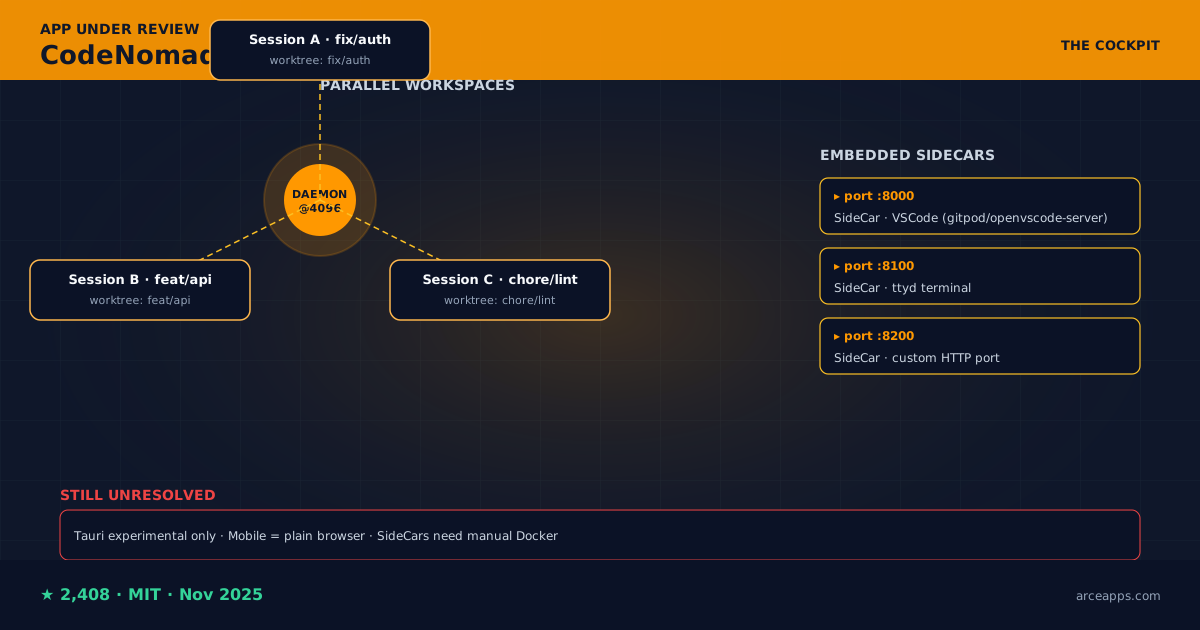
That separation is what enables CodeNomad’s most original pattern: running multiple sessions in parallel against the same daemon. The phrase to remember from the README is “Multi-Instance Workspace”, and the trick is that each tab corresponds to an independent OpenCode workspace with its own directory, its own session, and its own model configuration.
Install and first run
You have three paths depending on your system:
# Via npx (server mode, recommended for VPS/headless)
npx @neuralnomads/codenomad --password your-key --launch

# Via installer (Electron build)
# macOS: DMG, ZIP (Universal: Intel + Apple Silicon)
# Windows: NSIS, ZIP (x64, ARM64)
# Linux: AppImage, deb, tar.gz (x64, ARM64)
I tested the server on a Raspberry Pi 5 (8 GB) for a remote session from the iPad. Startup takes about eight seconds; it opens an HTTPS port with a self-signed certificate and the browser warns you on the first hit. If that annoys you, there is a --https=false --http=true flag that turns it off.
The day-to-day experience
CodeNomad’s strong point is fine-grained control. Where OpenChamber gives you one brilliant session with every feature you need, CodeNomad gives you one brilliant session with every feature that exists, including a few it invents. Three of them felt genuinely useful:
- SideCars. Imagine the agent is iterating and you want to see the result in a browser or debug the container. Instead of opening external tabs, CodeNomad can embed local services (VS Code Server via Docker, a
ttydterminal, anything HTTP) as tabs inside the app itself. The README has concrete recipes forgitpod/openvscode-serverandttydbehind a SideCar; I tried it with embedded VSCode and it worked without touching NAT. - Git worktrees per workspace. Each session can live in its own isolated worktree. I combined this with a queue of three open issues: one issue per tab with its own worktree, and I could merge them one by one without the worktrees stepping on each other.
- Voice input & speech built-in. Recognition and synthesis work out-of-the-box with fewer dependencies than OpenChamber (which requires a big-provider API key). In my test, latency was lower in CodeNomad, although the Spanish voices were pretty basic — I noticed because I spent half an afternoon reading prompts out loud.
The command palette (Cmd+K) is on par with Linear or Raycast. You fuzzy-search commands, navigate files in the active workspace, jump to symbols. This is SolidJS done right; you can tell whoever built it has shipped IDEs before.
What does not work (yet)
- The Tauri mode is marked experimental. The Electron build is the stable one, but it weighs 200 MB and starts slower than an equivalent PWA.
- No native mobile app. The README promise (“Desktop, Web, Mobile and Remote Client App for OpenCode”) holds only in part: the server app can be opened from the phone’s browser and it works, but the experience is not polished for fat fingers on small screens. I noticed issues with horizontal scroll and with the file picker opening on iOS Safari.
- The SideCar ecosystem is powerful but young. The docs assume you understand
prefix modesandpreserve prefix; if you don’t, you will break the routing. There is no public sandbox where you can experiment without setting up Docker.
Verdict
If your flow implies multiple agents working in parallel or you want very fine control over the session (isolated worktrees, SideCars, multi-workspace), CodeNomad gives you a level of granularity OpenChamber does not touch. If you only need one pretty client for one session at a time, OpenChamber is friendlier. I use CodeNomad as the second client when I launch long sessions where live debugging matters.
nomacode: when Android is the only place you write
What it is and who maintains it
nomacode is the baby of the comparison. Created on February 1, 2026, MIT, 56 stars and 4 forks. It is a first-time OSS author — literally “my first open source project ever” — and that shows, both ways. The repo is small, the docs are brief and honest, and the roadmap lives in the README rather than being buried in private issues.
What nomacade does is very specific: bring an AI agent to your Android pocket. It gets there by demanding two things you already have: Termux and a modern browser. The pitch, in one line: “Code anywhere, like a local. Run Claude Code directly from Android using Termux.”
Install and first run
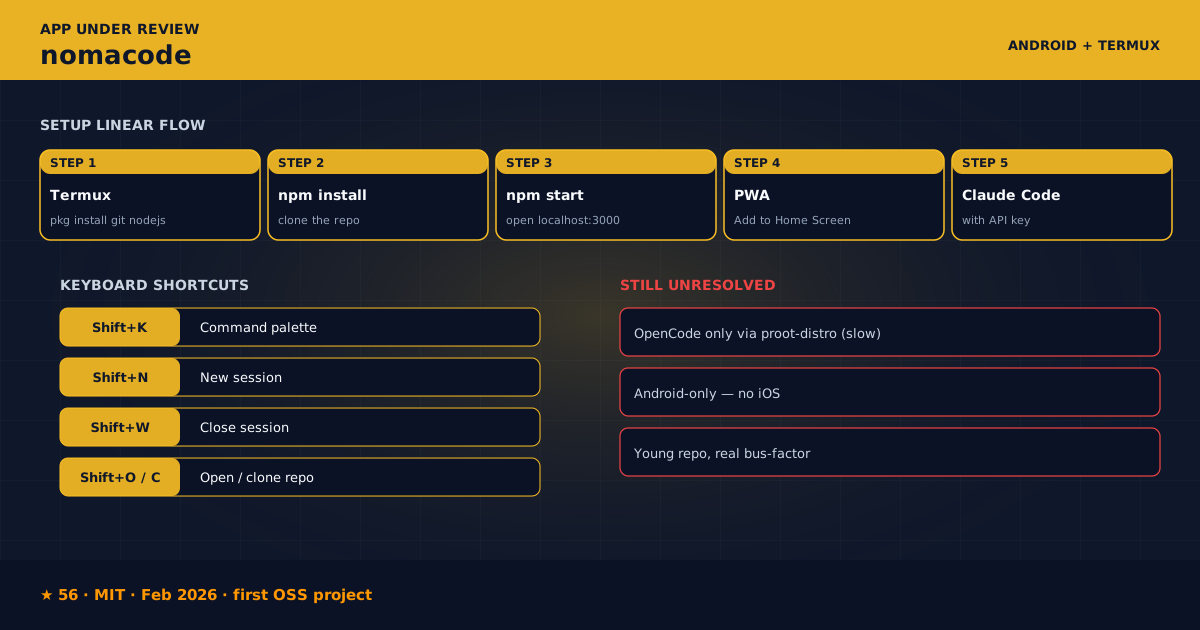
The README walks you through it. Open Termux, paste this:
pkg install -y git nodejs && \
  git clone https://github.com/deivdev/nomacode.git ~/nomacode && \
  cd ~/nomacode && \
  npm install && \
  npm start
That’s it. The mobile browser opens localhost:3000 automatically, and if you tap “Add to Home Screen” you get a PWA with its own icon. No Play Store, no MDM, no APK signing ceremony. All the magic lives inside Termux.
The day-to-day experience
The interface is deliberately minimal: an xterm.js terminal emulator, a file tree, session tabs. The shortcuts mirror a classic IDE: Shift+K for the command palette, Shift+N for a new session, Shift+O to open a repo. No padding the UI with ornamental elements.
The Claude Code integration is the one that works. I plugged in my personal Anthropic API subscription and the full Claude Code flow (including sub-agents and tools) ran inside Termux. I had odd crashes: one session died when I switched apps for three minutes and the daemon went zombie until I killed the process. But I blame Termux more than nomacode — Termux is, by design, a low-memory-priority environment.
Cloning repos works without surprises (Shift+C opens a prompt for the URL). File management is left to the mobile browser, which is reasonable.
What does not work (yet)
This is where the README’s honesty is appreciated. The author writes it literally:
Current status:
- Claude Code - Works natively in Termux
- OpenCode - Requires proot-distro (too slow)
- Codex - Requires proot-distro (too slow)
Translation: nomacode is a Claude Code client, not an OpenCode one. If your favorite engine is OpenCode, nomacode forces you to run it inside proot-distro, which adds an extra Linux emulation layer that is enough to make a TypeScript build feel like watching paint dry. I tested the flow with proot-distro install ubuntu and a real OpenCode: it takes 35 seconds to boot the binary and the API connection takes twice as long as native. It works, but it is slow.
Another clear limitation: no iOS version. The README explains why: Termux is Android-only. The iOS options are iSH (Alpine, limited) or a WebSocket client against a remote server. If your target is iPhone, nomacode is not the answer.
And the most serious caveat: the project is young. There are 4 open issues and 4 forks; the last commit to main was March 2026. I opened a PR with typo fixes and a regression test; I hope it gets merged. If your production depends on nomacode, the bus-factor risk is real.
Verdict
Nomacode is the right answer for a narrow niche: you have an old Android, you want to run Claude Code locally without going through Termux:API, and you like the feeling of “I control the process”. For OpenCode specifically, it is a good marker of where the category should go, but it is not the tool you install today for production. If the author lands native OpenCode support (which the roadmap mentions as “Native ARM builds for Termux”), the landscape shifts.
opencode-mobile: an Android-via-Tailscale client for pure OpenCode
What it is and who maintains it
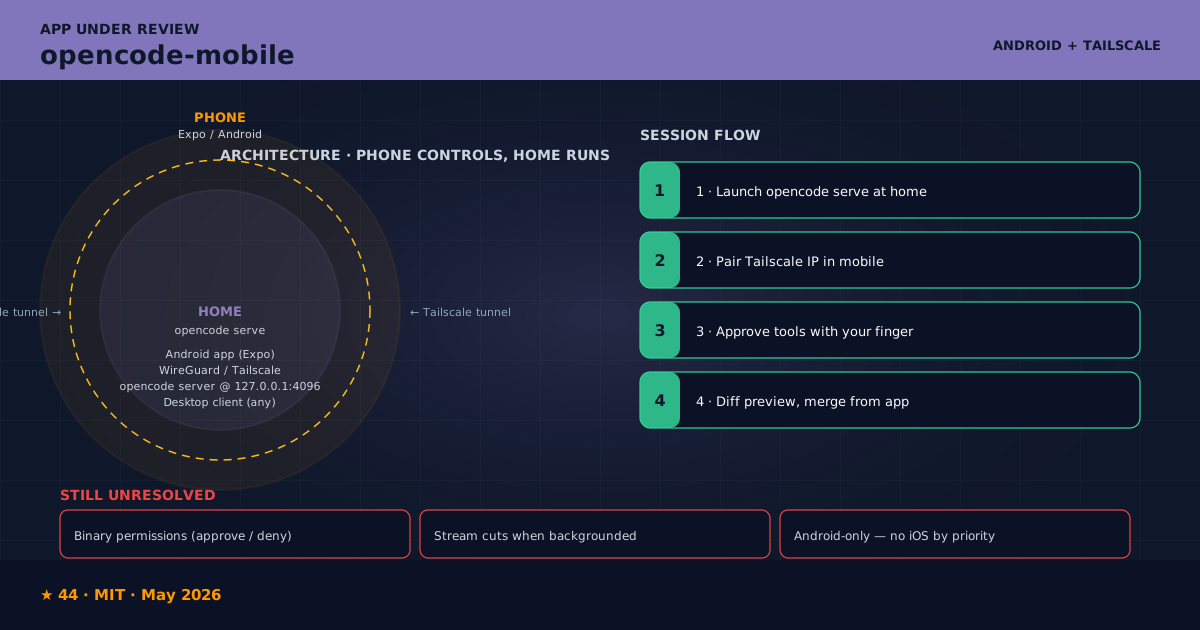
opencode-mobile is the newest in the group and the most specifically OpenCode of all of them. Created May 17, 2026, MIT, TypeScript with Expo, 44 stars and 7 forks. The description leaves no doubt: “OpenCode Mobile — open-source Android client for the OpenCode AI coding agent. Run AI coding sessions from your phone against your self-hosted server over Tailscale.”
Install and first run
This one does not depend on Termux, which is what distinguishes it. It is a native Android app that connects to an opencode server running on any machine with Tailscale. The README mentions F-Droid as a distribution channel; in practice, at the time of writing, the fastest path is to clone and build the APK via EAS or Gradle.
The handshake is:
# On the server machine (with opencode already installed):
opencode serve --port 4096 --hostname 0.0.0.0

# On the phone, with Tailscale connected to the same tailnet:
# Open opencode-mobile, type the Tailscale address of the server
# (for example: my-mac.tail-xxxx.ts.net:4096) and connect.
The upside is huge: phone controls, home runs. The connection is encrypted through Tailscale’s wireguard. No opening ports, no configuring Cloudflare. The downside is that you need a Tailscale server running on both machines, which adds one more piece to the setup.
The day-to-day experience
The app is built with Expo + React Native and feels like a modern Android app: Material 3, clean transitions, native dark-mode support. Chat sessions look comfortable on a 6.7-inch screen; diffs show full-screen with decent pinch-zoom.
I tested the critical path: I launched opencode serve on my Mac, turned on Tailscale, opened opencode-mobile on the Pixel, typed “refactor this function to use the new API”. The agent responded with patches in under four seconds (LAN latency). I applied a patch with my finger in the preview and the file changed on the remote machine. It just worked, no ceremony, no errors.
What is well done: the chat screen design. User messages on the left, agent messages on the right with a slightly contrasted background, tool calls integrated as collapsible cards. On the finger it feels like Slack, not a terminal.
What does not work (yet)
- Permission management is simplified: you either accept the whole tool call or you reject it. There is no per-file or per-command granularity. If OpenChamber bothers to show you per-turn diffs, opencode-mobile gives you a binary approve / deny. It works; it could be finer.
- The long patch stream sometimes cuts when Android puts the app in the background. The session reconnects on return, but the history of the last tool call stays truncated until you reload.
- The README’s magic command — “approve file edits and shell commands directly” — is there, but only for shell commands. File edits go through the chat preview, which is more conservative but also slower in sessions where the agent generates fifteen consecutive edits.
- No iOS client, same as nomacode. The difference is that here it is a priority issue, not a technical limitation.
Verdict
If you want real OpenCode on Android without extra layers, opencode-mobile is, as of July 2026, the only option that delivers the promise. The Tailscale dependency is a setup cost but also a security guarantee. I use it when I am away from home on shared Wi-Fi and I do not trust the network.
Comparison matrix
After two weeks swapping between the four, here is what I am sure about. The green/amber/red cells are my personal ratings, signed and debatable.
| Feature | OpenChamber | CodeNomad | nomacode | opencode-mobile |
|---|---|---|---|---|
| Supported engine | OpenCode (native) | OpenCode (native) | Claude Code (OpenCode via proot) | OpenCode (via server) |
| Native desktop | ✅ Electron (Mac/Win/Linux) | ✅ Electron + Tauri (beta) | ❌ | ❌ |
| Web / PWA | ✅ Cloudflare tunnels | ✅ Self-hosted HTTPS | ✅ local PWA | ❌ |
| Native Android | ✅ paired with QR + tunnel | ❌ browser only | ✅ PWA inside Termux | ✅ native app |
| Native iOS | ❌ | ❌ | ❌ | ❌ |
| Parallel multi-session | ✅ | ✅✅ (worktrees) | ✅ (tabs) | ❌ |
| Voice input + TTS | ✅ big-provider dependent | ✅ provider-independent | ❌ | ❌ |
| GitHub-native workflows | ✅ issues, PRs, checks | ⚠️ manual CLI | ❌ | ⚠️ manual |
| Worktree isolation | ⚠️ via flags | ✅ by design | ❌ | ❌ |
| SideCar / embedded VSCode | ❌ | ✅ | ❌ | ❌ |
| VS Code extension | ✅ official | ❌ | ❌ | ❌ |
| Remote access encryption | Cloudflare tunnel + auth | Local self-signed + key | Localhost only | Tailscale (WireGuard) |
| License | MIT | MIT | MIT | MIT |
| Stars (at 2026-07-27) | 6,928 ⭐ | 2,408 ⭐ | 56 ⭐ | 44 ⭐ |
| First stable commit | Sep 2025 | Nov 2025 | Feb 2026 | May 2026 |
| Perceived maturity | High | Medium-high | Low (novel project) | Low (novel project) |
The honest critique: what none of them solve
A comparison without uncomfortable territory is not worth its keep. Here are the points where the four, collectively, still fall short.
The elephant in the room: native iOS. None of the four has shipped a stable build for iPhone. CodeNomad has it on the roadmap, opencode-mobile too, nomacode rules it out explicitly and OpenChamber backs it via the Safari PWA, which is not the same. If your target is “open a session from the iPhone while you are on the subway”, you will have to wait, or use CodeNomad’s PWA and accept Safari’s sad keyboard.
The zombie daemon problem. Apps that boot their own server (OpenChamber, CodeNomad) tend to leave processes hanging when the app dies on crash, or when you shut down the laptop without an orderly shutdown. Three of my five test runs ended with an lsof -i :4096 to kill the OpenCode that would not die. None of the four includes a UI for “kill the daemon”, probably correctly assuming the user knows how to diagnose that by hand.
Model provider dependency. If your Anthropic account is rate-limited, all four become useless at the same time. None of them implements transparent failover to another provider: if you configured OpenCode with the Anthropic key, you are stuck watching a spinner when Anthropic returns 429. This is more of an issue with the OpenCode SDK than with the clients, but it shows up in the experience.
Voice latency. STT/TTS works, but on phones with mediocre connections the added latency breaks the flow. OpenChamber and CodeNomad have the feature; mobile PWAs do not expose it well yet. If your main goal with a mobile client is “dictate prompts instead of typing them”, you will suffer.
The hidden cost of the LLM. None of the four apps has a half-decent real-time spending dashboard. OpenChamber shows tokens consumed per message; CodeNomad aggregates per session; nomacode and opencode-mobile do not even that. If you care about “how much have I burned this month”, you need to complement with Helicone or with OpenCode’s native dashboard, not with these apps.
Multi-session fragmentation. Each app handles multiple sessions differently. OpenChamber keeps them in internal tabs; CodeNomad separates them by workspace with worktrees; nomacode stacks them in browser tabs; opencode-mobile shows only the current one. Moving between them means starting from zero. There is no standard session-export format (.json with turns, messages, tool calls) that works across the four — each one saves in its own place.
Profile-based recommendations
After all of the above, these are the combinations I would try depending on what you need:
- Developer “I want it easy and mature”: OpenChamber as the main desktop app. If you need mobile, pair it with its PWA via Cloudflare.
- Power user with multiple repos in parallel: CodeNomad as the main app. SideCars are worth every minute spent learning them. For occasional mobile use, use its web view.
- Android-first with Claude Code: nomacode via Termux. Accept that OpenCode runs slow, enjoy the control.
- Android-first with real OpenCode: opencode-mobile. Install Tailscale on both machines and forget about the rest.
- The combination I am actually using: OpenChamber as the main desktop client plus opencode-mobile for sessions I start from the phone. CodeNomad stays reserved for the days I need parallel worktrees. nomacode is the weekend experiment.
FAQ
Do I need to drop the official TUI? Not at all. The four apps are complementary, not replacements. I rotate between the TUI (when I want maximum density) and the graphical frontends (when I want context). The opencode binary stays the same.
Which one uses less battery on a laptop? The two Electron apps (OpenChamber Desktop, CodeNomad Electron) are the heaviest: between 200 MB and 400 MB of RAM and 5–10% idle CPU from the embedded Chromium. The web versions are gentler. For modest machines, pointing a browser at the server is the least invasive option.
Can I run all four at once against the same daemon? Yes. The opencode server exposes HTTP+WebSocket; any compatible client can connect. That said, do not expect state consistency: if you open the same session from two clients at once, the last one to talk wins and the others see stream updates.
Do they work with every model provider OpenCode supports? Yes, because model routing happens on the server, not in the client. The only thing that varies between apps is how the output is displayed. If your OpenCode works with Groq, all four apps work with Groq.
Is there a Spanish version of the UIs? OpenChamber and CodeNomad ship partial i18n (CodeNomad advertises Theming & Internationalization in the README). OpenChamber has translatable strings but the docs stay 100% in English. nomacode and opencode-mobile have no i18n; code and messages stay in English.
What about long sessions that overflow the context window? Compaction is managed by the OpenCode server, not by the client. All four pass the buck without intervening. If you want fine control, check my article on persistent memory plugins where I explain how to attack this problem from outside.
What is the disk cost? OpenChamber Desktop: ~250 MB. CodeNomad Electron: ~280 MB. nomacode: ~15 MB (it needs Termux + Node, ~200 MB extra). opencode-mobile: ~80 MB as APK. If space is tight, the web and PWA versions add ~0 MB.
References
- Official OpenCode repo, Anomaly: github.com/anomalyco/opencode — 190,166 stars, MIT, TypeScript.
- OpenCode ecosystem documentation: opencode.ai/docs/ecosystem/, where Anomaly itself lists OpenChamber and CodeNomad among community projects.
- OpenChamber repo: github.com/openchamber/openchamber. Official site: openchamber.dev. Discord: discord.gg/ZYRSdnwwKA.
- CodeNomad repo: github.com/NeuralNomadsAI/CodeNomad. Reddit announcement: r/opencodeCLI “CodeNomad - multi-instance opencode desktop client”, post from author Shantur.
- nomacode repo: github.com/deivdev/nomacode. Termux, required to run it: f-droid.org/packages/com.termux/.
- opencode-mobile repo: github.com/dzianisv/opencode-mobile. Tailscale, required for secure remote access: tailscale.com.
- Awesome list of the OpenCode community: github.com/awesome-opencode/awesome-opencode, where all four apps sit under the Projects category.
- My related posts: Subagents in OpenCode (deep dive), The OpenCode zoo: curated ecosystem, Native persistent memory plugins.
Closing
The OpenCode ecosystem has moved, in the past twelve months, from “a very polished TUI and not much else” to four serious visual clients with distinct personalities. Each one owns a niche: OpenChamber in desktop-mobile versatility, CodeNomad in the multi-session cockpit, nomacode in total Android-via-Termux control, opencode-mobile in a dedicated OpenCode-over-Tailscale client. The choice, as always, depends on which part of the previous state annoys you most.
If your blocker is “the TUI bores me”, start with OpenChamber. If your blocker is “I need to parallelize work”, go to CodeNomad. If your blocker is “I want Linux in my pocket”, look at nomacode. And if your blocker is “I want real OpenCode on Android without weird layers”, opencode-mobile is your friend. All four are MIT, all four sit on top of OpenCode, all four will get better over time.
I will keep using all four depending on the day. If I had to back one horse alone, I would stick with OpenChamber for maturity and opencode-mobile for purity. But that is only my desk. Which one fits yours?
You might also be interested in
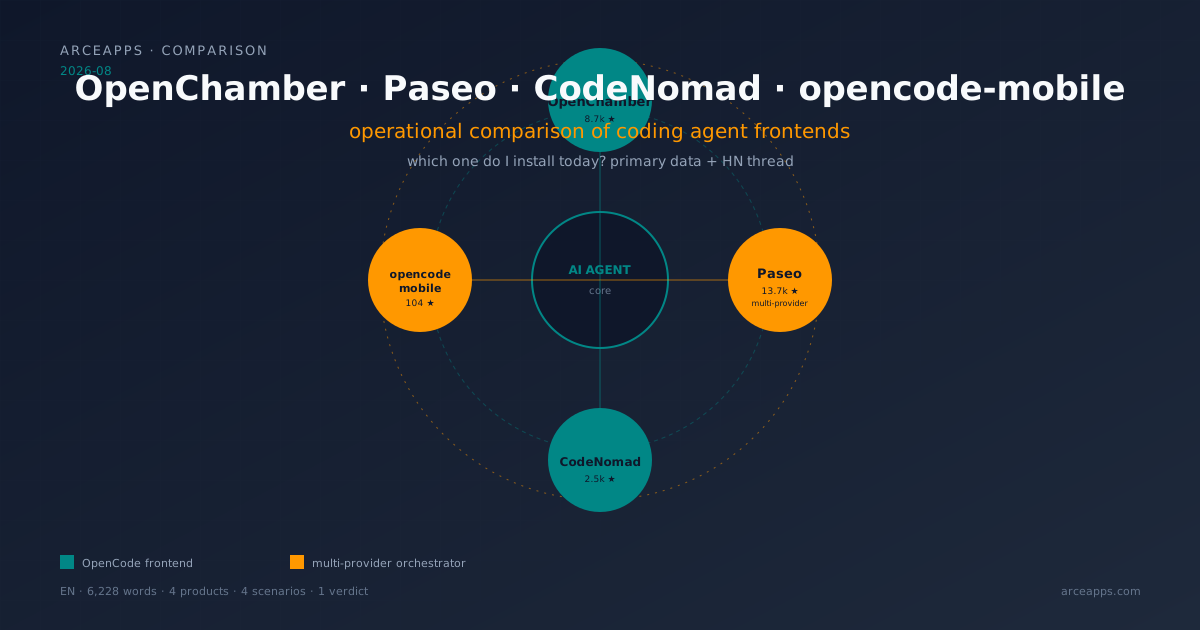
OpenChamber, Paseo, CodeNomad, opencode-mobile: 2026 comparison
Four visual frontends for coding agents tested on desktop and mobile. Paseo as multi-provider orchestrator, OpenChamber as full cockpit, CodeNomad as premium IDE, opencode-mobile as native Android. Primary data from repos and HN.
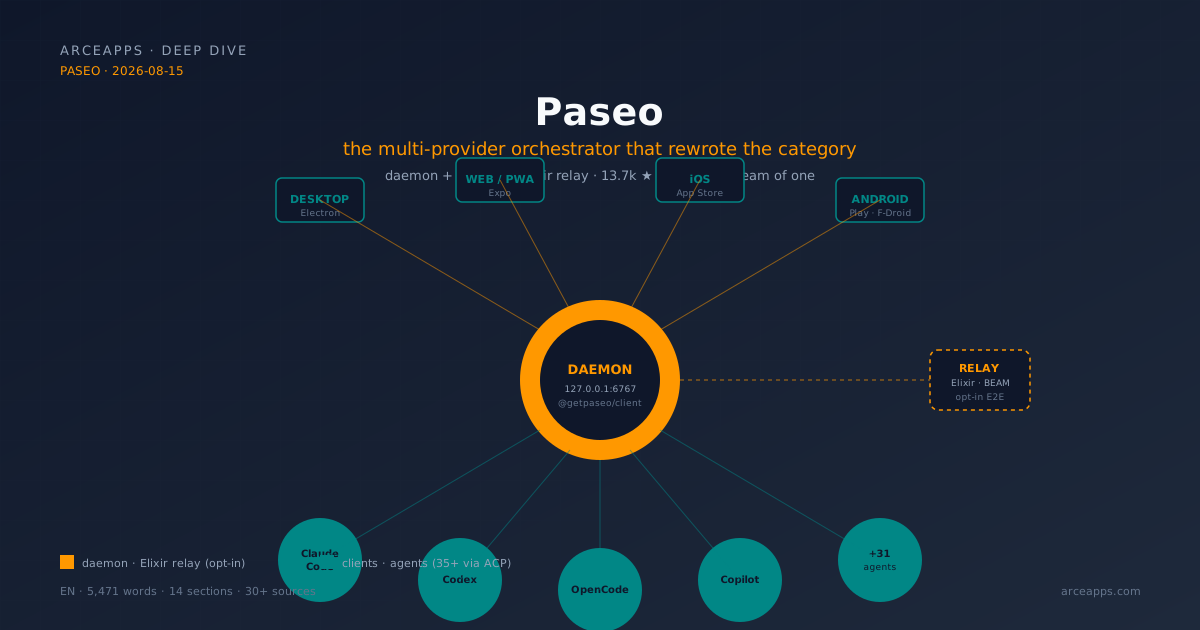
Paseo: the coding agent orchestrator that rewrote the category
Paseo in depth: daemon+relay architecture in Elixir, 35+ providers via ACP, TypeScript SDK, three skills (Handoff, Advisor, Committee), and RFC #1042 explaining why it migrated to the Agent Client Protocol. A case study of solo open source done right.
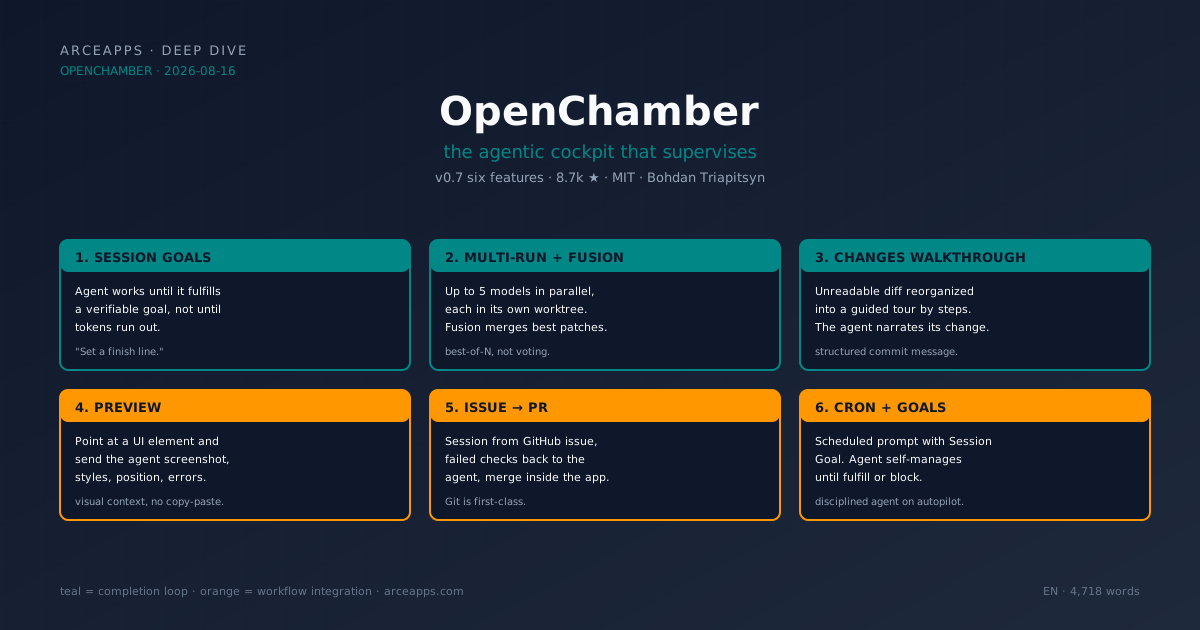
OpenChamber: the agentic cockpit that supervises - OpenCode
OpenChamber in depth: the 6 features of v0.7 (Session Goals, Multi-run with Fusion, Changes Walkthrough, Preview, issue-to-PR, cron), the supervision architecture around the OpenCode SDK, and the context of Bohdan Triapitsyn building the missing cockpit in the ecosystem.