
Table of Contents
This article is the centerpiece of my 2026 coverage on persistent memory for AI agents. It builds on earlier posts I’ve published this year: the landscape of frameworks (persistent memory for AI agents), the PARA method applied to agent files (PARA method for AI memory), the cross-agent MCP memory servers (cross-agent MCP memory servers), my real stack with basic-memory and supermemory (persistent memory stack implementation), and the hierarchical approaches like hmem and Hipocampus (hmem: SQLite hierarchical memory, Hipocampus: hierarchical memory). If you’ve read those, this is the natural next step: assembling the four pillars into one coherent architecture. If you’re new here, I recommend reading the landscape post first for shared vocabulary.
Thursday night, eleven pm
It’s eleven o’clock on a Thursday. I’ve spent the last two hours tuning Norvig’s algorithm in the solver of my Android Sudoku app — a variant that swaps DLX (Algorithm X with dancing links) for backtracking with heuristic pruning, because the MRV heuristic was giving me terrible results on 16x16 boards. I’ve explained to the agent seventeen times why I ruled out DLX, seventeen times why prune=true only works when the candidate queue is sorted by dominant constraint, and seventeen times which columns of the 9x9 sudoku have the highest constraint density and why everything falls into place from there.
Tomorrow, when I open a new session, the agent won’t have a clue.
Every new context is a blank slate. That’s the context fatigue that haunts any indie developer who works with LLMs for more than a couple of hours at a stretch. And when you’re in the middle of a problem with high decision density, it’s demoralizing: you realize that the entire conversation of the last two hours is incinerable. The mental state you’ve built with the model, the heuristics the model understood, the “we already discussed and ruled out X” — all of it evaporates when you close the tab.
The question that opens this article isn’t technical. It’s artisanal. It’s the question a software craftsman asks when looking at his workbench and deciding which tools deserve a place on it for the months ahead:
What do my tools need so that my next self — and my next agent — don’t have to re-explain everything every morning?
During 2026 I’ve published several articles covering loose pieces of the answer. Mem0 on one side, the PARA method on another, concrete MCP servers, hierarchical proposals like hmem or Hipocampus, even academic approaches like PlugMem from Microsoft Research. What was missing was the piece that ties them all together: a complete cognitive architecture you can assemble in an afternoon, that starts small, that scales without jumping onto the next hype train, and that can run on your laptop without vendor lock-in.
That’s what I’m going to unpack here. Four pillars, in this order: Mem0 for automatic fact extraction and deduplication, MemGPT/Letta for operating-system-style paging, the PARA method as a human-readable spatial ontology, and Chroma or LanceDB as a concrete vector store. Then, LangChain create_agent or LangGraph as the orchestrator. What follows is practice, verified code, and concrete numbers.
Background: what cognitive memory is and why it isn’t just context
Before diving into frameworks, let’s pin down the vocabulary. When an indie developer says “memory,” they can mean four very different things, and they’re not interchangeable.
Context is what fits in the model’s window: the tokens the LLM sees right now. In 2026 frontier models offer 128k to 200k token windows, and some flirt with a million, but that number is still a fraction of what a human accumulates with their assistant over six months. And the worst part: every new session starts from zero, so it doesn’t matter how much context you stuff into the window if the next session doesn’t remember any of it.
Memory is state that persists between sessions. It can live in a flat file, a SQL database, a vector store, a graph, or a mix of the above. The question isn’t where it lives, but what lives there, who decides what gets saved, and how it gets retrieved just-in-time.
Cognitive memory is the subset that not only persists but structures itself to mimic how humans remember: it classifies, deduplicates, prioritizes, forgets. And it forgets selectively: some memories deserve consolidation, others deserve archival on demand.
Agentic memory is cognitive memory exposed as tools an agent can call. If cognitive memory is the well-organized library, agentic memory is the library with a librarian on call 24/7.
A complete cognitive architecture combines all four. The taxonomy of memories I usually reach for when designing one has five entries, and it’s the one I’ll use to classify each framework:
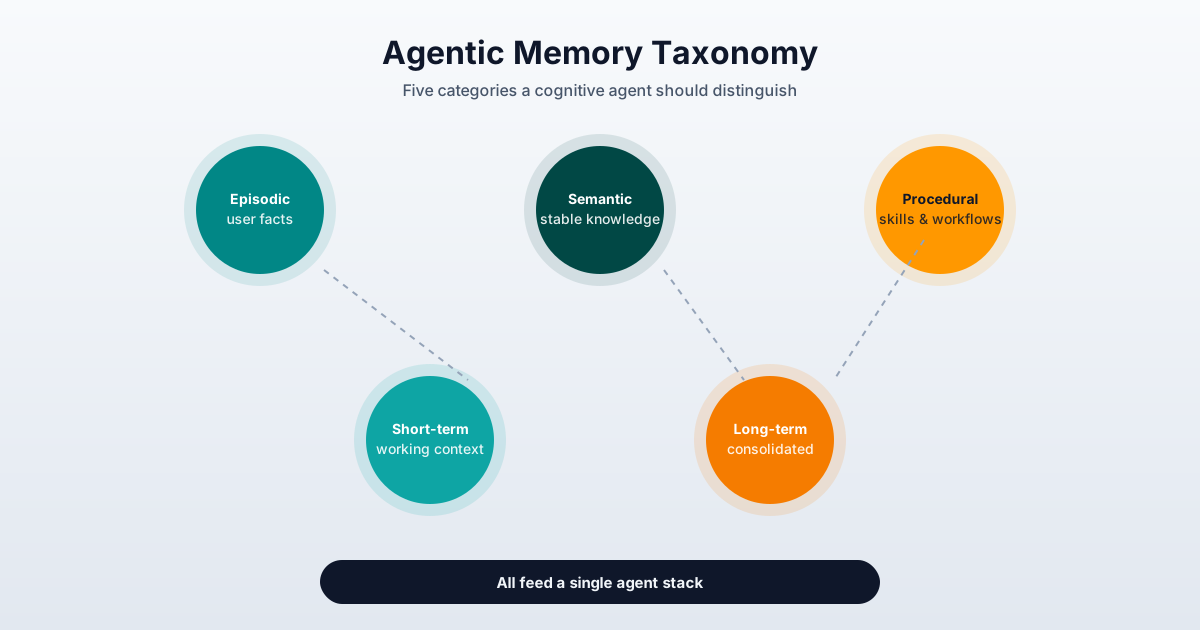
- Episodic memory: autobiographical facts about the user and the agent. “The user prefers DLX on 9x9 boards but not on 16x16 because constraint density changes the heuristic.”
- Semantic memory: stable knowledge about the world and the domain. “The
kotlinx.coroutineslibrary is at version 1.9.0.” - Procedural memory: skills, workflows, commands. “Always use
pnpmto install dependencies in this repo.” - Short-term memory: current session, working context, recently mentioned facts.
- Long-term memory: consolidated, deduplicated knowledge that survives weeks or months.
Good frameworks don’t marry themselves to a single category. They handle several at once. Bad frameworks only simulate short-term memory with a message buffer.
Now, the four pillars.
Pillar 1: Mem0 — automatic extraction and deduplication
Mem0 (mem0.ai, repository mem0ai/mem0, paper arXiv:2504.19413) positions itself as “the universal memory layer for AI agents.” The surface proposal is simple and what’s underneath is deep: you hand it raw messages and Mem0 extracts the durable facts, deduplicates them against what it already has, embeds them, and saves them. Three primitive operations and an engine that orchestrates them.
The three primitive operations
Verified at docs.mem0.ai/platform/quickstart:
from mem0 import MemoryClient

client = MemoryClient(api_key="your-api-key")

messages = [
    {"role": "user",      "content": "I'm vegetarian and allergic to nuts."},
    {"role": "assistant", "content": "Got it! I'll remember your dietary preferences."}
]

result = client.add(messages, user_id="user123")
# Returns a list of extracted memories:
# [
#   {"id": "...", "memory": "Is a vegetarian",     "event": "ADD"},
#   {"id": "...", "memory": "Allergic to nuts",    "event": "ADD"}
# ]
search retrieves relevant memories with a combined semantic + keyword + entity + temporal score:
results = client.search(
    "What are my dietary restrictions?",
    filters={"user_id": "user123"}
)
# Each result carries: id, memory, user_id, categories, created_at, score, metadata
update corrects without losing the memory_id, and a batch_update exists to process up to a thousand memories in a single call (docs.mem0.ai/core-concepts/memory-operations/update):
client.update(
    memory_id="14e1b28a-2014-40ad-ac42-69c9ef42193d",
    text="Allergic to tree nuts and peanuts (severity: anaphylactic)",
    metadata={"category": "health", "severity": "high"}
)

update_memories = [
    {"memory_id": "id1", "text": "Watches football"},
    {"memory_id": "id2", "text": "Likes to travel"}
]
client.batch_update(update_memories)
That’s the surface. The interesting part is what happens underneath.
The extraction pipeline
According to docs.mem0.ai/core-concepts/how-it-works, when you call add(messages) Mem0 runs four steps in chain:
- Context lookup: it first searches for existing memories related to the user. If it already has “likes black coffee,” before adding “prefers decaf coffee” it reads the existing one and reasons about whether to update the first or create a new one.
- Fact extraction: an extractor LLM (configurable,
gpt-5-miniby default in Platform) analyzes the user/assistant pair and emits a list of durable facts. It doesn’t memorize “asked about DLX,” it memorizes “the user rules out DLX for large boards because of constraint density.” - Deduplication and embedding: each new fact is compared against existing ones. If it’s a duplicate, it updates; if it’s new, it gets embedded and saved.
- Entity extraction: in Platform, entities are also extracted (people, tools, projects) and a memory graph is built to power retrieval.
Three separate stores hold the result: SQL for facts and metadata, vector store for embeddings, entity store for the graph. Retrieval fuses signals from all three. This explains why Mem0 handles queries like “what did the user say about the MRV heuristic in previous sessions?” well: a pure semantic query would fail, but the entity-linking layer knows that “MRV” is the same entity as “Minimum Remaining Values” mentioned in another session.
The v3 algorithm (April 2026)
In April 2026 Mem0 published its third iteration, per the official README. Three structural changes:
- Single-pass ADD-only extraction: instead of the classic
add+ eventualupdate/delete, Mem0 now adds facts without overwriting. This simplifies deduplication and improves traceability. - Entity linking with its own embedding: each entity has its own vector, doesn’t share embedding with the fact where it’s mentioned. That allows retrieval to do boosting when a query explicitly names an entity.
- Temporal reasoning: the extractor encodes temporal relations (“X happened before Y”, “the user changed their mind about Z in March”).
The benchmark numbers reported by the README are what impressed me most: 92.5 on LoCoMo (+21 points over the previous algorithm), 94.4 on LongMemEval (+27 points), 64.1 on BEAM at the 1M-token scale, with p50 latency below 1.1 seconds. That places Mem0 squarely in production infrastructure territory, not academic prototype.
The complete loop in your own agent
The canonical usage pattern combines Mem0 with an external LLM (I copied this from the mem0ai/mem0 README with minimal tweaks for my flow):
from openai import OpenAI
from mem0 import Memory

openai_client = OpenAI()
memory = Memory()

def chat_with_memories(message: str, user_id: str = "default_user") -> str:
    relevant_memories = memory.search(
        query=message,
        filters={"user_id": user_id},
        top_k=3
    )
    memories_str = "\n".join(
        f"- {entry['memory']}" for entry in relevant_memories["results"]
    )

    system_prompt = (
        "You are a helpful AI. Answer based on the query and "
        f"user memories.\n\nUser Memories:\n{memories_str}"
    )

    messages = [
        {"role": "system", "content": system_prompt},
        {"role": "user",   "content": message},
    ]

    response = openai_client.chat.completions.create(
        model="gpt-5-mini",
        messages=messages
    )
    assistant_response = response.choices[0].message.content

    messages.append({"role": "assistant", "content": assistant_response})
    memory.add(messages, user_id=user_id)

    return assistant_response
Three design ideas behind this loop worth highlighting:
- Retrieval goes before the prompt, not after. Recovered memories get injected into
system_promptso the model treats them as verified context rather than afterthought notes. addhappens after the response, not before. Mem0 extracts facts from the user + assistant pair, not just the user’s turn. This catches details revealed by the assistant that the user never stated explicitly.top_k=3is deliberately low. More memories isn’t better: injecting too many distractions degrades the response. Three relevant memories beat fifteen superficial ones.
Real limitations of Mem0
Not everything is rosy. After three months of running it in my projects I have a clear view of several frictions:
- Platform vs OSS: the managed version has entity linking, temporal reasoning, and an official MCP server. The OSS self-hosted version (mem0ai/mem0) does extraction and retrieval but the entity graph has to be wired up separately with Neo4j or similar.
- Scoping is mandatory: if you forget to pass
user_id, you mix memories between users. Mem0 isn’t secure by default. - The extractor eats tokens: each
addburns LLM. For a 50-message daily conversation per user, extraction cost can dominate total cost. You have to measure it. - Mem0 cloud stores your conversations on its servers. If you’re handling sensitive data, prefer self-hosted or pull in Letta for data you don’t want leaving your laptop.
Pillar 2: MemGPT and Letta — memory as an operating system
MemGPT (arXiv:2310.08560) is the foundational paper by Charles Packer et al. at UC Berkeley, October 2023. The idea is so elegant it deserves understanding before looking at any implementation: the LLM is a processor with limited RAM, and everything else is pageable storage. The modern successor is Letta (github.com/letta-ai/letta, 24.4k stars), which renamed the project and took it to production.
The virtual context hierarchy
The paper splits the agent’s memory into two large zones, each with sub-zones:
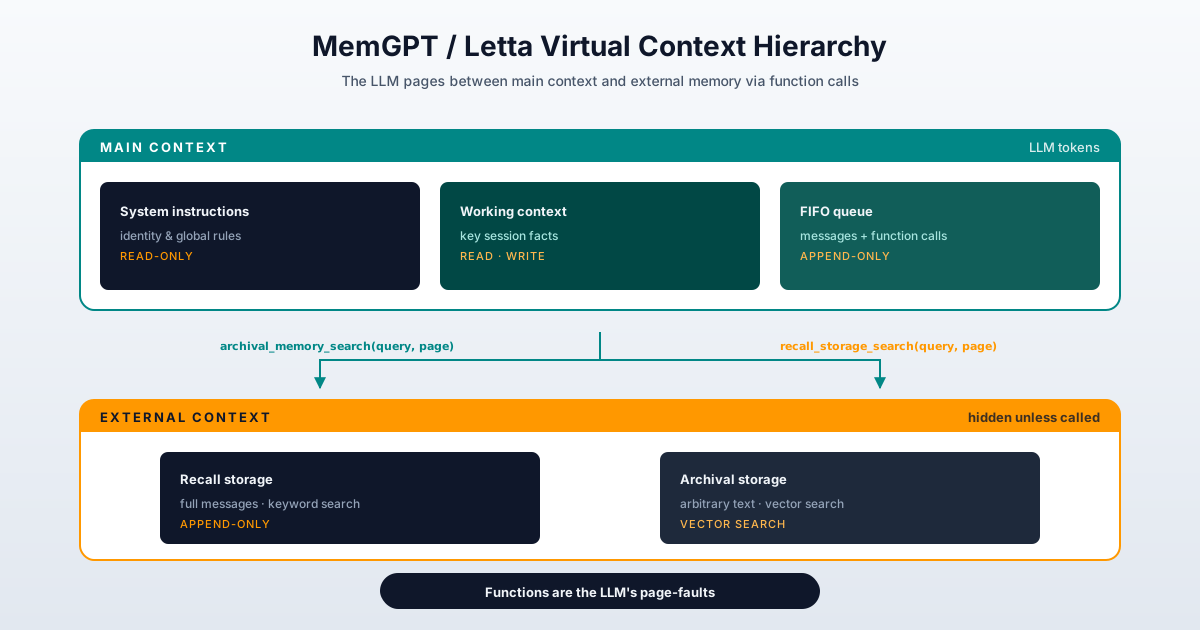
Main context (what the LLM “sees” in each turn):
- System instructions: read-only, the agent’s identity and global rules. Never moves.
- Working context: read-write, designed for the key facts of the active session. The LLM can call functions to modify it explicitly.
- FIFO queue: append-only, contains recent message history, system warnings, and function call/responses. When it fills up, it evicts.
External context (not visible to the LLM unless it invokes a function):
- Recall storage: full past messages, append-only, searchable by keyword and time range.
- Archival storage: arbitrary text objects (documents, notes, code), vector-searchable.
Functions as page-faults
The brilliant bit of the design is how the LLM “requests” memory pages. MemGPT exposes a bounded set of function calls that simulate an operating system’s operations:
archival_memory_search(query, page=0)→ pagination from archival storage with explicit page control.archival_memory_insert(text)→ write to archival storage.recall_storage_search(query, page=0)→ pagination from recall storage.core_memory_replace(label, new_content)/core_memory_append(label, content)→ modify working context.
When the model wants to remember something, it doesn’t expand its window — it invokes a function. The original implementation runs those functions in a tool runtime that feeds the results back into the FIFO queue, and the model continues.
Simplified pseudocode of the control flow (following arXiv:2310.08560 §2):
def memgpt_step(user_input, memory_state):
    memory_state.fifo_queue.append(user_input)

    prompt = (
        memory_state.system_instructions
        + memory_state.working_context
        + memory_state.fifo_queue
    )

    completion = llm.complete(prompt)

    if is_function_call(completion):
        fn, args = parse(completion)
        result = fn(**args)

        if args.get("request_heartbeat"):
            memory_state.fifo_queue.append(result)
            return memgpt_step("", memory_state)
        return result
    return completion
The eviction policy closes the loop. When the prompt tokens cross the warning token count (70% of the window), a system message gets inserted warning the model to move useful information to working_context or archival_storage. When it reaches the flush token count (100%), the FIFO queue is truncated and a recursive summary is generated from the evicted content. That’s the same idea as an operating system paging virtual memory to disk when RAM runs out.
The verified results from the paper
These are the numbers that convince anyone skeptical about whether the operating-system metaphor is just academic. From Table 2 and Figure 7 of arXiv:2310.08560:
| Model | Deep Memory Retrieval (without MemGPT) | Deep Memory Retrieval (with MemGPT) |
|---|---|---|
| GPT-3.5 | 38.7% | 66.9% |
| GPT-4 | 32.1% | 92.5% |
| GPT-4 Turbo | 35.3% | 93.4% |
And on nested key-value retrieval (recalling (((a, b), c), d)):
- Without MemGPT, all baselines collapse to 0% at level 3.
- With MemGPT on GPT-4, accuracy stays stable across all four levels.
Translated: with the same number of tokens and the same base model, adding the virtual memory layer triples precision on deep retrieval tasks and lets you solve hierarchical problems where the base model simply fails.
Evolution: from MemGPT to Letta and MemFS
In 2024 MemGPT was renamed to Letta. The change wasn’t cosmetic: the team consolidated the paper’s ideas into something production-ready. The piece that interests me most, and the one that most ties to the philosophy I’ve been defending on this blog, is MemFS.
MemFS (docs.letta.com/concepts/memfs) is a git-backed filesystem where each memory is projected as a Markdown file with YAML frontmatter. The resulting structure looks like this:
$MEMORY_DIR/
├── system/                 # Always in the system prompt
│   ├── persona.md          # Agent identity
│   └── human.md            # User preferences
├── reference/              # Loaded on demand
│   └── project-notes.md
└── skills/
    └── my-skill/
        └── SKILL.md
And the nicest part: the complete filesystem tree is injected as a navigable index into the system prompt. Files under system/ are included in every turn; everything else gets searched with ordinary file-search tools. It’s the practical materialization of the “memory awareness” idea I already covered with Hipocampus’s ROOT.md, but using Git as the versioning layer instead of a custom index.
Letta also exposes slash commands that materialize the learning flow:
/init→ bootstrap theMEMORY_DIR./remember <text>→ explicit teaching./sleeptime→ background consolidation (“dreamer” subagent)./doctor→ audit of placement, duplication, and token usage.
When to choose MemGPT/Letta and when Mem0
This is the question I get most. My rule of thumb after testing both:
- Mem0 when the agent consumes unstructured data (conversations, messages, tickets) and you want automatic fact extraction.
- Letta/MemGPT when the agent has long-running tasks, dense context, and you need fine control over what stays working vs archival.
- Both when the agent is production-grade: Mem0 as extractor, Letta as context manager. The integration is documented at
docs.mem0.ai/integrations/langgraph.
Pillar 3: the PARA method as spatial ontology
So far we’ve talked about memory as data. What remains is memory as organization. And here’s where the system that has influenced me most isn’t technical — it’s Tiago Forte’s PARA method.
PARA (fortelabs.com/blog/para) is four folders, one decision. The golden rule: is this processable right now or not?
- Projects: things with a defined end date. The Sudoku solver, the site redesign, next month’s security audit.
- Areas: continuous standards with no end date. Health, personal finances, my Android technical domain, my prompting practice.
- Resources: topics or interests without immediate action. Articles to read, references, books.
- Archives: inactive. Finished projects, abandoned areas, expired resources.
The line dividing active (Projects + Areas) from inactive (Resources + Archives) is the only thing the method needs. That single decision, says Forte and his thousands of trained students, separates PKM systems that work from those that rot.
Why PARA fits AI agents so well
The reason PARA has become a natural cognitive substrate for my agents isn’t the taxonomy itself but the actionability principle that inspires it. PARA rejects organizing by academic topic (“Marketing”, “Psychology”) in favor of organizing by what you’re trying to do right now. A note about a graphic design project belongs in Projects/diseno-grafico/, not in a shared “Marketing” folder. And that’s exactly what an agent needs to decide what to load into context without expensive semantic reasoning.
The agentic translation of PARA is direct:
- Projects → load at the start of each active session. They’re the working set.
- Areas → load only when the domain is relevant to the query. Retrieval by keyword or embedding.
- Resources → on-demand search, low scale-out.
- Archives → compressed historical reference, queried rarely.
In my own setup I have PARA implemented as four directories in an Obsidian vault accessible via MCP, and the agent receives tools list_projects + read_project <name> + search_resource <query> that let it load only what it needs. I covered all the details in the article dedicated to the PARA method applied to AI memory. What matters here is the idea: PARA is the ontology, Letta’s MemFS or your own Markdown vault is the substrate, and the agent decides what to load following the actionability principle.
The Project vs Area trap
This is the mistake 99% of people make when applying PARA, according to Forte, and I’ve seen it also fail in agents: mixing Projects and Areas. If “Improve my Spanish” ends up in Projects/, the system loses the ability to signal temporal relevance: is this actionable now or is it a continuous standard? “Improve my Spanish” is Area. “Prepare the DELE C1 exam for October 15” is Project. When an agent opens its Projects/, it expects to find work with an end date. When it opens its Areas/, it expects to find a standard. Don’t mix them, and certainly don’t mix them in the filesystem your agent will consult.
Pillar 4: Chroma vs LanceDB — choosing the vector store
The first three pillars are vector-store agnostic. Mem0 can use Chroma, LanceDB, Qdrant, Milvus. Letta uses pgvector by default. MemFS on plain disk doesn’t even need a vector store. But as soon as your stack grows, you need to choose one. And the two reasonable options for an indie dev who doesn’t want to maintain a cluster are Chroma and LanceDB.
The table that matters
I mixed verified data from docs.trychroma.com, lancedb.github.io/lancedb, and the comparison at zilliz.com/comparison/chroma-vs-lancedb:
| Dimension | Chroma | LanceDB |
|---|---|---|
| License | Apache 2.0 | Apache 2.0 |
| GitHub stars | ~29k | ~11k |
| Execution mode | Embedded (in-process) | Embedded, on-prem, or cloud |
| Canonical Python API | chromadb.Client() + collection.add/query | lancedb.connect(uri) + table.add/search |
| Autogenerated embeddings | Yes (default: all-MiniLM-L6-v2) | Requires explicit embedding_functions |
| Persistence | PersistentClient(path=...) or Chroma Cloud | .lance file per table on disk |
| Hybrid search | where filters on metadata | Vector + BM25 + SQL-like via LanceHybridQueryBuilder |
| Embedder ecosystem | Limited to the Python client | OpenAI, Cohere, SentenceTransformers, Instructor, Jina, Voyage |
| Comfortable scale | Tens/hundreds of thousands of vectors | Tens/hundreds of millions (Lance columnar format) |
| Best for | Prototyping, notebooks, local agents | Production on-prem, edge, large datasets with metadata |
When Chroma is your pick
If you’re starting from scratch with fewer than 100k memories and less than 100 MB of vectors, Chroma is the obvious pick. Installation friction is minimal (pip install chromadb), embeddings auto-generate without you having to decide anything, and the collection.add + collection.query pattern is straightforward. Minimal example:
import chromadb

client = chromadb.Client()                      # in memory
# client = chromadb.PersistentClient(path="./chroma_data")  # persistent

collection = client.get_or_create_collection(name="agent_memory")

collection.upsert(
    documents=[
        "Prefer Composable navigation over Fragment-based",
        "Project min SDK is 24, target SDK is 36",
    ],
    ids=["pref-nav-001", "config-sdk-002"],
    metadatas=[{"type": "preference"}, {"type": "config"}]
)

results = collection.query(
    query_texts=["what minimum Android version do I use?"],
    n_results=2,
    where={"type": "config"}
)
# results = {
#   "documents": [["Project min SDK is 24, target SDK is 36", ...]],
#   "ids":       [["config-sdk-002", ...]],
#   "distances": [[0.31, ...]],
#   "metadatas": [[{"type": "config"}, ...]]
# }
The TypeScript variant is equally clean, and a Rust client also exists. Chroma is ideal when you want your agent running in an afternoon and being iterable tomorrow.
When LanceDB is your pick
LanceDB shines where Chroma starts to hurt: when the dataset grows to millions of vectors with structured metadata and you want serious hybrid search (vector + keyword + SQL-like filter over typed columns). The columnar .lance format enables time-travel, versioning, and operations Chroma doesn’t natively support. Example with precomputed data:
import lancedb
import pyarrow as pa
import numpy as np

db = lancedb.connect("./lance_data")

table = db.create_table(
    "agent_memory",
    schema=pa.schema([
        pa.field("vector",     pa.list_(pa.float32(), 384)),
        pa.field("text",       pa.string()),
        pa.field("type",       pa.string()),
        pa.field("user_id",    pa.string()),
        pa.field("created_at", pa.timestamp("ms")),
    ])
)

table.add([{
    "vector":     np.random.randn(384).astype("float32").tolist(),
    "text":       "Prefer Composable navigation",
    "type":       "preference",
    "user_id":    "arceapps",
    "created_at": 1756176000000,
}])

query_vec = np.random.randn(384).astype("float32")
results = (
    table.search(query_vec)
         .metric("cosine")
         .where("user_id = 'arceapps'")
         .limit(5)
         .to_pandas()
)

results_hybrid = (
    table.search(query_vec, query_type="hybrid")
         .text("Composable navigation")
         .limit(5)
         .to_pandas()
)

table.create_index(num_sub_vectors=64, type="IVF_PQ")
LanceHybridQueryBuilder is the part that matters most to me: when I have notes with dates, authors, and categories, being able to combine semantic similarity with BM25 and a WHERE type = 'decision' changes everything. For an agent that has to reason over its own structured history, that hybrid search capability is the difference between “the agent finds things” and “the agent finds the right things right now.”
The decision rule
My decision flow, in pseudocode:
- If you’re starting and you have <50k memories → start with Chroma. Switching later is only costly if your code got too tightly coupled, so keep the
vector_storeabstraction behind your own interface. - If you foresee >500k memories with structured metadata → start with LanceDB. The columnar format pays dividends.
- If you need real hybrid search (vector + BM25 + filters) → LanceDB.
- If you’re only working in notebooks and prototypes → Chroma.
In my case, small projects run on Chroma and those with >6 months of structured history migrated to LanceDB without drama. To validate performance on your own dataset, VectorDBBench is the open-source benchmarking tool from the Zilliz team.
Pillar 5: LangChain as orchestrator
The last pillar doesn’t store memory; it moves memory around. LangChain has evolved a lot, and the most common confusion is still using the legacy API. In 2026 the canonical pattern is create_agent on top of LangGraph, with a persistent checkpointer if you want memory across invocations.
The current pattern with create_agent
from langchain.agents import create_agent
from langgraph.checkpoint.sqlite import SqliteSaver

def get_weather(city: str) -> str:
    """Get weather for a given city."""
    return f"It's always sunny in {city}!"

checkpointer = SqliteSaver.from_conn_string("./agent_state.db")

agent = create_agent(
    model="openai:gpt-5.5",
    tools=[get_weather],
    system_prompt="You are a helpful assistant",
    checkpointer=checkpointer,
)

config = {"configurable": {"thread_id": "user-arceapps-proj1"}}
result = agent.invoke(
    {"messages": [{"role": "user", "content": "Weather in Madrid?"}]},
    config=config,
)
Same thread_id in a second invocation → the agent remembers the full conversation context. The SqliteSaver persists state per thread, which gives durable memory without spinning up infrastructure. For multi-user production, swap it for PostgresSaver or RedisSaver.
Mem0 ↔ LangGraph integration
The piece that closes the stack: Mem0 as external memory for a LangGraph agent. Official docs at docs.mem0.ai/integrations/langgraph. The pattern is always the same:
- Before each agent turn, call
mem0.search(query)with the current query. - Inject the results into the agent’s
system_prompt(or into a “memory context” message). - After each response, call
mem0.add([user_msg, assistant_msg], user_id=...)so Mem0 extracts facts from the exchange.
This turns Mem0 into a memory layer orthogonal to LangGraph’s checkpointer. The checkpointer handles short-term state (turn-to-turn within a thread); Mem0 handles long-term memory (consolidated facts cross-thread, cross-session, cross-agent).
Deep Agents: the MemGPT alternative inside LangChain
If you’d rather stay in LangChain without adding dependencies, Deep Agents exists. It’s a “batteries-included” harness on top of create_agent that adds three things:
- Automatic context compression: when context grows, the agent summarizes/culls messages without you writing the logic.
- Virtual filesystem: analogous to Letta’s MemFS, but managed in-process.
- Subagent spawning: the main agent can delegate subtasks to specialized subagents.
For an indie who doesn’t want to learn MemGPT in depth, Deep Agents is the “everything-included” version. For those wanting fine control, Letta is still superior.
The complete stack: how the four pillars connect
After five individual sections, let me bring the pieces together. Imagine this architecture — it’s what I run in my production projects:
                      ┌──────────────────────────────┐
                      │      Your app/CLI           │
                      │   (human interface)          │
                      └──────────────┬───────────────┘
                                     │
        ┌────────────────────────────▼─────────────────────────┐
        │   Orchestrator: LangChain create_agent / LangGraph   │
        │   checkpointer = PostgresSaver (multi-thread)        │
        └──────┬──────────────────────────┬───────────────────┘
               │                          │
               │ (1) pre-prompt            │ (2) post-response
               ▼                          ▼
        ┌────────────────────┐    ┌──────────────────────────┐
        │       Mem0         │    │   Consolidation (cron)   │
        │  add / search /    │    │  - summarize clusters    │
        │  update / dedup    │    │  - archive inactive      │
        │  v3 single-pass    │    │  - reindex embeddings    │
        └─────────┬──────────┘    └──────────┬───────────────┘
                  │                          │
                  ▼                          ▼
        ┌────────────────────┐    ┌──────────────────────────┐
        │  Vector store      │    │   Human-readable substrate│
        │  Chroma or LanceDB │    │   PARA + Markdown        │
        │  + entity store    │    │   (Obsidian/Logseq/MemFS)│
        │  (SQL + graph)     │    │   via MCP                │
        └────────────────────┘    └──────────────────────────┘
Detailed diagram of the memory consolidation flow:
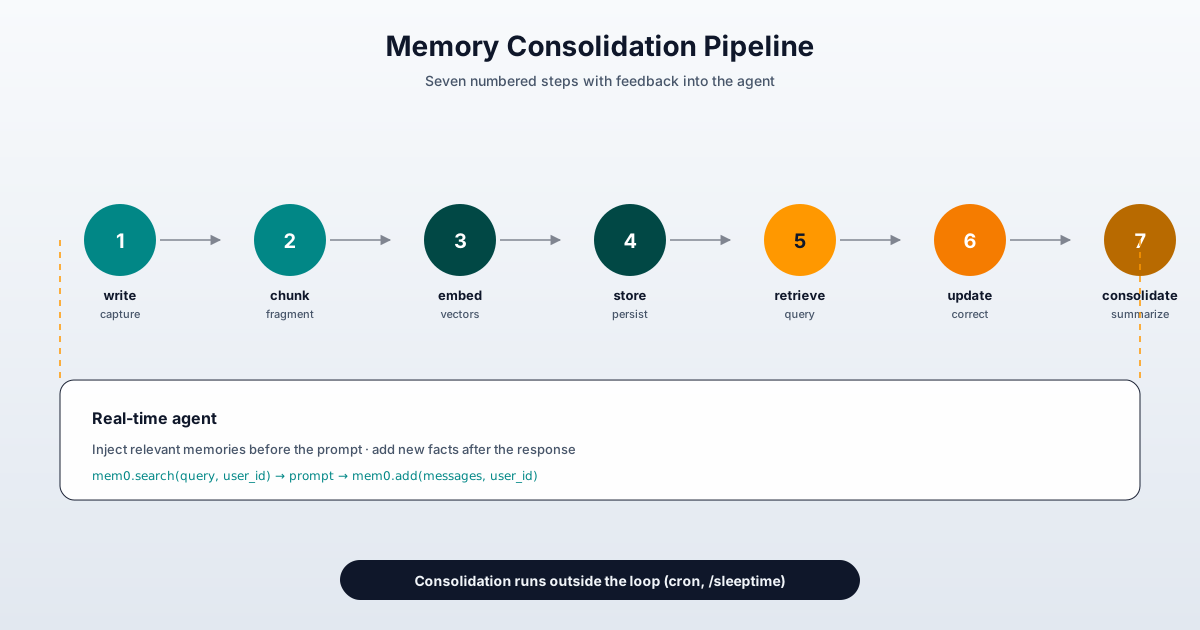
Four design principles behind the diagram above:
- Mem0 is the extractor, not the final storage. If you use it as the only memory layer you’ll end up with logical duplicates and an inconsistent graph as it grows.
- LangGraph’s checkpointer handles short-term memory. Mem0 retrieval handles mid-term. The PARA vault handles long-term with readable indexes.
- Consolidation runs outside the loop (cron job, background
/sleeptimesubagent in Letta, or weekly manual command). The agent in real time shouldn’t be thinking “should I forget something now?” - The readable substrate is what survives provider changes. If you migrate from Mem0 to another extractor tomorrow, your PARA files are still there. If you switch from LangChain to another library next year, your Obsidian vault is still the source of truth.
The equivalent of “Hello World”
To make this actionable, here’s a minimal viable setup you can copy and run in an afternoon. It’s not the final one (you’ll iterate), but it’s what I use as a basis for new projects:
# stack_minimum.py
from openai import OpenAI
from mem0 import Memory
from langchain.agents import create_agent
from langgraph.checkpoint.sqlite import SqliteSaver
import chromadb

class Agentic:
    def __init__(self, user_id: str, project_id: str):
        self.user_id = user_id
        self.project_id = project_id
        self.llm = OpenAI()
        self.memory = Memory()

        checkpointer = SqliteSaver.from_conn_string("./state.db")
        self.agent = create_agent(
            model="openai:gpt-5.5",
            tools=[],
            system_prompt="Persistent assistant. Reply briefly and consult memories.",
            checkpointer=checkpointer,
        )

    def chat(self, message: str) -> str:
        memories = self.memory.search(
            query=message,
            filters={"user_id": self.user_id},
            top_k=3
        )
        mem_str = "\n".join(f"- {e['memory']}" for e in memories["results"])

        config = {"configurable": {"thread_id": f"{self.project_id}-{self.user_id}"}}
        result = self.agent.invoke(
            {"messages": [
                {"role": "system", "content": f"Relevant memories:\n{mem_str}"},
                {"role": "user",   "content": message},
            ]},
            config=config,
        )

        self.memory.add(
            [{"role": "user",      "content": message},
             {"role": "assistant", "content": result["messages"][-1].content}],
            user_id=self.user_id
        )
        return result["messages"][-1].content
Not glamorous, but it works. On top of this skeleton I’ve added tools, PARA vault parsers, MCP integrations, and the rest of the paraphernalia. What matters is that all five pillars are present from day one: LangChain orchestrates, Mem0 extracts, Chroma/LanceDB embeds, PARA gives the readable ontology, and the Sqlite checkpointer gives short-term memory.
Lessons learned (six months later)
After six months with this stack across several projects — from personal Android apps to internal log-analysis tooling — I have several things clear that weren’t in the official docs.
1. There isn’t “one memory to rule them all.” The costliest mistake I made at first was trying to centralize. Having Mem0, Hipocampus, hmem, and PARA in a single agent produced duplication and contradiction. Today I use Mem0 for semantic user memory, my own PARA vault as domain substrate (the project’s source of truth), and LangGraph’s checkpointer as conversation memory. Three layers, three responsibilities, no overlap.
2. The extractor burns tokens and that matters. Mem0 with gpt-5-mini looks cheap, but in long conversations the extraction cost rivals the model’s response cost. I’ve migrated to selective extractions (add only at consolidation moments, not every turn) and the monthly bill dropped 40% without perceptible quality loss.
3. Temporality is the hardest thing to model. “The user prefers X” changes. “The user ruled out X for Y” also changes. The difference between the two matters: one gets rewritten with update, the other gets archived but not deleted. The temporal reasoning module in Mem0 v3 helps, but the reality is each agent needs domain-specific forgetting logic. Don’t scale this from a generic library.
4. MCP memory servers complement, don’t replace. My PARA vault via MCP complements Mem0: the vault gives readable Git-versioned storage, Mem0 gives extraction and deduplication. Confusing them is the most common misconception I see in community questions. For depth on this, re-read the article on cross-agent MCP memory servers I published months ago.
5. Benchmarks mislead. Mem0 v3’s numbers (92.5 LoCoMo, 94.4 LongMemEval) are real on the evaluation datasets. On my real-world daily-use dataset the delta versus the previous version was 4%, not 21%. Benchmarks measure performance on long, structured test-style questions; day-to-day is noisier, more conversational, less extreme. Measure on your own turf.
6. Privacy and memory are inseparable. If your memories contain personal data (and they almost always will), they need to follow the same rules as the rest of your system: encryption at rest, strict user_id scopes, operational right-to-be-forgotten. I’ve covered the specific considerations in persistent memory and agentic privacy, but the TL;DR is: treat memory as PII by default.
Closing: a map, not a destination
This article isn’t a closed recipe. It’s a map. The architecture I’ve described is what works on my workbench today; in six months part of it may be obsolete — LangChain iterates fast, Letta is still finding its footing, Mem0 publishes a new algorithm every few months. What I hope survives is the principle: cognitive memory = automatic extraction + operating-system-style paging + readable spatial ontology + informed vector store choice.
If I had to leave you with three concrete actions you can do this week, they’d be:
- Set up Mem0 OSS in an afternoon.
pip install mem0ai, clone the repo, run the examples. You’ll see in an hour what it does and what it doesn’t. - Apply PARA to your current vault. You don’t need an agent for this; take the filesystem where you store notes, projects, and references and reorganize it into four folders. When the agent arrives, the vault is already ready.
- Make an informed vector store decision. If you haven’t, run a benchmark with VectorDBBench on your real data. Chroma or LanceDB, but for data reasons, not hype.
And if you find yourself on a Thursday night at eleven pm, tuning Norvig’s algorithm with your agent, and tomorrow when you open a session you discover that it does remember you ruled out DLX because constraint density changes the heuristic… you’ve built something I’m still building: a digital craftsman with memory. Not perfect, not scalable to millions, but yours.
Did this map help? Do you have a different stack that works better for you? I read the comments, my X account, or wherever you prefer. And if you want to deep-dive into any of the pieces — Mem0 in production, the PARA method step by step, the alternatives to Chroma and LanceDB — subscribe to the blog, because each one will have its own article in the coming months.
Bibliography and references
Frameworks and official documentation
- Mem0 — Official homepage: https://mem0.ai. v3 algorithm metrics (April 2026) and use cases.
- Mem0 — Platform Quickstart: https://docs.mem0.ai/platform/quickstart. Verified Python API for
add/search. - Mem0 — How it works: https://docs.mem0.ai/core-concepts/how-it-works. Detailed extraction pipeline.
- Mem0 — Update operation: https://docs.mem0.ai/core-concepts/memory-operations/update.
updateandbatch_update. - Mem0 — MCP integration: https://docs.mem0.ai/platform/mem0-mcp. Mem0 as MCP server for Claude Code, Cursor, Codex.
- Mem0 — GitHub: https://github.com/mem0ai/mem0. Canonical repository, paper arXiv:2504.19413, v3 benchmarks.
- MemGPT — Original paper (arXiv:2310.08560v2): https://arxiv.org/abs/2310.08560. Packer et al., UC Berkeley, October 2023.
- Letta — Memory & dreaming: https://docs.letta.com/configuration/memory. Commands
/init,/remember,/sleeptime. - Letta — MemFS: https://docs.letta.com/concepts/memfs. Git-backed filesystem.
- Letta — Stateful agents: https://docs.letta.com/concepts/stateful-agents. Conceptual framework of persistent identity.
- Letta — GitHub: https://github.com/letta-ai/letta. 24.4k stars, current source code.
- Letta — Research: https://www.letta.com/research. Recent papers from the lab.
LangChain and orchestration
- LangChain — Current overview: https://docs.langchain.com/oss/python/langchain/overview.
create_agentAPI on LangGraph. - LangChain — Deep Agents: https://docs.langchain.com/oss/python/deepagents/overview/. Batteries-included harness with virtual filesystem.
- Mem0 + LangGraph integration: https://docs.mem0.ai/integrations/langgraph. Using Mem0 as external memory.
Vector databases
- Chroma — Getting Started: https://docs.trychroma.com/docs/overview/getting-started. Python, JS, and Rust.
- LanceDB — Python SDK: https://lancedb.github.io/lancedb/python/python/. Complete API and hybrid search.
- Zilliz — Chroma vs LanceDB: https://zilliz.com/comparison/chroma-vs-lancedb. Comparison with quantitative data.
- VectorDBBench — GitHub: https://github.com/zilliztech/VectorDBBench. Open-source benchmarking tool.
PARA method and cognitive substrate
- Tiago Forte — The PARA Method: https://fortelabs.com/blog/para/. Canonical definition and actionability principle.
- Tiago Forte — Building a Second Brain: https://www.buildingasecondbrain.com/para. Book-length version of the method.
Standards and context
- Anthropic — Model Context Protocol: https://modelcontextprotocol.io. Open standard connecting PARA vault to agents.
- OpenMemory (Mem0 self-hosted): https://mem0.ai/openmemory. Open-source alternative to the memory engine.
- Mem0 research page: https://mem0.ai/research. Technical paper and complete benchmarks.
Related articles on ArceApps
- General landscape of memory frameworks: persistent memory for AI agents.
- PARA method applied to AI files: PARA method for AI memory.
- My real stack with basic-memory and supermemory: persistent memory stack implementation.
- Cross-agent MCP memory servers: cross-agent MCP memory servers.
- Hierarchical memory like hmem: hierarchical memory with SQLite.
- Hipocampus as a memory harness: Hipocampus, hierarchical memory.
- PlugMem from Microsoft Research: PlugMem, task-agnostic agentic memory.
- Privacy and security in agentic memory: agentic memory privacy and security.
- Obsidian as a vault for agents: Obsidian for developers.
- Native memory plugins in OpenCode: native memory plugins in OpenCode.
- Subagent workflows consuming the same memory: OpenCode subagents and superpowers.
You might also be interested in
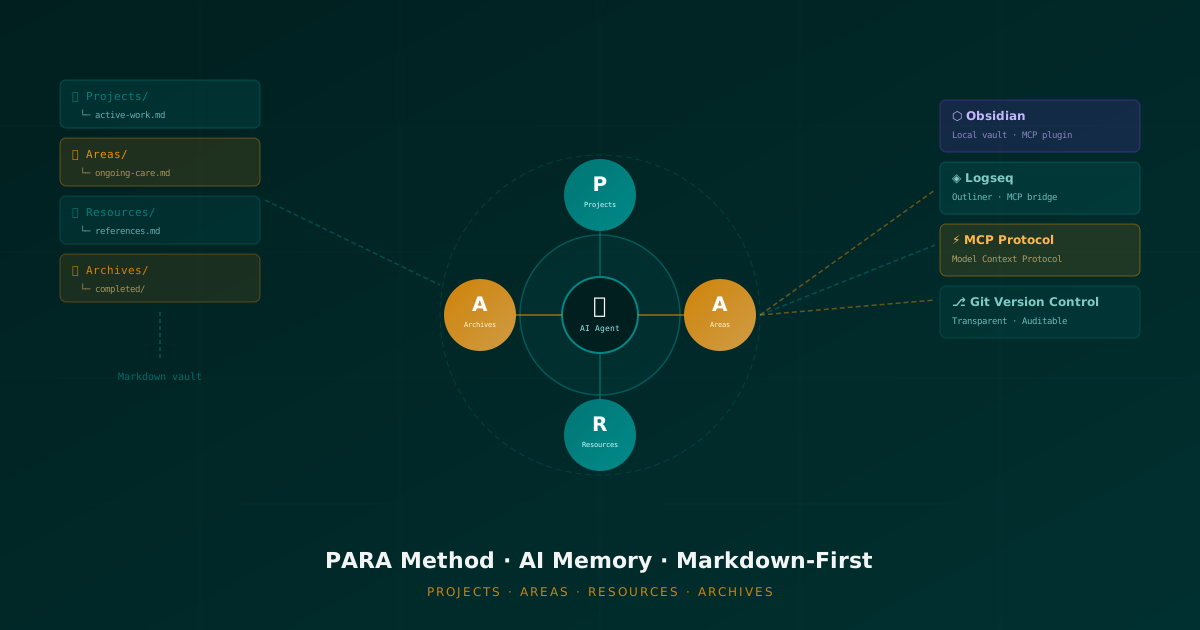
The PARA Method and File-Based AI
A deep dive into using the PARA method (Projects, Areas, Resources, Archives) as a cognitive scaffold for AI agent memory. How Markdown files, Obsidian, and Logseq via MCP create transparent, human-editable memory systems that actually persist.
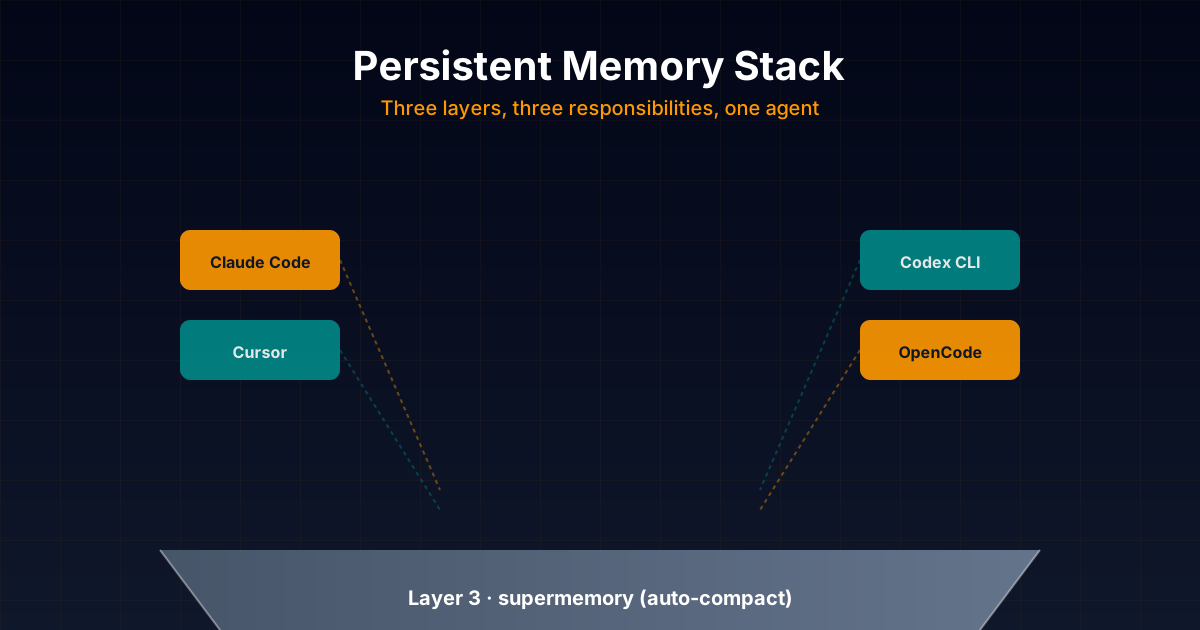
The Persistent Memory Stack I Actually Use...
Honest technical deep dive into the persistent memory stack I combine daily in my projects: opencode-supermemory for auto-compact, basic-memory as main memory with Markdown + graph, and forgetful as procedural skills layer. With real configuration examples for Claude Code, Codex,
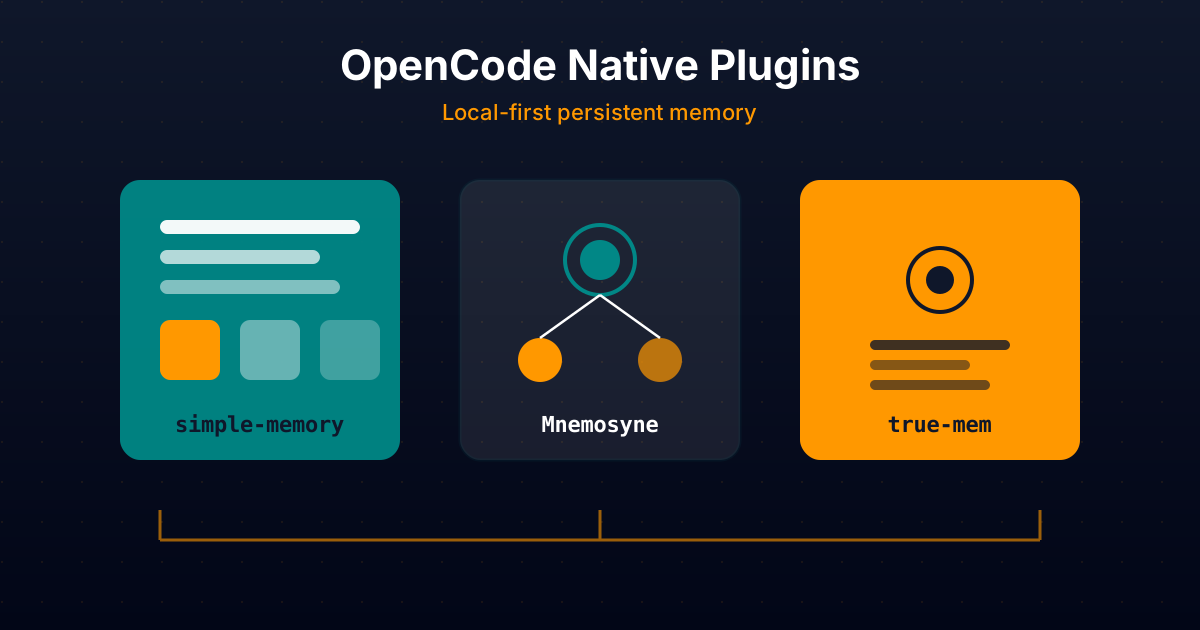
Native OpenCode Plugins for Persistent
Comparative technical analysis of three native OpenCode plugins to give your AI agent persistent local memory: simple-memory (logfmt), Mnemosyne (offline Go binary), and true-mem (cognitive psychology).