
SLMs vs LLMs for Android: When to Run AI on the Device
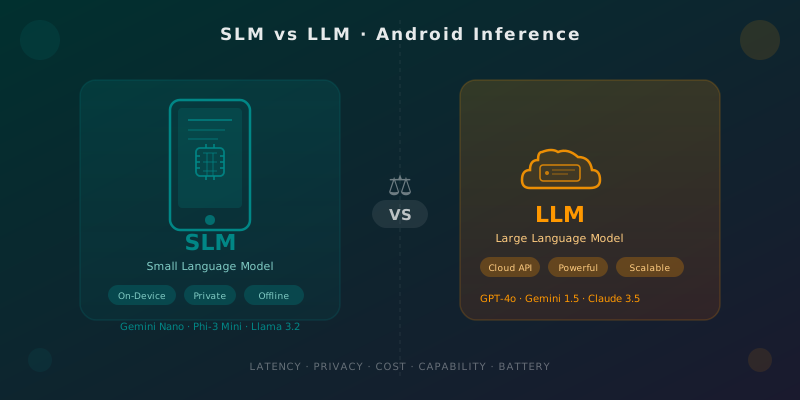
Table of Contents
This article assumes familiarity with on-device model inference on Android. Before continuing, I recommend these articles:
- Local Inference Architecture for Android — How to structure your app to support on-device models.
- Gemini Nano on Android: Practical On-Device AI — Step-by-step implementation with Google’s AICore API.
- Offline-First AI Patterns for Android — Strategies for apps that work without connectivity using local models.
The question has been circling Android team conversations for months: do we send our inferences to the cloud or run them on-device? And the honest answer is there is no single answer. It depends on your use case, your users, your business model, and how much architectural complexity you’re willing to take on.
This article gives you the decision framework you need to answer that question in your specific context.
🧠 The Problem Space: SLMs vs LLMs
Before the comparison, let’s align on terminology since the industry uses it quite loosely.
LLM (Large Language Model): Models with billions of parameters (7B+), generally accessed via cloud API. GPT-4o, Gemini 1.5 Pro, Claude 3.5 Sonnet. Powerful, versatile, expensive per inference.
SLM (Small Language Model): Smaller models (1B-7B parameters), optimized to run on constrained hardware. Gemini Nano (~1.8B), Phi-3 Mini (3.8B), Llama 3.2 1B/3B. More limited in capability, but executable directly on your phone.
The key distinction isn’t just size — it’s where you run the inference. An LLM could theoretically run on-device if the hardware supports it (and there are gaming phones with 16GB RAM where this is becoming viable). But in practice, in 2026, on-device means SLM for the vast majority of Android devices.
⚖️ The Five Decision Axes
To choose between on-device (SLM) and cloud (LLM), evaluate your use case across these five axes:
1. Latency
Cloud LLMs have a network latency of roughly 300-1500ms to the first token, plus generation time. For conversational apps or real-time assistance, this is noticeable.
On-device SLMs start in 50-200ms and generate tokens at 10-40 tokens/second on modern hardware (Tensor G4, Snapdragon 8 Gen 3). No network variability, no dependency on server load.
Choose on-device if: The response needs to appear while the user is typing, or if speed perception is critical for UX.
2. Privacy
With a cloud LLM, the user’s data (their query, their context) leaves the device. Even though providers have non-retention policies, the data travels over the network and passes through their infrastructure.
With an on-device SLM, data never leaves the device. Inference happens completely locally.
Choose on-device if: Your app processes sensitive data (health, finance, private messages, biometric data). Also if your target market includes users with corporate or regulatory restrictions (GDPR, HIPAA).
3. Cost Per Inference
Cloud LLM APIs charge per token. GPT-4o: ~$0.005/1K input tokens. For an app with a million active users making 10 daily queries of 500 tokens each, you’re looking at $25,000/day. The numbers scale fast.
On-device SLMs have zero marginal cost per additional inference. The cost is engineering time to integrate them and the impact on APK size.
Choose on-device if: Your business model doesn’t include per-inference monetization, or if query volume makes API costs prohibitive.
4. Model Capability
Here cloud LLMs win without contest. Complex reasoning, long code generation, extensive document analysis, advanced multimodal understanding — large models are significantly better.
SLMs are good for: intent classification, entity extraction, short summaries, simple text completion, phrase rewriting, question answering with bounded context.
Choose cloud if: The task requires deep reasoning, broad general knowledge, or generation of extensive and complex content.
5. Battery Consumption
On-device inference consumes the device’s CPU/GPU/NPU. A 3B-parameter SLM generating 100 tokens can consume 50-200mJ depending on hardware, which accumulates with frequent inferences.
Cloud LLMs consume only the radio (WiFi/5G) to send and receive data — generally lower than running the model locally.
Choose cloud if: Your app makes very frequent background inferences, or if your users are particularly sensitive to battery life.
📊 SLM Comparison Table for Android
| Model | Parameters | Min RAM | Tokens/sec (Pixel 8) | Context Window | License |
|---|---|---|---|---|---|
| Gemini Nano | ~1.8B | 4GB | 20-40 | 512 tokens | Proprietary (via AICore) |
| Phi-3 Mini | 3.8B | 4GB | 15-25 | 4K tokens | MIT |
| Llama 3.2 1B | 1B | 2GB | 30-50 | 128K tokens | Llama 3 Community |
| Llama 3.2 3B | 3B | 4GB | 18-30 | 128K tokens | Llama 3 Community |
| Gemma 2 2B | 2B | 3GB | 22-35 | 8K tokens | Gemma Terms |
Note on Gemini Nano: When using Google’s AICore API, you don’t download the model yourself — Google manages it at the system level. This means less control over version and availability (only certified Android devices with feature level 35+), but also zero download overhead for the user.
🏗️ Dynamic Selector: Cloud or Local Based on Context
The most robust pattern isn’t choosing one approach forever, but implementing both and deciding at runtime based on current conditions.
// InferenceRouter.kt
class InferenceRouter(
    private val onDeviceProvider: OnDeviceInferenceProvider,
    private val cloudProvider: CloudInferenceProvider,
    private val networkMonitor: NetworkMonitor,
    private val deviceCapabilityChecker: DeviceCapabilityChecker
) {

    suspend fun route(request: InferenceRequest): InferenceProvider {
        return when {
            // Sensitive data → always local
            request.containsSensitiveData -> {
                onDeviceProvider.takeIf { it.isAvailable() }
                    ?: throw InferenceException("On-device required for sensitive data but not available")
            }

            // No connectivity → local or error
            !networkMonitor.isConnected() -> {
                onDeviceProvider.takeIf { it.isAvailable() }
                    ?: throw InferenceException("No network and on-device not available")
            }

            // Complex task → cloud
            request.complexity == Complexity.HIGH -> cloudProvider

            // Low battery + frequent inference → cloud (less local consumption)
            deviceCapabilityChecker.batteryLevel < 20 && request.isFrequent -> cloudProvider

            // On-device available and simple task → local
            onDeviceProvider.isAvailable() && request.complexity == Complexity.LOW -> onDeviceProvider

            // Default → cloud
            else -> cloudProvider
        }
    }
}

// Usage in ViewModel
class AssistantViewModel(
    private val router: InferenceRouter,
    private val localModel: GeminiNanoClient,
    private val cloudModel: GeminiProClient
) : ViewModel() {

    fun processUserInput(input: String, isSensitive: Boolean = false) {
        viewModelScope.launch {
            val request = InferenceRequest(
                prompt = input,
                containsSensitiveData = isSensitive,
                complexity = estimateComplexity(input)
            )

            val provider = router.route(request)
            val response = provider.generate(request.prompt)

            _uiState.update { it.copy(response = response) }
        }
    }

    private fun estimateComplexity(input: String): Complexity {
        // Simple heuristic: length + reasoning keywords
        return when {
            input.length > 500 -> Complexity.HIGH
            input.contains(Regex("analyze|compare|explain in detail|reason through")) -> Complexity.HIGH
            else -> Complexity.LOW
        }
    }
}
📱 Real-World Use Cases: What Do Apps Actually Use?
Google Messages (Reply Suggestions): On-device. Quick reply suggestions use a small local model because they must be instant and conversation privacy is critical.
Grammarly Mobile: Hybrid. Basic corrections (grammar, punctuation) on-device for zero latency; complex style suggestions go to the cloud.
GitHub Copilot for Android Studio: Cloud. Complex code generation requires a large model; network latency is acceptable because the developer is thinking between suggestions.
Mental health app with chatbot: On-device mandatory. Mental health data is extremely sensitive; a privacy breach would destroy user trust.
Semantic search in notes app: On-device. Local search over user content, without sending their notes to any server. Llama 3.2 1B with embeddings is sufficient for this.
🔧 Technical Integration: The Kotlin Stack
For on-device, you have three main options in the Android ecosystem:
// Option 1: AICore API (Gemini Nano via Google)
val generativeModel = GenerativeModel(
    modelName = "gemini-nano",
    // No API key — the model lives in the system
)

// Option 2: LiteRT (successor to TensorFlow Lite) for custom models
val interpreter = LiteRtInferenceSession.create(
    modelPath = "models/phi3-mini-q4.bin",
    options = InferenceOptions.builder()
        .setNumThreads(4)
        .setUseNnApi(true) // delegate to NPU if available
        .build()
)

// Option 3: MediaPipe LLM Inference API (cross-platform)
val llmInference = LlmInference.createFromOptions(
    context,
    LlmInference.LlmInferenceOptions.builder()
        .setModelPath("/data/local/tmp/llama_3_2_1b_q8.bin")
        .setMaxTokens(1024)
        .setTopK(40)
        .setTemperature(0.8f)
        .build()
)
For cloud, the obvious choice remains Google’s Gemini API for the Android ecosystem, with the official SDK:
// Cloud inference with Gemini Pro
val cloudModel = GenerativeModel(
    modelName = "gemini-1.5-pro",
    apiKey = BuildConfig.GEMINI_API_KEY
)
val response = cloudModel.generateContent(prompt)
Conclusion
The SLM vs LLM decision is neither binary nor permanent. The best approach for Android apps in 2026 is assuming a hybrid design from the start: a common interface for inference providers that allows switching between local and cloud based on runtime context.
If you had to start with a single rule: use on-device by default for sensitive data and simple tasks; use cloud for complex tasks where model quality makes a meaningful difference. And measure continuously — SLMs are improving rapidly, and what requires a large LLM today might be solved by Gemini Nano in six months.
Users rarely care where the model runs. They care whether the app is fast, private, and works without internet. That’s the right north star for making this decision.
References
You might also be interested in
Gemini Nano on Android: On-Device AI Without Cloud Dependency
Learn to integrate Gemini Nano in Android via Android AI Core. Real use cases, Kotlin snippets, and when to choose on-device vs. cloud inference.

Local Inference Architecture: Integrating LiteRT into Clean Architecture
A guide to decoupling on-device AI models like Gemini Nano using Clean Architecture principles in Android 16.
AI Agents on Android: Theory and Practice
Understanding the role of AI Agents in modern mobile development. From theoretical foundations to practical implementation strategies using LLMs.