
Gemini Nano on Android: On-Device AI Without Cloud Dependency
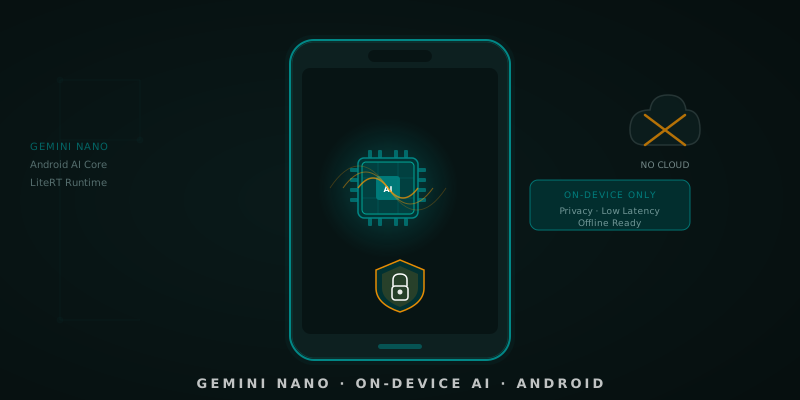
Table of Contents
Before diving in, if you’re interested in the broader architectural context of local AI on Android, these two articles are essential reading:
- Local Inference Architecture: Integrating LiteRT into Clean Architecture — How to properly decouple on-device models using Clean Architecture principles.
- Offline-First Synchronization Patterns Powered by AI — How to combine local AI with offline-first data strategies.
In May 2024, Google announced something that would have seemed like science fiction two years earlier: Gemini Nano running directly on the device, without sending any data to the cloud, on Pixel phones (and progressively on more compatible Android devices). In 2026, with Android AI Core mature and the on-device model ecosystem growing, it’s time to understand how to genuinely integrate it into your apps.
This article isn’t a marketing overview. We’re going to look at the code, the real limitations, and when on-device makes sense vs. when cloud is still the right answer.
🧩 What Gemini Nano Is and How It Reaches the Device
Gemini Nano is the smallest version of Google’s Gemini family, optimized specifically for execution on mobile hardware. It’s not a general-purpose model forcibly shrunk down: it’s designed from scratch to operate within the memory, battery, and thermal budget constraints of a smartphone.
The model doesn’t ship with your APK. It reaches the device through Android AI Core, a system service that manages the download, update, and serving of the model in a centralized way. This has several important implications:
- Your app doesn’t increase in size by including the model.
- The model updates independently of your app.
- Multiple apps share the same model in memory (efficiency).
- Access requires the device to be compatible and the model to be available locally.
Runtime: Gemini Nano uses LiteRT (formerly TensorFlow Lite) as its inference runtime on Android, optimized with hardware acceleration via the Neural Networks API (NNAPI) and the NPUs available in the SoC.
📱 Compatible Devices and Requirements
At the time of writing this article (March 2026), Gemini Nano is available on:
- Pixel 8, 8 Pro, 8a, 9, 9 Pro, 9 Pro XL (full support via AICore)
- Samsung Galaxy S24 series (via Samsung AI, subset of capabilities)
- Devices with Snapdragon 8 Gen 3 (progressive support)
Minimum system requirements:
- Android 10+ for basic AICore
- Android 14+ for the latest Gemini Nano APIs
- At least 6 GB of RAM recommended
- ~1.7 GB storage for the base model
If your app targets a broad range of devices, you need to handle the case where the model is not available gracefully (more on this below).
🔌 Integration with Android AI Core: The Real Code
Let’s get to what matters. The API for accessing Gemini Nano from Android goes through the com.google.android.gms.ai package (Google Play Services AI).
Dependencies in libs.versions.toml
// libs.versions.toml
[versions]
google-aicore = "0.0.1-exp01"

[libraries]
// Android AI Core — access to Gemini Nano on-device via Google Play Services
google-aicore = { group = "com.google.ai.edge.aicore", name = "aicore", version.ref = "google-aicore" }
Configuration and availability check
// domain/ai/OnDeviceInferenceRepository.kt
interface OnDeviceInferenceRepository {
    suspend fun isAvailable(): Boolean
    suspend fun generateText(prompt: String): Result<String>
    suspend fun generateTextStreaming(prompt: String): Flow<String>
}

// data/ai/GeminiNanoRepository.kt
class GeminiNanoRepository(
    private val context: Context
) : OnDeviceInferenceRepository {

    private var generativeModel: GenerativeModel? = null

    override suspend fun isAvailable(): Boolean {
        return withContext(Dispatchers.IO) {
            try {
                val availability = GenerativeModel.checkAvailability(context)
                availability == AvailabilityStatus.AVAILABLE
            } catch (e: Exception) {
                false
            }
        }
    }

    private suspend fun getOrInitModel(): GenerativeModel {
        return generativeModel ?: run {
            val model = GenerativeModel.getInstance(
                modelName = "gemini-nano",
                context = context,
                generationConfig = generationConfig {
                    temperature = 0.7f
                    maxOutputTokens = 512
                    topK = 40
                }
            )
            generativeModel = model
            model
        }
    }

    override suspend fun generateText(prompt: String): Result<String> {
        return withContext(Dispatchers.Default) {
            runCatching {
                val model = getOrInitModel()
                val response = model.generateContent(prompt)
                response.text ?: throw IllegalStateException("Empty response from Gemini Nano")
            }
        }
    }

    override suspend fun generateTextStreaming(prompt: String): Flow<String> {
        return flow {
            val model = getOrInitModel()
            model.generateContentStream(prompt).collect { chunk ->
                chunk.text?.let { emit(it) }
            }
        }.flowOn(Dispatchers.Default)
    }
}
UseCase with cloud fallback handling
// domain/ai/GenerateSmartSummaryUseCase.kt
class GenerateSmartSummaryUseCase(
    private val onDeviceRepo: OnDeviceInferenceRepository,
    private val cloudRepo: CloudInferenceRepository, // Fallback
    private val userPreferences: UserPreferencesRepository
) {
    sealed class InferenceSource {
        object OnDevice : InferenceSource()
        object Cloud : InferenceSource()
    }

    data class SummaryResult(
        val text: String,
        val source: InferenceSource
    )

    suspend operator fun invoke(content: String): Result<SummaryResult> {
        val privacyModeEnabled = userPreferences.isPrivacyModeEnabled()

        // If privacy mode is enabled, only use on-device
        if (privacyModeEnabled) {
            return onDeviceRepo.generateText(buildSummaryPrompt(content))
                .map { SummaryResult(it, InferenceSource.OnDevice) }
        }

        // Try on-device first; fall back to cloud if unavailable
        return if (onDeviceRepo.isAvailable()) {
            onDeviceRepo.generateText(buildSummaryPrompt(content))
                .map { SummaryResult(it, InferenceSource.OnDevice) }
                .recoverCatching {
                    cloudRepo.generateText(buildSummaryPrompt(content))
                        .getOrThrow()
                        .let { SummaryResult(it, InferenceSource.Cloud) }
                }
        } else {
            cloudRepo.generateText(buildSummaryPrompt(content))
                .map { SummaryResult(it, InferenceSource.Cloud) }
        }
    }

    private fun buildSummaryPrompt(content: String): String {
        return """Summarize the following content in 2-3 sentences,
            |keeping the key technical points:
            |
            |$content""".trimMargin()
    }
}
🎯 Use Cases Where Gemini Nano Shines
Not all AI use cases make sense on-device. Here are the ones that genuinely benefit:
✅ Works great on-device
Local content summaries: Summarizing notes, emails, or articles directly on the device without the text ever reaching a server. Ideal for productivity apps with sensitive data.
Smart Compose / contextual autocomplete: Text suggestions based on the current screen context, with <100ms latency that isn’t possible with a cloud call.
Offline content classification and tagging: Categorizing notes, photos (with text descriptions), or tasks when there’s no connection.
Local tone/sentiment detection: Analyzing the tone of a message before sending it, without the draft leaving the device.
Suggested quick replies: In messaging apps, suggesting short replies based on the received message with ultra-low latency.
❌ Better to use cloud
- Tasks that require up-to-date knowledge (news, prices, real-time data).
- Complex code generation or deep business logic analysis.
- Advanced multimodality (complex image analysis, video).
- When context needs to exceed ~2048 tokens (Gemini Nano has a limited context window).
- Incompatible devices or model not downloaded.
⚠️ Real Limitations You Need to Know
Being honest about limitations is fundamental for making good architectural decisions:
Availability not guaranteed: The model may not be downloaded when the user needs it for the first time. The first run may require downloading ~1.7 GB.
Reduced context window: Gemini Nano has a significantly smaller context window than its cloud versions (approx. 2048 tokens vs. 1M in Gemini 1.5 Pro). It’s not suitable for long document analysis.
Limited reasoning capabilities: For complex multi-step reasoning tasks (math, complex code, deep logical analysis), the cloud version clearly outperforms Nano.
No user fine-tuning: You can’t customize Gemini Nano with your own training data (unlike some alternative on-device models like MediaPipe with TFLite).
Thermal throttling: In long inference sessions on devices with aggressive thermal management, inference speed can degrade.
Conclusion
Gemini Nano on Android represents a genuine shift in how we can build AI-powered apps: privacy by design, no network latency, working offline. The integration via Android AI Core is mature enough to use in production, as long as you correctly design the availability flow and fallback.
The golden rule: use on-device when privacy, latency, or offline availability are non-negotiable requirements; use cloud when you need maximum capability, long context, or deep reasoning. The UseCase pattern with explicit fallback we’ve seen is your best friend for managing this tradeoff cleanly in Clean Architecture.
References
-
Android AI Core — Developer Guide — Google. Integrating Gemini Nano with Android AI Core. https://developer.android.com/ml/android-ai-core
-
Gemini Nano Overview — Google DeepMind. Gemini: A Family of Highly Capable Multimodal Models. https://deepmind.google/technologies/gemini/nano/
-
LiteRT (TensorFlow Lite) Documentation — Google. On-device ML Inference for Android. https://ai.google.dev/edge/litert
-
Building AI-powered features with Gemini Nano — Google I/O 2024. Android Developers Blog. https://android-developers.googleblog.com
-
Privacy-Preserving Machine Learning — Coursera / Google. On-device AI for Mobile Applications. https://developers.google.com/ml-kit
You might also be interested in

Local Inference Architecture: Integrating LiteRT into Clean Architecture
A guide to decoupling on-device AI models like Gemini Nano using Clean Architecture principles in Android 16.
Autonomous AI Agents in Android Development: Beyond the Assistant
How autonomous AI agents transform Android development: from multi-agent frameworks to pipelines that open PRs and run tests on their own.
ChatGPT 5.3 Codex: The New Standard for Mobile Development?
A deep dive into ChatGPT 5.3 Codex, its new dedicated app, and what it means for Android developers. Includes comparison with Gemini 3.0 Pro.