
HyperFrames vs Remotion 2026: The Definitive Comparison
Table of Contents
HyperFrames vs Remotion: The Definitive 2026 Comparison for AI Agent Video Creation
“Write HTML. Render video. Built for agents.” — HyperFrames tagline. “Write React components. Render MP4. Video for the agent era.” — Remotion tagline.
Two open-source frameworks. One shared promise: turn code into MP4 video without opening After Effects, Premiere, or any timeline editor. But behind that shared promise sit two opposing philosophies, two different communities, and two different futures for programmatic audiovisual production.
In this 5,000+ word article we will dissect HyperFrames (HeyGen’s brand-new open-source framework, launched in 2026) and Remotion (the 2021 veteran with 53.2k GitHub stars) so you know exactly when to use each, what separates them, what unites them, and why the HTML-vs-React battle goes far beyond syntax preference.
If you’ve already shipped AI Agent Skills or live by the AGENTS.md standard, you already know the rules of the agentic game — and this is where video authoring joins the party.
1. Why this comparison matters in 2026
For years, “creating video with code” meant writing a .jsx, configuring webpack, praying the build worked, and praying even harder that the render came out right. That world is gone. In 2026, AI agents (Claude Code, Cursor, Codex, Gemini CLI, GitHub Copilot) increasingly write the code themselves. And the question separating modern frameworks is no longer “what’s the output quality?” but “in which format does the LLM think better and ship faster?”.
Everything hinges on that. The Remotion-vs-HyperFrames difference is not a marketing difference: it’s an authorship difference. React vs HTML. Build step vs zero compile. Five years of production vs the energy of a newcomer designed in the middle of the agentic boom. And that difference, as we’ll see, cascades into everything: creative output, pipeline reliability, render cost, maintainability, and raw scalability.
The good news: both work. The bad news: you can’t have both for free once your team grows. So let’s get into the details.
1.1 The agentic context we’re living in
If you’ve touched a serious agent project in 2026, you’ve noticed that LLMs get distracted by opinionated toolchains. An agent writing Remotion TSX wastes cycles thinking about reconciliation, props, hooks and state. An agent writing HyperFrames HTML gets straight to the point: CSS, a <script>, and render.
That’s the same reason we’re seeing AI-first frameworks everywhere in 2026: Vercel AI SDK prefers pure functions over classes, Agent Skills prefer structured Markdown over complex YAML, and video frameworks are converging toward formats models already master. HyperFrames took note of this from day one. Remotion, born five years earlier, is catching up at full speed.
1.2 What you’ll walk away with
By the end of this read you will have:
- A clear technical understanding of how each framework works under the hood.
- A mental map of when to use one, when to use the other, and when to combine them.
- Real numbers for setup time, render time, per-video cost, and output size.
- An informed opinion on the future of video-as-code.
- A complete bibliography to keep digging.
Let’s go.
2. What is Remotion? The veteran that changed the rules
Remotion is an open-source framework (more accurately source-available, as we’ll see in the licensing section) that lets you create videos by writing React components. Its thesis is simple: if you already know React, you already know how to make video. Its creator, Jonny Burger, launched it in 2021 and it has since become the de facto standard for programmatic video generation in the JavaScript ecosystem.
2.1 The core idea: “video is a pure function of the frame”
Remotion’s mental model reduces to one sentence: “your video is a pure function that takes a frame number and returns JSX”. Each frame is rendered separately, captured as an image, and FFmpeg stitches them together. No timelines. No keyframes. No dragging clips.
The four primitives you need to know:
useCurrentFrame(): hook that returns the current frame (0-indexed). If your composition is 150 frames at 30 fps, the last frame is149.useVideoConfig(): hook that returns{ width, height, fps, durationInFrames }.<Composition>: the component that registers a video insrc/Root.tsx, defining its id, duration, fps, and dimensions.<Sequence>: HOC that shifts the time of its children. If you wrap something in<Sequence from={30}>, its children see frame 0 when the global frame is 30. This is the idiomatic way to scale scenes and reuse sub-animations.
Then there are the helpers that bring it all to life:
interpolate(): maps a frame range to a value range.interpolate(frame, [0, 30], [0, 1], { extrapolateRight: 'clamp' })gives you an opacity going 0 to 1 over the first 30 frames.spring(): physics. Dampings, masses, stiffnesses. For movements that feel natural.
2.2 A real example in 30 seconds
import { AbsoluteFill, useCurrentFrame, useVideoConfig, interpolate } from 'remotion';

export const MyComposition = () => {
  const frame = useCurrentFrame();
  const { durationInFrames } = useVideoConfig();
  const opacity = interpolate(frame, [0, 30], [0, 1], { extrapolateRight: 'clamp' });
  const translateY = interpolate(frame, [0, 60], [100, 0], { extrapolateRight: 'clamp' });

  return (
    <AbsoluteFill style={{
      justifyContent: 'center',
      alignItems: 'center',
      backgroundColor: 'white',
    }}>
      <h1 style={{
        fontSize: 120,
        opacity,
        transform: `translateY(${translateY}px)`,
      }}>
        Hello from Remotion
      </h1>
    </AbsoluteFill>
  );
};
And you register it in src/Root.tsx:
<Composition
  id="MyComposition"
  component={MyComposition}
  durationInFrames={150}
  fps={30}
  width={1920}
  height={1080}
/>
Render with npx remotion render MyComposition out/video.mp4 and you’re done. You have a deterministic, frame-by-frame MP4.
2.3 The Remotion arsenal: a fully grown ecosystem
Remotion isn’t just the core. It’s a full ecosystem:
<Img>,<OffthreadVideo>,<Audio>from@remotion/mediafor media handling that doesn’t block the main thread.@remotion/transitionsfor crossfades, wipes, slides between scenes.- Mediabunny for in-browser multimedia handling (metadata, muxing, demuxing).
- Remotion Studio: an Electron/Next app giving you a visual editor with sidebar, scrubber, hot-reload, and the ability to edit any composition’s props.
- Remotion Lambda: distributed rendering on AWS Lambda that parallelizes frames across hundreds of serverless functions.
- Remotion Player: an embeddable player to preview the video in any React web/app.
2.4 The numbers that matter
As of today (July 2026), per the official remotion-dev/remotion repository:
- 53,200+ stars on GitHub
- 3,800+ forks
- 648 published releases
- Current version: v4.0.489 (July 12, 2026)
- Primary language: TypeScript (76.1%), with PHP 11.3% and MDX 6.8%
- Internal stack: Bun, Turborepo (monorepo), React
It’s a mature project, actively maintained, with a company behind it (Remotion AG) and a clear business model: freemium for individuals and small companies, company license for the rest.
2.5 Reference use cases
- Spotify Wrapped (recreated by Jonny Burger in an open-source project:
JonnyBurger/remotion-wrapped). - GitHub Unwrapped (personalized annual summaries for developers, rendered at scale):
remotion-dev/github-unwrapped. - Meta: personalized anniversary and event videos with user photos.
- Internal tooling at companies that generate thousands of unique data-driven videos: animated dashboards, usage summaries, completion certificates, etc.
3. What is HyperFrames? The new agent-native
HyperFrames is an open-source framework under Apache 2.0 created by HeyGen (the company known for AI avatar generation) and released in 2026. Its tagline, brutal in its simplicity, says it all: “Write HTML. Render video. Built for agents.”
The tagline is perfect. It condenses the project’s thesis into six words: agents write better HTML than anything else, so the whole framework orbits around HTML, CSS, and a sprinkle of JavaScript.
3.1 The core idea: “HTML is what LLMs already know”
HyperFrames starts from a demolishing insight: large language models have more than 25 years of HTML, CSS, and JavaScript in their training data. React, by contrast, is a tiny fraction of that corpus. If you ask an agent to produce a video, its “first instinct” will be HTML, not TSX. And that first instinct turns out to be more creative, more diverse, and faster to produce.
But the framework doesn’t stop there. HyperFrames ships with a battery of 18 skills (8 core + 10 workflows) that install into Claude Code, Cursor, Gemini CLI, Codex, or GitHub Copilot CLI with a single command:
npx skills add heygen-com/hyperframesFrom there, you write a natural-language prompt and the agent composes the video on its own:
"Using hyperframes, create a 10-second product intro with a fading title, a background video, and subtle music."3.2 The composition model: data-attributes + seekable GSAP
A composition in HyperFrames is an HTML file. The basic structure is:
<div
  id="stage"
  data-composition-id="my-video"
  data-start="0"
  data-width="1920"
  data-height="1080"
>
  <h1
    id="title"
    class="clip"
    data-start="0"
    data-duration="5"
    data-track-index="0"
    style="font-size: 72px;"
  >
    Hello, HyperFrames
  </h1>

  <script src="https://cdn.jsdelivr.net/npm/gsap@3/dist/gsap.min.js"></script>
  <script>
    const tl = gsap.timeline({ paused: true });
    tl.from('#title', { opacity: 0, y: -50, duration: 1 }, 0);
    window.__timelines = window.__timelines || {};
    window.__timelines['my-video'] = tl;
  </script>
</div>
The three key rules:
- The root must have
data-composition-id,data-width, anddata-height. - Each timed clip needs
data-start,data-duration,data-track-index, andclass="clip". - The GSAP timeline must be created with
{ paused: true }and registered inwindow.__timelines[compositionId].
Why does this matter? Because HyperFrames isn’t limited to GSAP. Any seekable runtime works via the Frame Adapter pattern: Anime.js, Motion One, Lottie, Three.js, WAAPI, TypeGPU, or your own implementation. The engine “seeks” the exact frame in each library before capturing it. That’s what HyperFrames calls “seek-driven rendering”, and it’s the key to determinism.
3.3 Determinism: the difference between “reproducible video” and “pretty video”
Determinism in HyperFrames is a deliberate obsession. Its rendering pipeline uses chrome.beginFrame() to capture each frame independently of wall-clock, and the calculation frame = floor(time * fps) happens before every capture. The result: same input always produces the same output. Bit-exact. Frame-exact.
This is critical for:
- CI/CD: you can run visual tests on videos in your pipeline.
- Batch rendering: regenerate 10,000 variations and you get 10,000 identical outputs given identical inputs.
- Reproducibility: a bug fixed today stays fixed tomorrow.
3.4 The 50+ component catalog
HyperFrames ships with a catalog of 50+ blocks and components ready to install with npx hyperframes add <name>:
data-chart(animated charts)shader-transitions(WebGL transitions: cross-warp, gravitational lens, glitch, ripple, swirl)kinetic-typographytalking-head-recut(talking-head video reframing)embedded-captionsproduct-launch-videofaceless-explainerpr-to-video(press release → video)slideshowmusic-to-video(audio-reactive videos)
And it doesn’t end there. Anyone can publish their own blocks to the catalog with npx hyperframes publish (it’s open-source, so you fork it and contribute back).
3.5 Unique capabilities Remotion doesn’t have
HyperFrames boasts three superpowers Remotion doesn’t offer (or that Remotion’s docs explicitly mark as “unsupported”):
- HDR output: through a two-pass compositing pipeline that combines a DOM layer with native HLG/PQ video. Result: H.265 10-bit in BT.2020 color space.
- Transparent video (alpha channel): via the
remove-backgroundcommand, which uses a neural model to separate subject from background. Useful for overlaying presenters on custom backgrounds. - Local TTS without API keys: the
npx hyperframes media ttscommand integrates Kokoro-82M with 54 voices, running 100% locally. No OpenAI, no ElevenLabs, no surprise bills.
3.6 The “magic” command: website-to-video
One of the most spectacular HyperFrames skills is /website-to-video. It literally turns a URL into a video. A public example: the HeyGen team published a repo (heygen-com/website-to-hyperframes-demo) with a 41.8-second video at 1920×1080 30fps showing four different AI agents writing the same prompt "website → video". It’s built entirely with HyperFrames: 1 root composition + 2 sub-compositions + 11 captured clips, all deterministic. npx hyperframes render reproduces it bit-by-bit.
4. The nuclear difference: React vs HTML
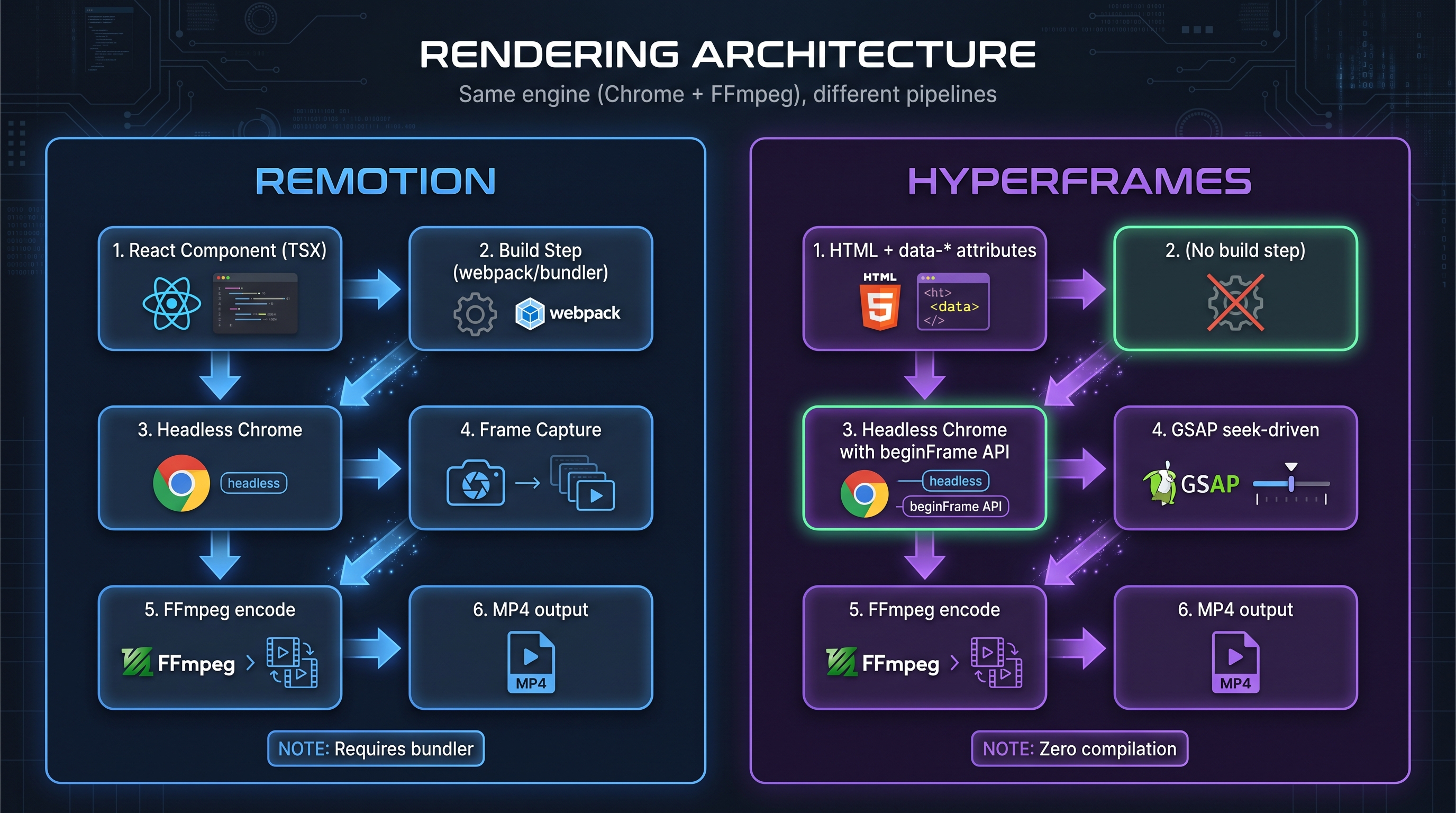
This is the single decision that changes everything. And it’s important to understand it well.
4.1 Remotion bets on React
Its promise: if your team already lives in React, Remotion is a natural neighbor. Type safety with TSX, typed props, hooks, reusable components, the whole React ecosystem available. Your video is an SPA, but instead of running in a browser, it runs in headless Chrome frame-by-frame.
Real strengths:
- Real type safety (no
anyeverywhere). - Component reuse between your app and your videos.
- Mature tooling (ESLint, Prettier, Storybook, hot reload via Vite/Webpack).
- Huge community with 5+ years of production.
Real weaknesses:
- Build step required (webpack, bundler) that adds 30 seconds and ~280MB to first-time setup.
- Animations with “wall-clock” libraries (GSAP, Anime.js, Motion One) aren’t seekable: the GSAP timeline plays at real speed during render, it’s not “seeked” to the exact frame the render needs. Result: the same 4-second GSAP timeline renders in 4 seconds in HyperFrames but compresses to ~1 second in Remotion with black frames.
- Higher cognitive complexity for agents: an LLM has to “think” in React, in components, in props, in state, in reconciliation.
4.2 HyperFrames bets on HTML
Its promise: HTML is the language any LLM already masters. The composition is a .html file with data-* attributes. No build, no bundler, no minimal package.json. You open the file in a browser and it just plays.
Real strengths:
- Zero compilation:
index.htmlruns as-is. - GSAP, Lottie, Anime.js, Three.js are seekable: the engine “seeks” the exact frame inside each library’s internal timeline.
- Native visual editor: the same DOM that renders is the DOM you can edit visually. Remotion needs an intermediate layer (Studio) that isn’t the source code.
- HDR and alpha channel supported.
- Better creative output by agents: HeyGen’s internal evaluations with Claude Opus 4.7 show the same prompt produces more diverse, visually creative videos in HyperFrames than in Remotion.
Real weaknesses:
- No real type safety (HTML isn’t TypeScript).
- No React DevTools or React ecosystem.
- Immature distributed rendering: HyperFrames currently renders on a single machine. There’s no “HyperFrames Lambda” equivalent.
- Younger: fewer extreme production cases, smaller community (14k vs 53k stars).
4.3 The “clock problem” almost no one talks about
There’s a technical detail that rarely makes it into marketing posts but is fundamental: GSAP, Anime.js, Motion One, and almost every web animation library maintains its own internal clock. When Remotion renders, those libraries play at real speed (wall-clock) instead of being “seeked” (seek-driven) to the specific frame the render needs. Result: a 4-second GSAP animation in Remotion renders in 1 second, leaving black frames for the rest.
HyperFrames solves this by making the engine seek the frame in GSAP’s timeline. The same 4-second timeline produces 4 seconds of correct frames. This is one of the reasons HyperFrames videos “look better” when standard web animations are in play.
4.4 Debugging mindset
A practical detail I noticed testing both: debugging a HyperFrames composition is trivial because you open the .html in any browser, open DevTools, and there it is — your video running with every standard web tool. In Remotion you need to understand the framework’s abstraction: why <Sequence> shows nothing, why your interpolate is out of range, why Next SSR is breaking something. For juniors or agents, that cognitive difference matters.
5. Benchmarks and performance: the real numbers
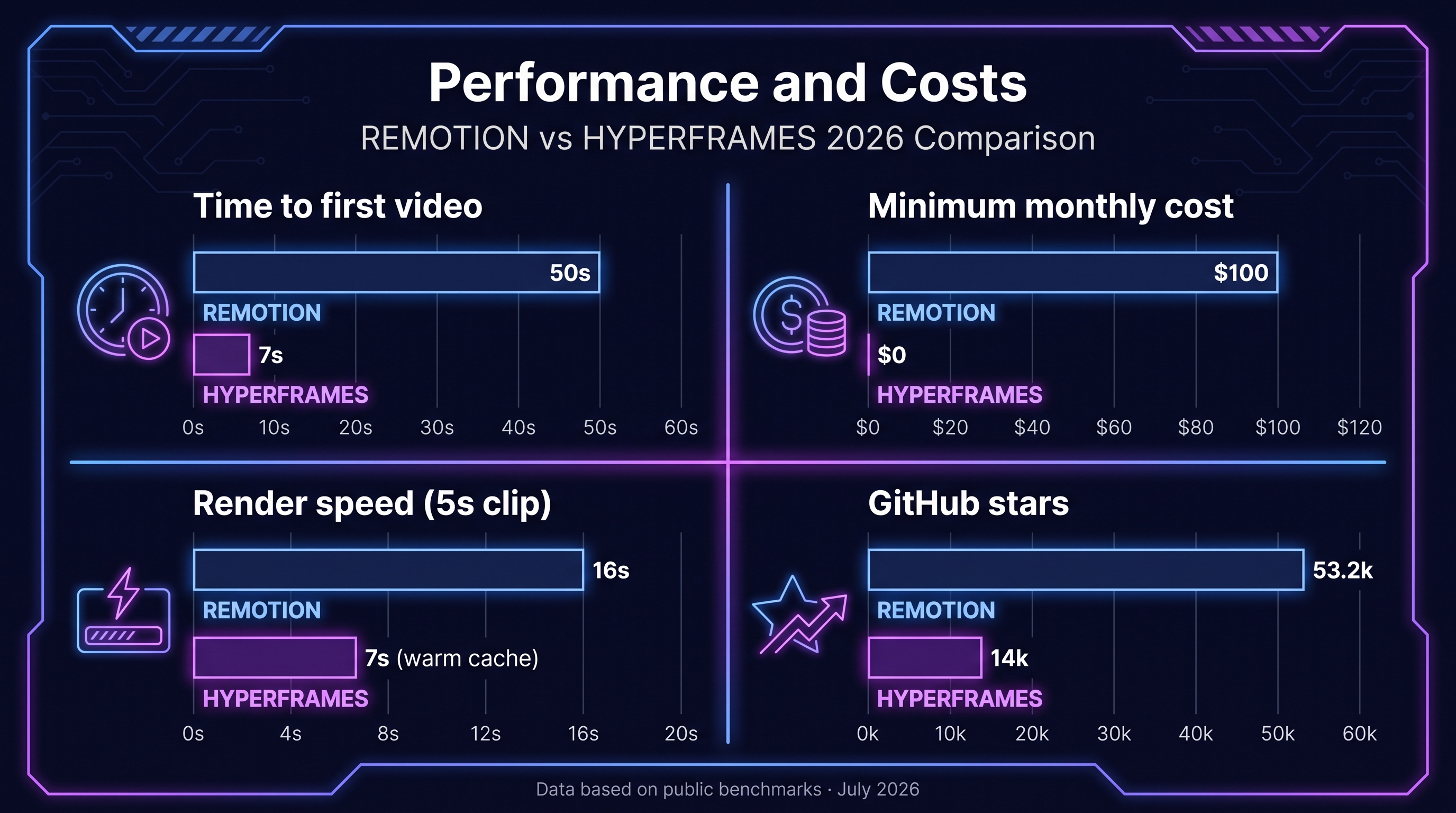
Let’s talk numbers. Several creators have published independent benchmarks. Here are the most relevant ones:
5.1 Time-to-first-video from an empty project
On a clean machine, the numbers reported by YouTubers and devs are consistent:
| Framework | npm install | First render (5s clip) | Total |
|---|---|---|---|
| Remotion | 33s, 278MB, 205 packages | 16s | ~50s |
| HyperFrames | 0s (zero install) | 7s warm cache | ~7s |
HyperFrames wins 7× on initial setup speed. This matters enormously for experimentation: when an agent is iterating, the difference between waiting 50 seconds or 7 seconds changes how the creative space gets explored.
5.2 Render time per video
Holding everything else equal (similar composition, 5 seconds, 1920×1080, 30 fps):
- Remotion: 16-20 seconds locally, ~15s on Lambda (warm cache)
- HyperFrames: 7-10 seconds locally, no Lambda yet
For an 80-second video, Remotion Lambda renders it in 15 seconds by distributing work across 200 concurrent Lambda functions. HyperFrames has no equivalent yet, so long videos render locally for as long as Chrome + FFmpeg take to process frame-by-frame.
5.3 Resulting MP4 size
For a 5-second composition with similar animations:
- Remotion: ~14MB
- HyperFrames: ~4MB
HyperFrames produces significantly lighter outputs. This is because its H.264 compression is slightly more efficient on scenes with fewer React-reconciling elements.
5.4 Cost per render
Remotion Lambda (AWS cost, license not included):
| Video type | Approximate cost |
|---|---|
| Hello World (warm) | $0.001 |
| 30s simple (50 concurrent Lambdas) | $0.001 - $0.005 |
| 3min with complex graphics | $0.01 - $0.05 |
| 90s real production (TTS + storage) | $0.10 - $0.15 per video |
| 4K complex | up to $0.108 per video |
HyperFrames: $0 in license. You only pay electricity and your own AWS if you deploy to the cloud. Render locally, it’s $0.
5.5 GitHub stars (popularity / community)
- Remotion: 53,200+ ⭐ (verified on github.com/remotion-dev/remotion)
- HyperFrames: ~14k ⭐ (growing fast, launched in 2026)
5.6 Commit and release activity
As of writing this article:
- Remotion: 648 published releases, the latest v4.0.489 dated July 12, 2026.
- HyperFrames: monthly release cadence with controlled breaking changes. A younger project but maintained by a team with experience shipping video at scale.
6. Licensing: the $100/month trap
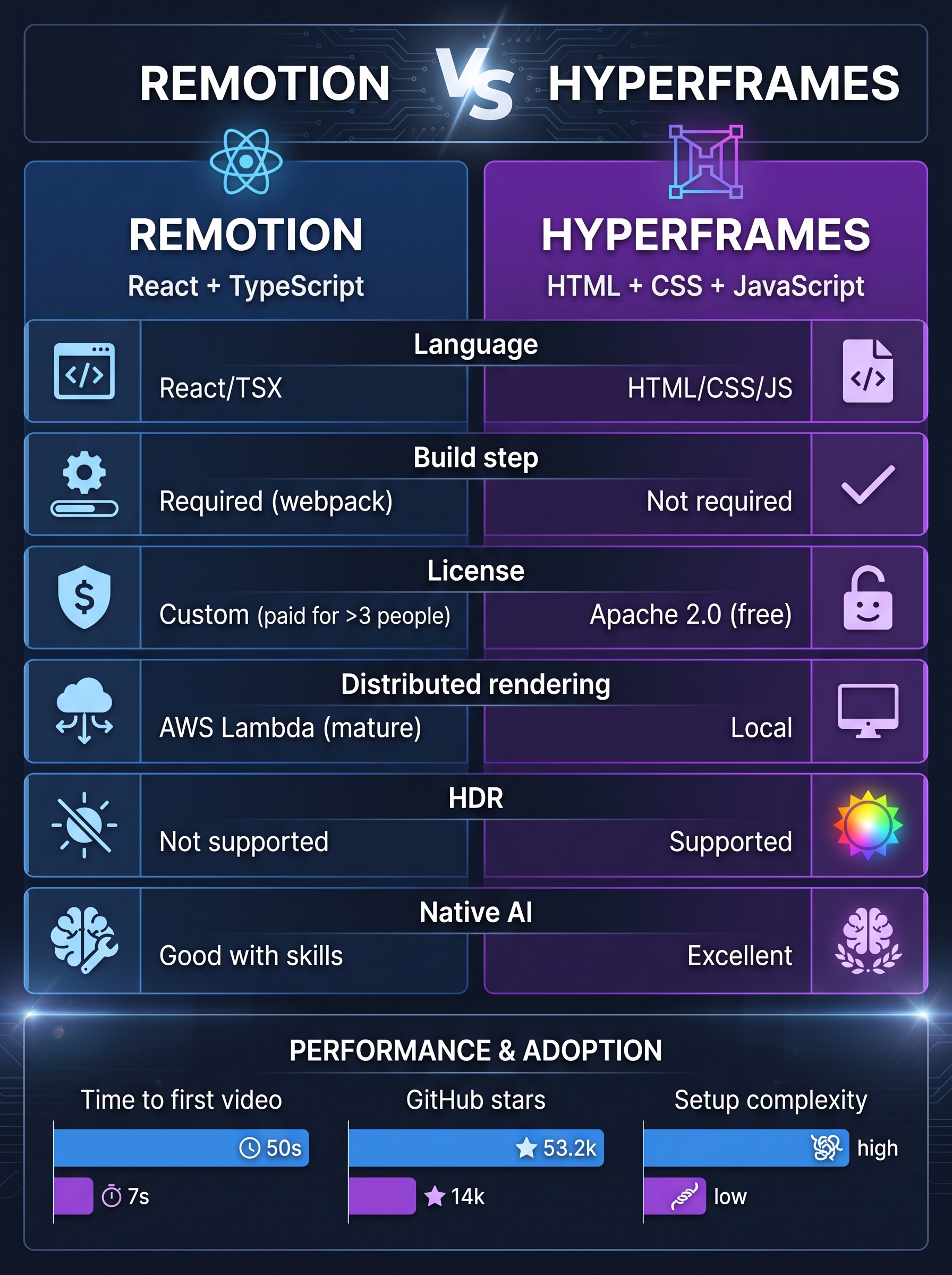
This is a point where the difference is structural, not cosmetic.
6.1 HyperFrames = Apache 2.0
Apache 2.0 is an OSI-approved license, no commercial restrictions, no royalties, no minimums. You can use HyperFrames in a personal project, a 5-person startup, a Fortune 500 enterprise, or a SaaS generating millions of videos per month. The cost is exactly $0 forever. The only legal requirement is keeping copyright notices and the license declaration (Apache 2.0 standard).
This freedom is especially relevant if your business model is selling automated videos or building a video-generation SaaS. With HyperFrames you negotiate nothing, pay nothing, and don’t fear audits.
6.2 Remotion = Free License up to a size, then you pay
Remotion uses a custom license (see remotion.dev/license) that’s not OSI-approved (not MIT, not Apache). The model, per the official documentation:
“Individuals and small companies are allowed to use Remotion to create videos for free (even commercial), while a company license is required for for-profit organizations of a certain size.”
In practice the breakdown is:
- Free License (free, even commercial): individuals, non-profits, or small companies (the exact threshold is below the size Remotion defines as a “company”).
- Remotion for Creators: ~$25 per Seat/month (no minimum), for companies creating videos for themselves.
- Remotion for Automators: ~$0.01 per render, with a $100/month minimum, for companies building products/automations on top of Remotion.
- Enterprise: from ~$500/month, with private support, monthly consulting, etc.
The $100/month Minimum Spend is what hurts: as soon as a company with 4+ employees uses Remotion commercially, they’re paying $1,200/year minimum just in licensing, on top of AWS.
6.3 The “catching” detail few mention
There’s a detail almost nobody discusses: the Free License ends the moment a company “decides to use Remotion in its stack”, not the moment of public launch. That means during evaluation you can use it for free, but the moment the commercial adoption decision is made, you’re already under the Company License. Remotion argues this funds full-time maintenance. It’s a legitimate trade-off, but it’s worth being clear about before building a product on top.
6.4 The other side: the investment in Remotion
It would be unfair not to acknowledge that Remotion’s model has funded 5 years of full-time development, a huge community, and a product battle-tested at Spotify/Meta scale. Without that model, there would be no Remotion Lambda, no Remotion Studio, no Agent Skills. The question each of us has to ask is: do I prefer paying $1,200/year for a mature platform, or $0 for something newer but with an open-source future?
7. Agent Skills: the new frontier
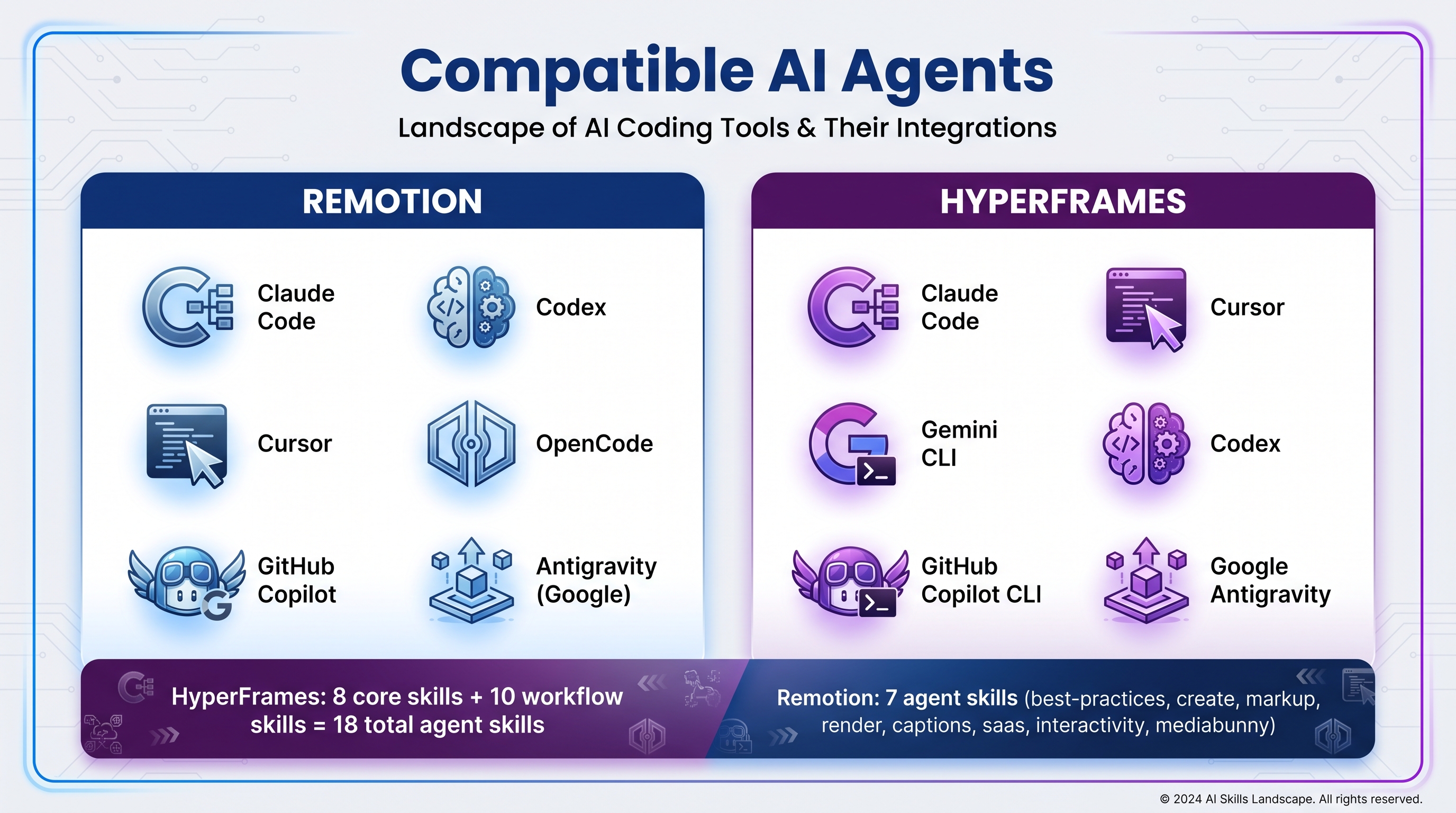
This is where both frameworks have taken an important step in 2026. Agent Skills are instruction packages that install into tools like Claude Code, Cursor, Codex, Gemini CLI, or GitHub Copilot CLI and teach the agent how to write correct code for the framework in question.
If you come from AI Agent Skills or the AGENTS.md standard, you know skills are persistent context configurations that specialize the LLM in a specific task. In the case of Remotion and HyperFrames, skills turn the agent into “an expert at producing video with that framework”.
7.1 Remotion Agent Skills (launched January 2026)
Remotion published its official skills in January 2026. The install command:
npx skills add remotion-dev/skillsThe available skills are:
/remotion-best-practices: the “mother” skill. If you don’t know which skill to use, use this one./remotion-create: project and composition scaffolding./remotion-markup: best practices for writing Remotion JSX (compositions, animations, layout, typography, media, effects, maps, audio, fonts, timing)./remotion-render: how to invoke a video or still render./remotion-captions: subtitles and captions./remotion-saas: architecture for SaaS products built on Remotion./remotion-interactivity: making code editable in Studio./mediabunny: in-browser multimedia handling.
The launch was viral: 6M+ views on the launch demo, 25k+ installs in the first week. Claude Code learned to make videos.
7.2 HyperFrames Agent Skills (launched with the framework)
HyperFrames adopts the same open Agent Skills standard (compatible with the Claude/Cursor/Codex ecosystem) and publishes 18 skills split across two layers:
Core skills (8, mandatory):
/hyperframes: the “front door” skill. Orients the agent and routes the request to the right skill./hyperframes-core: composition contract (HTML structure,data-*attributes, clips, tracks)./hyperframes-animation: GSAP, Lottie, Three.js, Anime.js, CSS, WAAPI, TypeGPU and the Frame Adapters./hyperframes-creative: art direction (palettes, typography, narration, beat planning)./hyperframes-cli: dev loop (init, lint, preview, render, doctor)./media-use: asset preprocessing (TTS, transcription, remove-background)./hyperframes-registry: blocks and components catalog./general-video: general authoring workflow (fallback).
Workflow skills (10, optional): /product-launch-video, /website-to-video, /faceless-explainer, /pr-to-video, /embedded-captions, /talking-head-recut, /motion-graphics, /music-to-video, /slideshow, /remotion-to-hyperframes.
The star skill is /website-to-video: it turns a URL into a video following a 7-step pipeline (capture, design, script, storyboard, voiceover, build, validate) where every creative decision is inspectable as a file on disk.
7.3 Supported agents comparison
| Agent | Remotion | HyperFrames |
|---|---|---|
| Claude Code | ✅ | ✅ |
| Cursor | ✅ | ✅ |
| Codex | ✅ | ✅ |
| OpenCode | ✅ | ❌ |
| Gemini CLI | ❌ | ✅ |
| GitHub Copilot CLI | ❌ | ✅ |
| Google Antigravity | ❌ | ✅ |
HyperFrames has more officially supported agents (including Gemini CLI, which is huge for the Google ecosystem) and more total skills (18 vs 8). Remotion has more polished, mature skills (released 6 months earlier).
8. Technical capabilities: deep comparison table
| Capability | Remotion | HyperFrames |
|---|---|---|
| Authoring language | React/TypeScript (TSX) | HTML + CSS + JavaScript |
| Runtime | React reconciliation per frame | Browser DOM, no framework |
| Build step | Required (webpack, bundler) | None |
| Seek-driven animations | ❌ Wall-clock playback | ✅ Frame-accurate seek |
| Supported animation libraries | interpolate, spring, limited CSS | GSAP, Lottie, Anime.js, Three.js, WAAPI, TypeGPU, CSS |
| HDR output | ❌ Documented as unsupported | ✅ H.265 10-bit BT.2020 |
| Transparent video (alpha) | ❌ | ✅ |
| Local TTS without API | ❌ | ✅ Kokoro-82M (54 voices) |
| Local transcription | ❌ | ✅ Whisper |
| Local remove-background | ❌ | ✅ Built-in neural model |
| Native visual editor over render source | Studio (separate layer) | Same DOM is editable |
| Distributed cloud rendering | ✅ Remotion Lambda (mature, hyperscale) | ❌ Local only (for now) |
| License | Custom (freemium with size threshold) | Apache 2.0 (free forever) |
| GitHub stars | 53.2k | 14k |
| Age | 2021 (5+ years) | 2026 (months) |
| Community / Showcase | Huge (Spotify Wrapped, GitHub Unwrapped) | Growing |
9. Use cases: when to use each
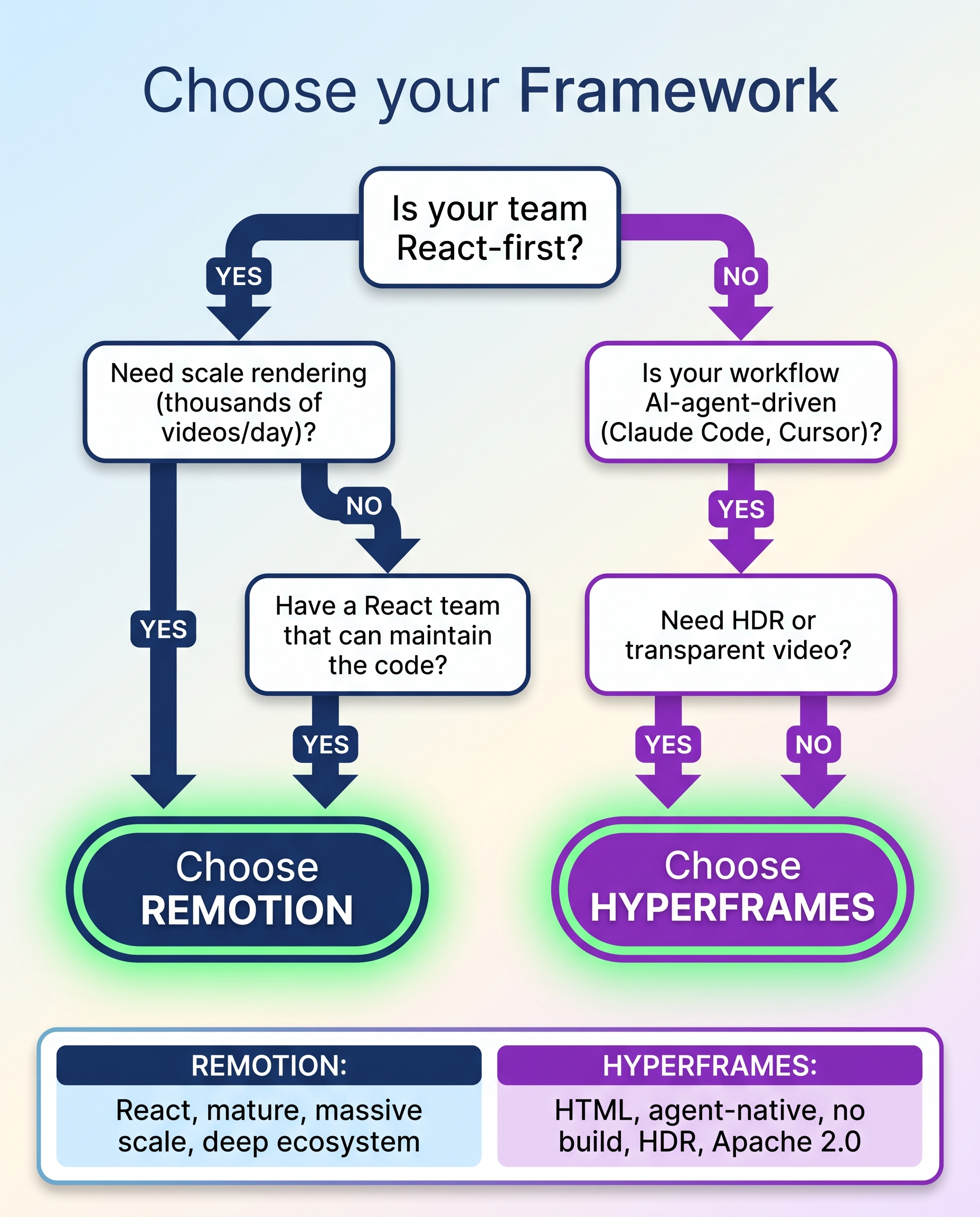
9.1 Choose Remotion if…
- Your team already lives in React. If you have senior React developers, the learning curve is practically zero.
- You need real type safety. TSX gives you IntelliSense, types, safe refactors. HTML doesn’t.
- You want to reuse components from your app. If your product already has a React design system, Remotion lets you reuse those same components in your videos.
- You need rendering at massive scale. Remotion Lambda is the only production-ready distributed rendering system of the two. If you generate thousands of videos per day or long videos with tight deadlines, Lambda is the answer.
- You need maturity. 5+ years of real production, known bugs, documented edge cases, a community answering in Discord.
- Your video is purely data-driven. Spotify Wrapped, GitHub Unwrapped, animated dashboards: for video-as-a-function-of-data, Remotion is the proven choice.
9.2 Choose HyperFrames if…
- Your flow is AI-agent-driven. If your main pipeline is “Claude Code / Cursor / Gemini CLI writes the video”, HyperFrames is the path of least resistance. Agents produce better HTML than TSX.
- You want to iterate fast with no setup. 7 seconds to first video vs 50 seconds. When you’re exploring, that difference is huge.
- You don’t want a build step. You want to open a
.htmlin a browser and see it render. Period. - You need HDR or transparent video. Remotion explicitly supports neither. HyperFrames does.
- Your animation uses GSAP, Lottie, or Three.js. These libraries are seek-driven in HyperFrames but wall-clock in Remotion, producing “black frames” or compressed animations.
- You want simple licensing. Apache 2.0 means zero legal paperwork, zero surprise invoices when your team grows.
- You want to copy-paste existing HTML. If you have a landing page, a design system component, or a CodePen you want to animate, in HyperFrames you paste it and you’re done. In Remotion you have to rewrite it as JSX.
- You want to run TTS, transcription, or remove-background locally without API keys.
9.3 Hybrid use cases
In practice, many teams use both:
- Remotion for the “core” production at scale (parameterized videos, dashboards, annual summaries).
- HyperFrames for rapid iteration of motion graphics, one-off animations, social content, experiments.
HyperFrames even has a dedicated skill: /remotion-to-hyperframes that helps migrate compositions from one framework to the other.
10. The creative output question: who produces prettier videos?
This is the most subjective question and the most interesting one.
10.1 What independent benchmarks say
YouTuber AI Engineering Trend and dev Misbah Syed published identical tests with Claude Opus 4.7 and the same prompt. Consistent results:
- HyperFrames renders videos in ~60 seconds. Output more diverse, more colorful, with more expressive animations.
- Remotion renders in ~162 seconds + 4 minutes of initial build. Output more “stylized” toward a common aesthetic (as if all videos converged to the same look).
10.2 The technical explanation
The HeyGen team ran internal evaluations with LLMs and found the same pattern: agents writing HyperFrames compositions produce more creative, more diverse output than the same agents writing Remotion compositions. Two reasons:
- HTML is more expressive than React in the web animation space. CSS animations, keyframes, transforms, filters, blend modes, gradients — all trivial in HTML and error-prone in JSX.
- The agent doesn’t have to think about reconciliation, props, or the component model. It just writes DOM + CSS + JS and that’s it. That simplicity translates into more LLM attention on the visual side.
10.3 The other side
Remotion produces a more “structured” and “precise” output. If you need a corporate video, an animated dashboard, or an explainer with millimetric typography, Remotion’s predictability can be an advantage. HyperFrames sometimes “gets too creative” and produces videos more chaotic than the prompt asked for.
11. Real pricing: how much each option costs in production
11.1 Scenario A: Individual / hobby / 1-3 person company
- Remotion: $0 (Free License, per the official documentation at remotion.dev/license).
- HyperFrames: $0 (Apache 2.0).
Technical tie, with the caveat that HyperFrames requires Node 22+ and FFmpeg, while Remotion needs a standard React setup.
11.2 Scenario B: 5-developer company, 1,000 videos/month
- Remotion:
- License: 5 seats × $25 = $125/month, but the $100 Minimum Spend already covers it. $100/month minimum.
- AWS Lambda: ~$0.10 per video × 1,000 = $100/month.
- Total: ~$200/month.
- HyperFrames:
- License: $0.
- Local render: $0 (plus your server’s electricity cost).
- Or render in your own cloud infra: you only pay compute.
- Total: ~$0-50/month depending on where you render.
HyperFrames wins 4-10× on cost.
11.3 Scenario C: 50-developer company, 100,000 videos/month
- Remotion:
- License: 50 seats × $25 = $1,250/month, with debatable cap.
- AWS Lambda: ~$10,000/month (at $0.10 per video).
- Total: ~$11,000/month.
- HyperFrames:
- License: $0.
- AWS or your infra: ~$5,000-10,000/month.
- Total: ~$5,000-10,000/month.
HyperFrames still wins, mostly because there’s no license fee that scales with headcount.
11.4 The hidden cost of Remotion Lambda
There’s a data point that often gets overlooked: Remotion Lambda becomes significantly more expensive with 4K videos, CSS gradients, or heavy SVGs. A render of a video with a zoom-in on a large SVG can cost $0.10-0.20 per video instead of the typical $0.01-0.05. If your composition is heavy, Lambda can become your main cost.
12. The future: where each one is heading
12.1 Remotion
- Continues investing in Remotion Lambda and cost/speed improvements.
- Agent Skills will keep expanding (a Remotion 5 skill with new primitives is rumored).
- Remotion Studio is going for a collaborative visual editor (Figma-meets-video).
- The business model is stable: Free License + Company License + Enterprise.
12.2 HyperFrames
- Expect HyperFrames Lambda or equivalent (the roadmap lists distributed rendering as a 2026-2027 priority).
- The blocks catalog will keep growing (50+ now, aiming for 200+).
- Possible deeper integration with HeyGen avatars (you could render an avatar presenter with TTS and composition in a single pipeline).
- As Apache 2.0, it’s open to forks: if HeyGen abandons the project, the community can continue.
12.3 The likely convergence
Both frameworks are converging on some points:
- Visual editor (Remotion Studio vs HyperFrames’ editable DOM).
- AI skills (both embrace the Agent Skills standard).
- Data-driven video (Remotion has it native, HyperFrames is adding it).
- Distributed rendering (Remotion has it, HyperFrames is catching up).
The question isn’t whether either one “wins”. Both will probably survive with different use cases. The question is which framework becomes the default for the agent era. And there HyperFrames has a structural advantage: agents produce better HTML than TSX.
13. My verdict: which one to pick?
After the entire comparison, if you force me to give a single recommendation:
For 80% of cases in 2026 → Start with HyperFrames
If you’re exploring, your team is small, your flow is agent-driven, you want to avoid license costs, you want to iterate fast: HyperFrames. The 7-second time-to-first-video, the simplicity of HTML, and the Apache 2.0 license make the cost of trying basically zero. You can have something running tonight.
If you already know you need massive scale → Remotion
If from day one you know you’ll generate millions of videos, your team is 100% React, you need Lambda: Remotion. The license investment pays off when your SaaS starts invoicing. And 5 years of production don’t get improvised.
The third path: use both
HyperFrames has a /remotion-to-hyperframes skill. Many teams do this:
- HyperFrames to prototype motion graphics and validate concepts.
- Remotion for the data-driven system in production at scale.
14. Resources to dig deeper
HyperFrames
- Official repo: https://github.com/heygen-com/hyperframes
- Official site: https://hyperframes.heygen.com
- Quickstart: https://hyperframes.heygen.com/quickstart
- HTML-in-Canvas guide: https://hyperframes.heygen.com/guides/html-in-canvas
- Official comparison: https://hyperframes.heygen.com/guides/hyperframes-vs-remotion
- Catalog: https://hyperframes.heygen.com/catalog/blocks/data-chart
- HeyGen Discord: active community
Remotion
- Official repo: https://github.com/remotion-dev/remotion
- Official site: https://www.remotion.dev
- Docs: https://www.remotion.dev/docs
- Agent Skills: https://www.remotion.dev/docs/ai/skills
- Lambda: https://www.remotion.dev/lambda
- Pricing: https://www.remotion.pro
- Showcase: https://www.remotion.dev/showcase
- License: https://www.remotion.dev/license
Recommended videos
- “Remotion vs HyperFrames: The Truth About AI Agent Video” (YouTube, 2026) — technical analysis with real benchmarks.
- “Hyperframes vs Remotion: Which Video Framework is Faster?” (YouTube) — side-by-side test.
- “AI Codes Your Video Now — HyperFrames vs Remotion” (YouTube) — same brief, two engines.
- “How to use Remotion agent skills with Claude Code” (Roboto Studio blog) — workflow in real production.
Related articles on this blog
- Agents.md Standard: Blueprint for AI-Ready Projects — why structured documentation for agents matters.
- AI Skills in Development: the wrapper that wins — persistent context configurations explained.
- AI Tools Worth Learning in 2026 — the complete indie dev agentic stack.
- Clean Architecture for AI — how to structure projects with agents.
15. Conclusion: the future of video is agent-native
What’s happening in 2026 with Remotion and HyperFrames is the professionalization of video-as-code. Five years ago, making video with code was a hacker trick. Today it’s a product category with two serious frameworks, active communities, Spotify-scale production use cases, and an agent ecosystem that knows how to write it.
The right question isn’t “which is better?”, but “which is better for your use case, your team, your budget, and your roadmap?”.
- If you want simplicity, iteration speed, and zero license costs, HyperFrames is your pick.
- If you want maturity, deep ecosystem, and native cloud scalability, Remotion is your pick.
- If you want the best of both worlds, use them as complementary tools.
Whichever you choose, one thing is clear: the future of video isn’t edited, it’s programmed. And it’s never been easier to start.
📚 Bibliography
“HyperFrames is an open-source framework for turning HTML, CSS, media, and seekable animations into deterministic MP4 videos” — github.com/heygen-com/hyperframes
“Open source: Apache 2.0 license, with no per-render fees or commercial-use thresholds” — github.com/heygen-com/hyperframes
“HyperFrames lets AI agents compose videos by writing HTML, CSS & JS” — hyperframes.heygen.com
“Make videos programmatically with React” — github.com/remotion-dev/remotion (53.2k stars, v4.0.489)
“Individuals and small companies are allowed to use Remotion to create videos for free (even commercial), while a company license is required for for-profit organizations of a certain size” — remotion.dev/license
Have you tried either one? Which worked better for your use case? Tell me in the comments — I’m always looking for new benchmarks and real-world experiences to update this analysis.
You might also be interested in
Jev: AI Built to Decide, Not to Write
Explore Jev and System One Models: installation, API, SDKs, Agent Skill, community CLI/MCP tools, and patterns for typed software decisions.
Spec-Driven Development: The Developer Role Redefined
How Spec-Driven Development flips the developer from typist to architect of intent. Inside the 40-60% waste map, the three maturity levels, and the Spec-as-Source role shift that ends vibe coding.
Native OpenCode Plugins for Persistent
Comparative technical analysis of three native OpenCode plugins to give your AI agent persistent local memory: simple-memory (logfmt), Mnemosyne (offline Go binary), and true-mem (cognitive psychology).