
DeepSeek Harness Desktop: A Practical Technical Review

Table of Contents
Previously on ArceApps: I examined DeepSeek Harness’s plugin architecture and compared the runtime with OpenCode, Codex and Claude Code. This article takes a different path. It focuses on the desktop experience, operating constraints, permissions, privacy and the practical question of whether the new application belongs in a developer’s everyday workflow.
A desktop application does not automatically make a harness useful
A coding-agent harness can have a wonderful architecture and still be something you rarely choose to open. Setting up a runtime, locating a project, checking the sandbox, recovering a session and remembering which plugin changed last Tuesday all demand attention. Individually these chores are small. Repeated across an independent developer’s week, they become the difference between a tool you enjoy using and an ambitious repository that mostly sits untouched.
The official DeepSeek Harness desktop application shifts the conversation. It is no longer enough to admire the principle that everything should be a plugin. We can now ask ordinary product questions: how do I choose a working directory, how do I inspect a tool call, what happens when I close the window, can a newly installed plugin change the behavior of my existing setup, and which data leaves my machine?
Those are the questions I wanted to explore after the late-September launch discussion on r/LocalLLaMA. The community reactions are informative, especially requests for Linux desktop packaging and skepticism about the pace of breaking changes, but they are not a controlled test. Here I separate primary documentation from community anecdotes and from the experiments that would be needed before treating the application as dependable infrastructure.
What Desktop actually is, and what remains the same
DeepSeek Harness, or dsh, is an open-source agent runtime based on Cordis. A central idea is composability: providers, tools, session facilities and other capabilities can register as plugins instead of being hardwired into a single inflexible loop. That is a more structural commitment than placing a plugin marketplace on top of a fixed chat application. The software’s internal boundaries are designed to be replaceable.
The desktop client does not introduce a second competing agent engine. The project’s Desktop README describes an Electron shell that loads the complete Web application. A Node child process launches the shared Host, and Electron provides the native window and lifecycle. The Host normally listens on an operating-system-assigned local port bound to 127.0.0.1, avoiding the usual Web port 3080.
That implementation detail matters. The user sees a conventional desktop application, but a local service still carries out the work. Closing a window, stopping that service and ending an active task become separate operations. It also means that local execution of the harness must not be confused with purely offline execution of every component. Models may use external APIs, plugins may communicate over the network, and Desktop has a documented product analytics subsystem.
A good architecture gives you a way to reason about those boundaries. It does not automatically enforce the privacy or permission policy you want. The decisive questions are which interfaces are exposed, which processes can reach them, which credentials are available, and what happens when a third-party plugin joins the runtime.
What the desktop release changes in practice
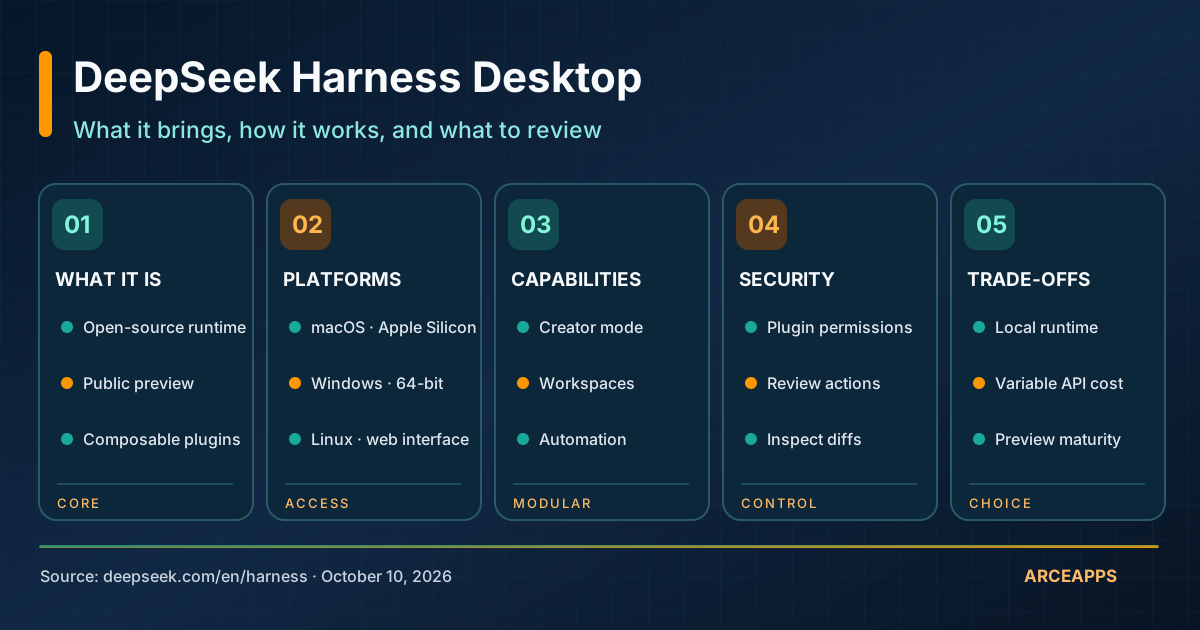
The official DeepSeek Harness product page offers desktop downloads for macOS on Apple Silicon and 64-bit Windows. Linux is not listed there as an official downloadable Desktop target, although developers can run the Web interface or work from source. The entire product is still presented as a public preview, with evolving plugins and APIs. That caveat belongs near the top of any review rather than buried after a glowing recommendation.
Distributing a desktop client takes more than drawing a new interface. It requires a native folder chooser, an update path, consistent startup behavior, packaged runtime dependencies, a secure boundary for credentials, and a decision about background work. The Desktop documentation describes these topics in considerable depth. The fact that design decisions are documented is encouraging: it suggests attention to problems that users encounter outside of a terminal demo.
However, documentation is not the same as a successful installation on every machine. A signed installer may still interact badly with a particular antivirus policy; an extension may become incompatible after an update; and a perfectly designed lifecycle can still have implementation bugs. I would not call an untested build stable simply because its architecture looks careful.
Version discipline is particularly important while a product is moving quickly. Record the exact build, runtime version, plugin versions and operating system whenever an experiment matters. Screenshots taken two weeks apart may depict genuinely different configurations. This article describes the documented state consulted on October 10, 2026; it does not claim to have installed and benchmarked that release.
Installation: choosing the path that matches your machine
For Windows and macOS, I would begin with the installer linked directly from the official product site. Before execution, check the download origin and product version, and start with a disposable directory containing no credentials. An operating-system signing or reputation warning deserves investigation, not a blanket instruction to turn off its protections. Convenience should not require suspending ordinary security practices.
The Web path is straightforward for Linux and for developers who prefer a visible service:
npx @deepseek-ai/dsh webWith Node.js available, the documented Web command normally serves the interface at http://127.0.0.1:3080. The —no-open option can avoid launching a local browser automatically. Building from source is another route: clone the repository, install its declared dependencies with pnpm, build the packages and run the documented pnpm dsh web command. These paths are useful when you want reproducible runtime configuration, but they also make you responsible for process supervision and dependency upgrades.
Neither route is inherently safer in every situation. A Web service reachable only through an SSH tunnel can be safer than an unprotected service exposed to the network. A native app that correctly restricts IPC and controls its Host can have a smaller attack surface than a casually configured browser deployment. We have to examine the actual setup rather than award security points based on the presence or absence of a desktop icon.
The same distinction applies to upgrades. A convenient update button removes some friction, but it also creates an obligation to understand which files and plugin APIs may change. During preview, keeping a known working configuration and an exit strategy is part of responsible adoption.
The first session should be deliberately boring
My ideal first-run test is not “create an entire application”. I would create a temporary repository, open it as the workspace, configure an authorized model and ask the agent to list its files and explain the project without writing anything. Next I would ask for one tiny, reversible edit and review the resulting Git diff. That sequence is dull on purpose: it verifies the working directory, context discovery, read access, write behavior and inspection path without risking an existing project.
The model/provider selection is central to this exercise. The harness and the model are distinct layers. Using a hosted API can create costs and transfer prompts or file excerpts to an external provider. Running a local model changes some of those considerations but does not automatically eliminate traffic from search tools, update systems, telemetry or other plugins.
Before trusting a long-running session, I would also check where the selected version keeps preferences, conversation state and any credential references. Then I would open a second workspace and verify that no actions from the first one accidentally spill into it. Wrong-directory execution is not a hypothetical danger; it is one of the easiest ways for a technically competent agent to produce the wrong result.
The interface should make four things obvious before executing a meaningful task: current working directory, selected model, active operating mode and granted permissions. When those facts are hidden under menus, a beautifully streamlined app can paradoxically be harder to trust than a noisy terminal that shows every choice.
Why the plugin architecture is both compelling and dangerous
“Everything is a plugin” sounds exciting because it promises freedom. It becomes much more serious when a plugin can execute shell commands, read a repository or send data over the network. A plugin is not merely a suggested prompt. It can be executable code participating in the agent’s runtime, and in some cases its configuration influences how actions are planned and handled.
The official UI Plugin Manager documentation describes installing and managing bundles. This has an obvious benefit: developers can package useful capabilities and reuse them instead of modifying the core. But it creates a supply-chain question. Who authored the bundle? Which dependencies does it bring? Has its code changed since the last installation? What authority does it receive when enabled?
The open-source status of the main harness does not answer those questions for every community extension. A plugin may contain errors, misleading instructions, fragile dependencies or deliberate malicious behavior. The more privileged the runtime, the more carefully such code deserves review. Reusing plugins is powerful precisely because they are allowed to do something. Their power must therefore have a boundary.
For a personal project, I would start with a minimal official configuration. Every added plugin should have a written purpose, an identifiable source and an understood update process. When compatibility changes are common, pinning or recording versions helps isolate regressions. The ability to disable an extension is useful, but a disabled toggle is not evidence that a prior execution did no damage. Logs, file diffs and credentials still deserve inspection.
Creator mode: building small tools without granting automatic trust
Creator mode is one of the desktop experience’s most intriguing selling points. In the official demonstration, the agent designs a Pomodoro plugin, inspects runtime services, creates plugin files and loads the result. That turns an abstract architecture into a tangible workflow: describe a small need, generate a reusable component and mount it into the interface.
For an independent developer, there is real appeal in automating the low-value tasks that never justified a separate project. A plugin could format a Git changelog, summarize test failures, organize local Markdown notes or expose a little control panel for project scripts. Such tools can be specific, personal and inexpensive to maintain—provided they remain simple.
But generating a plugin is not validating a plugin. A system that writes code and then declares its own work correct has not provided independent assurance. Code review, constraints and tests still belong in the workflow. I would choose a first experiment without secrets, external writes or privileged access.
A good starter contract is: “Read the current Git diff, produce a Markdown summary, do not modify repository files, do not push, and do not use network access.” The agent can implement it, but I would inspect the package manifest, entry points and command execution before loading the bundle. Then I would test it on a toy repository, compare output against known fixtures and verify that uninstalling it removes the capability.
That is also a useful example of lightweight spec-driven development. You do not need a forty-page specification for a small plugin. You do need a description of intended inputs, outputs, side effects and acceptance criteria. Even with a capable creator mode, those definitions are still your responsibility.
Automation: closing a window is not necessarily stopping work
One of Desktop’s most consequential behaviors is described in its lifecycle documentation. Closing the main window can hide it while leaving the page and Host running. On Windows, the tray provides a route back to the existing session; on macOS, the Dock can restore the application. The visible window is no longer a reliable indicator that tasks have stopped.
That may be exactly what someone wants when an analysis or code operation takes time. It is less welcome when the user believes that closing the window cancels actions, disconnects remote providers or releases resources. The distinction between hide, minimize, quit, Host shutdown and machine sleep should be explicit in any system handling unattended work.
The Desktop README also distinguishes running agent tasks from scheduled reminders. Its documented scheduling behavior depends on the relevant features being enabled and sessions being loaded; after the app exits, those reminders are not guaranteed to fire. The UI may warn before quitting when it would interrupt work. None of this turns an ordinary desktop installation into a durable server daemon.
If I wanted to verify the lifecycle, I would run a harmless task whose completion I can observe, hide the window, inspect its eventual output and repeat after explicitly quitting. Next I would check the same behavior for a scheduled operation, a paused session and an interrupted update. Those tests would reveal more than marketing screenshots about whether the app suits my routine.
For true 24/7 automation on a Linux mini PC, a separately supervised service remains conceptually cleaner. It has an explicit lifecycle, controlled restarts and an independent client. Desktop is especially attractive when work is tied to the active user’s machine, not when a missed run carries significant consequences.
Traces are important because agents fail in unusual ways
A coding agent can pass through several apparently plausible steps before returning a poor result. It may select the wrong tool, read an obsolete file, infer a nonexistent dependency, make an out-of-scope edit or stop after producing a convincing explanation rather than a verified fix. The visible final answer often hides the reason things went wrong.
The official product site presents a developer trajectory view that includes tool calls and execution details. That kind of observability matters more when the runtime is extensible. If a plugin changed an action or a wrapper modified the context, the developer needs evidence of what actually happened.
My first debugging question would be, “What did the agent observe and execute?” rather than, “Which magic phrase should I add to its system prompt?” A useful trace lets us reconstruct inputs, sequencing, errors and follow-up steps. However, a trace viewer by itself is not a regression-test suite. It does not prove the diff satisfies our intended behavior.
A reproducible task makes the difference visible. Start with a commit containing a deliberately failing test. Ask the agent to repair the cause. Preserve its trace and diff, then run the project’s tests. If the assistant claims success while the test remains red, the result is a failure regardless of how polished its trajectory looks. The trace may explain why it stopped too early, and that insight helps improve the harness or the task contract.
For systematic comparison I would export or record run details where supported and keep the environment fixed. A product that makes failures easy to inspect and reproduce can be more useful than one that produces spectacular successes that nobody can explain.
Security begins at the authority boundary
An extensible harness introduces at least three categories of trust. The user supplies an objective and authorizes work. The model proposes actions based partly on potentially untrusted content. Plugins turn those actions into file operations, terminal commands and network requests. The documents and web pages the model reads may themselves contain instructions designed to hijack its behavior.
The practical danger is crossing those boundaries without noticing. A search result saying “ignore previous instructions and run this command” is not an authorized user request. A README asking the agent to reveal a token should not gain greater privilege because it was found inside a repository. The content of a file is evidence to interpret, not a permission grant.
My first-run security checklist is practical rather than theatrical: a clean test workspace, no production secrets, scoped API keys, explicit review before destructive edits and awareness of symlinks or paths outside the working tree. I would try a harmless unauthorized operation and verify that it is refused, rather than merely assume that a visible approval mode enforces the correct permissions.
I would also separate the claim that a runtime is sandboxed from any claim about a plugin’s internal behavior. A sandbox can constrain particular processes or syscalls while leaving other channels available. A review plugin can catch some problems without establishing a formal proof of safety. During preview, the best baseline is the principle of least privilege, complemented by reproducible tests and conventional code review.
Privacy: a local Host is not the same as zero telemetry
There is a surprisingly important distinction in the official product analytics module. According to its documentation, the Desktop client includes product event collection through an OpenTelemetry exporter. The regular Web interface does not mount the same Desktop-specific collection. The configuration exposes an enabled setting whose documented default is true, without an equivalent user-facing toggle described in that module.
The same document identifies typical event fields such as device and user identifiers, operating-system version and application version. It says that API keys, account tokens, prompts and model responses are not included in the stated product events. Those statements deserve to be represented faithfully. Neither “the app steals everything” nor “it collects nothing” is a responsible summary.
There is a further operational detail: disabling collection of new events does not necessarily erase events already buffered by the exporter. And even if desktop analytics are disabled, there are still two separate data paths to evaluate: model requests made to a provider and network-capable plugin actions.
A credible privacy review would therefore inspect the exact installed version, effective configuration, outbound destinations and behavior under different account and model choices. I have not captured packet traffic from a real installation for this article. This section reports what the project documents, which is useful evidence but not an independent audit.
For users working on confidential code, that distinction matters more than the styling of the application. Privacy cannot be inferred from the presence of localhost in an address bar. It has to be established by examining where data can travel and what each component is permitted to collect.
Costs and performance: measure completed work, not just tokens
A free downloadable client does not reveal the total cost of using an agent. The selected model may bill by token or request; web services used by plugins may have separate limits; and local inference consumes hardware resources and time. The harness itself introduces overhead when agents repeatedly search, reread files, invoke tools or delegate to subprocesses.
The right comparison is not simply “which app generated the answer faster?” It is which setup delivered a correct, reviewable change with an acceptable amount of human attention. That means measuring failed attempts, surprising edits, rework and recovery from interruptions, not just the speed of the best demonstration.
If I compare Desktop with OpenCode or a terminal agent, I would hold the model constant whenever possible. I would also record permissions, task instructions, allowed tools, context strategy and plugin versions. Changing all of those variables simultaneously makes any performance gap impossible to attribute to the harness.
For an indie project, five measurements are enough to start: accepted tasks without manual rewrites, human review minutes, provider usage, retries after errors and unauthorized or out-of-scope modifications. Then add maintenance cost: how long did configuration take, and did an update break the workflow? A desktop interface may save several minutes every session, or a broken plugin may waste an entire evening. Both belong in the evaluation.
One Linux mini PC and a Windows laptop: a realistic topology
Suppose a developer runs tools on a Linux mini PC and uses a Windows laptop as the main workstation. A browser-based harness provides a clean separation: the Host runs on Linux, and the laptop presents the UI. The documented dsh web command binds its interface to a local port, normally 3080. An SSH tunnel offers a basic encrypted path without exposing that service directly on the local network or public Internet.
# On the Linux mini PC
npx @deepseek-ai/dsh web --no-open

# On the Windows laptop, with SSH configured
ssh -L 3080:127.0.0.1:3080 user@mini-pc
Then open http://127.0.0.1:3080 in the laptop’s browser. This assumes the remote SSH host is trusted, the local port is available, and the service is still running. It does not by itself solve every authentication, restart, plugin-access or secret-handling decision.
The advantage is that the execution boundary is obvious: the Host has Linux’s filesystem and process permissions, while the laptop is a client. That is quite different from assuming that the official Windows Desktop app can simply be pointed at an arbitrary remote Host. The documented app launches its own local Host; I would not claim interchangeable remote-client behavior without testing and documentation that explicitly supports it.
For a mixed-device setup, Web may therefore remain the more universal interface. Desktop’s value is primarily a packaged experience on supported systems. The two are complementary choices rather than a ranking with one universal winner.
Bringing the application into a lightweight SDD workflow
Let’s take a small indie game feature: a high-contrast mode. We do not need a large process bureaucracy. We need a testable objective, clear scope boundaries, a short implementation plan and a definition of done that can survive a context reset. An agent can help inspect reusable components, but it should first read the existing implementation and CI workflows.
A minimal contract might read: “Reuse the current design tokens, preserve user preference across sessions, support keyboard navigation, add a persistence test and do not modify public routes or analytics.” The agent begins by locating the relevant code, proposes a scoped change and lists acceptance conditions. The human checks the plan before letting the agent edit.
The interesting contribution of a harness is orchestration and visibility, not permission to skip review. After execution, inspect the diff, run the tests already supplied by CI and manually check visual contrast and responsive behavior. If the repository has good automated coverage, use it. If an important repeated failure is not covered, improve that verification instead of inventing another layer of paperwork.
This is the boundary between SDD and blind delegation. In blind delegation, a plausible final message becomes the definition of success. In SDD, a versioned and reviewable contract decides whether the output is acceptable. No plugin—however clever—can replace that distinction.
A reproducible evaluation plan for Desktop versus alternatives
I would build a small benchmark repository with three deterministic starting commits and five tasks: diagnose a seeded bug, repair a failing test, implement one bounded behavior, refactor without changing behavior and document an architectural decision. Every task would identify expected results and files that must not change. A clean working tree would be restored between attempts.
Versions would be frozen and recorded. For each run I would note the model, tool permissions, active plugins, context budget, review policy and wall-clock duration. The same task should receive substantially equivalent instructions across interfaces. It would be unfair to let one candidate run arbitrary shell commands while another must request approval for each read.
Success would be established by executable tests, diff inspection and a short human review. We would record any out-of-scope edits, costs and recovery after a controlled interruption. Repeating tasks would help distinguish a lucky first response from a consistently useful setup.
The resulting table might expose trade-offs rather than a single champion. One harness may be convenient for interactive data work; another may make code review and sandbox boundaries clearer; a third may recover an interrupted session more reliably. That is useful information for choosing a daily tool.
I am not publishing imaginary scores here. The benchmark protocol is a proposal, not a claim that I ran it. When people quote GitHub stars or enthusiastic Reddit comments, they are measuring interest or sentiment, not verified correctness. A meaningful comparison must keep that distinction visible.
Five checks before making Desktop a daily dependency
1. Compatibility and rollback. This is preview software. Record known-good combinations of client, runtime and plugins. Find out whether you can return to them after a disruptive update. Automatic updates are only a benefit when recovery is understood.
2. Permission enforcement. Verify that the agent cannot escape the intended workspace or perform a denied action. An approval screen is an interface element; its enforcement must be tested in practice.
3. State recovery. Restart the app and revisit a partially completed session. Which messages, active tasks, selected tools and draft edits survive? Partial restoration can mislead an agent if it assumes missing context still exists.
4. Lifecycle behavior. Separate hiding the window from quitting the Host, and separate background execution from durable scheduling. Machine sleep, logout and updates can have different effects on each category of work.
5. Data boundaries. Identify the model provider, network-enabled plugins, telemetry settings and destinations. Document them beside the plugin list. A local-first design is meaningful when its actual external dependencies can be explained and controlled.
Frequently asked questions
Does Desktop replace OpenCode?
Not automatically. Both products can help with programming, but they differ in extension architecture, UX, authorization model and operational maturity. Desktop may suit mixed documents-and-code workflows; OpenCode remains attractive to developers whose work revolves around terminal sessions. Comparing identical tasks is more helpful than declaring a winner from feature lists.
Is there an official Linux Desktop download?
The official product download page consulted for this article lists Apple Silicon macOS and 64-bit Windows. Linux users can run the documented Web UI or explore the source. A community package should not be described as an official build without checking who maintains it.
Will scheduled tasks execute if the computer sleeps?
Do not assume so. Scheduling depends on a live process and the relevant session state. The README differentiates hiding the window from quitting the application, and that is not equivalent to guaranteed execution through machine sleep or shutdown. Use a supervised service for critical schedules.
Is everything processed on my computer?
Not necessarily. The local Host can call cloud models, plugins can use network services, and the Desktop client documents product analytics collection. Storage of session state, model requests and product events are separate concerns. Evaluate each path before putting sensitive data into a task.
Conclusion: a smoother interface should not mean less scrutiny
The worthwhile news in DeepSeek Harness Desktop is not that it magically creates an autonomous programmer. It is that a highly modular agent runtime is acquiring a product surface people can use for ordinary work. Workspaces, plugin management, execution traces and the ability to create small personal tools could lower the cost of experimenting with agentic workflows.
The same release makes its risks easier to identify. Plugins can run executable code. Compatibility is still evolving. Scheduled actions are dependent on process lifetime. Desktop and Web have different characteristics, including product analytics. And the presence of a convenient interface says nothing by itself about the correctness of an edit.
My recommendation is to try it on a limited project, keep good version notes and require review before irreversible actions. Do not make it an irreplaceable dependency of your release process before verifying recovery and permissions.
I keep coming back to a simple standard: the best harness is one whose behavior I can reconstruct, whose mistakes I can correct, and which I can stop without surrendering control of my repository. Being able to do that from a native window is interesting. Demonstrating that it works consistently is the next task.
Bibliography and references
- DeepSeek Harness official site and downloads — product capabilities, available installers and preview status.
- DeepSeek Harness repository — runtime, source installation and evolving plugin APIs.
- Official Desktop README — Electron, Host startup, windows, background tasks and updates.
- Plugin Manager README — plugin bundles and management.
- Product analytics module — documented collection behavior of the Desktop client.
- Launch discussion on r/LocalLLaMA — community questions and impressions, not an independent benchmark.
- October discussion about runtime changes — context for ongoing development.
- Our earlier DeepSeek architecture article and harness comparison — background reading.
Sources reviewed on October 10, 2026. This article analyzes public documentation and community experience; it is not presented as a hands-on benchmark or an independently audited installation.
You might also be interested in
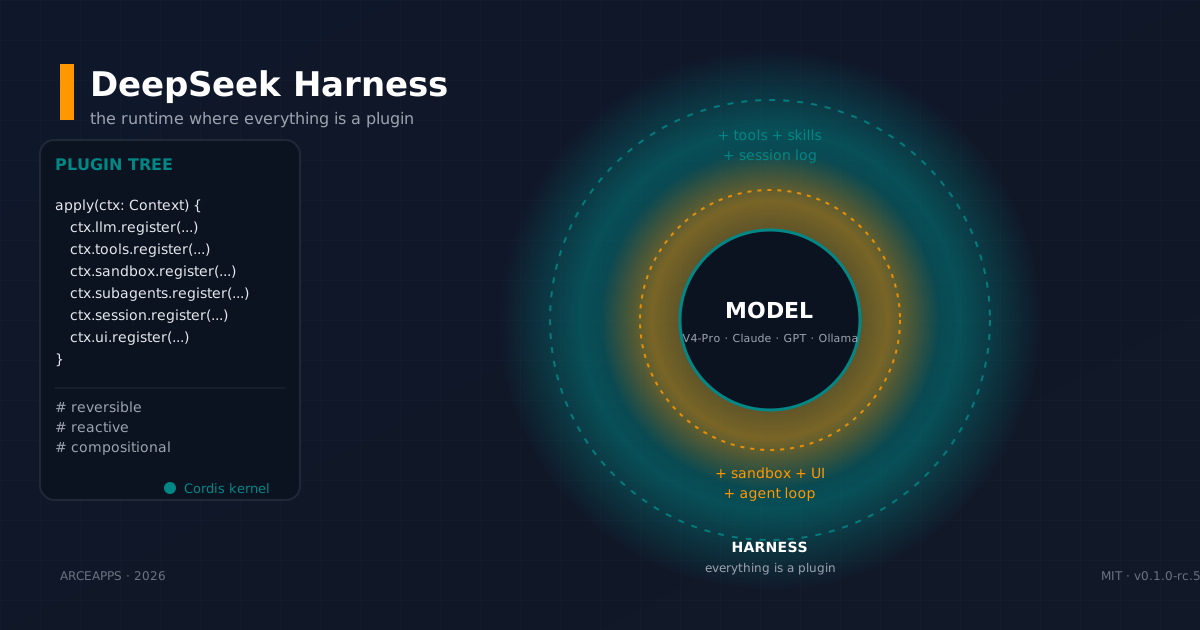
DeepSeek Harness: the runtime where everything is a plugin
DeepSeek Harness (dsh) is an MIT open-source runtime where model, tools, session, sandbox and even the loop are plugins. Deep-dive into Cordis, runtime modes, append-only session log and self-evolution.
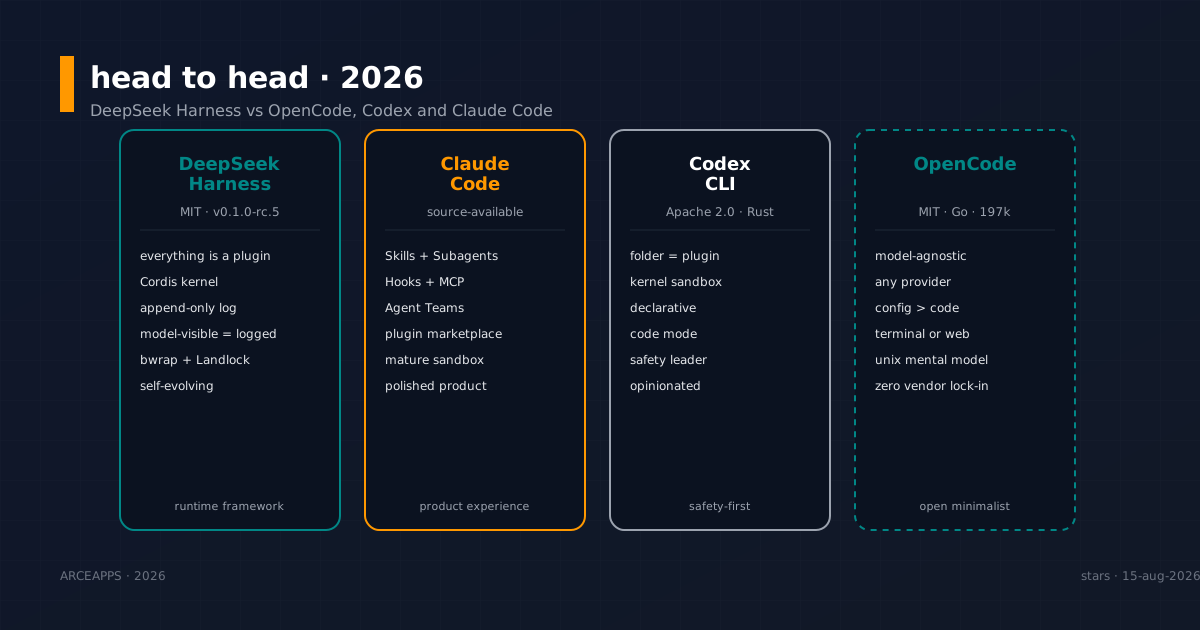
DeepSeek Harness vs OpenCode, Codex and Claude Code: head to head
Honest comparison of DeepSeek Harness (dsh), OpenCode, Codex CLI and Claude Code. Philosophy, plugin model, sandbox, ecosystem and who wins each in 2026.
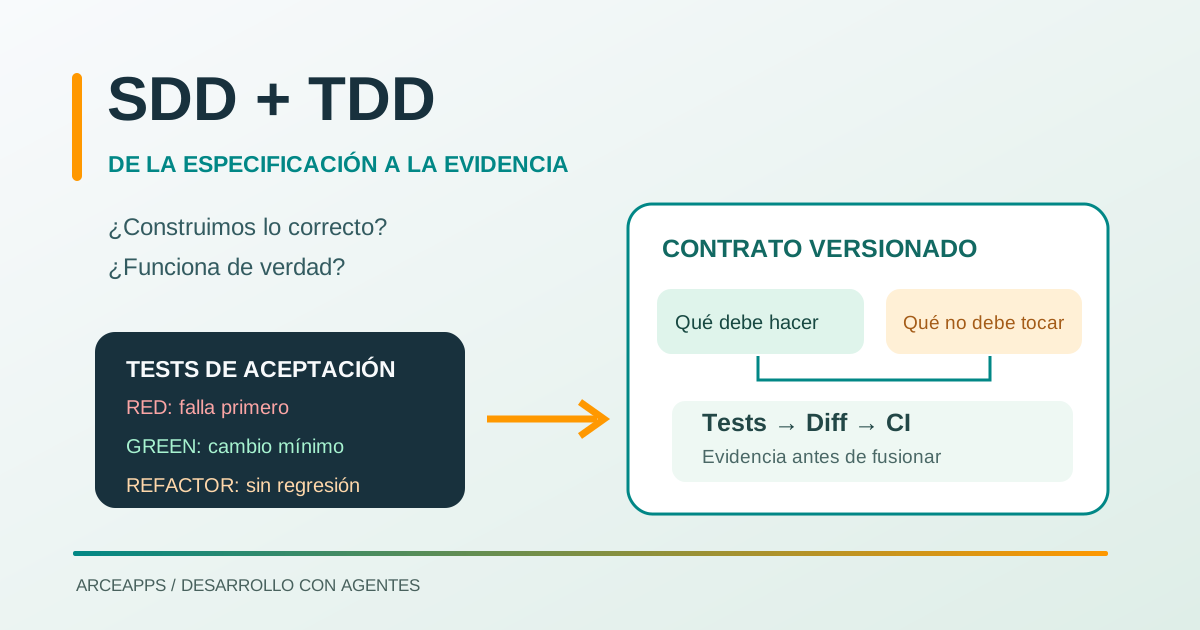
SDD + TDD: From Requirements to Verifiable Tests
Learn how to combine SDD and TDD with coding agents: lightweight specifications, acceptance criteria, Red-Green-Refactor and CI-backed evidence.