
OpenClaw 2.0: A Reliable and Secure Gateway
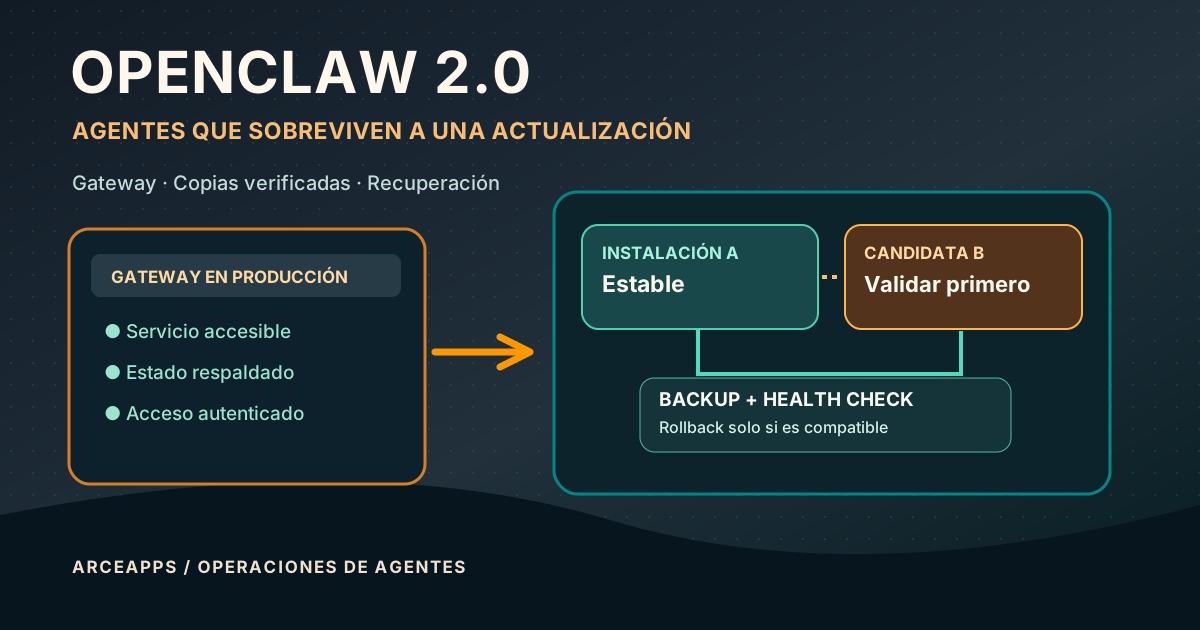
Table of Contents
Related reading: ArceApps has already compared Hermes Agent with OpenClaw and covered a beginner-friendly agent stack. This is a different problem: how to keep a self-hosted OpenClaw Gateway available, recoverable and safe beyond a successful first installation.
The day your self-repairing agent stops launching
There is a particular kind of frustration that only a persistent AI agent can produce. While it works, it can diagnose configuration errors, inspect code, search documentation and suggest a repair. When the Gateway itself fails after an upgrade, the very tool that was supposed to help disappears. An extensive memory, dozens of plugins and a convenient chat interface offer little comfort if the server never reaches readiness again.
OpenClaw acknowledged this problem publicly in September 2026. In the project’s article Shipping updates that don’t break, maintainer Jason Sy explains that the shift to the generation commonly called OpenClaw 2.0 made breaking updates too important to ignore. Different users had different packages, channels, authentication settings, plugins and state layouts. A change that passed a maintainer’s tests might still strand an ordinary user’s installation.
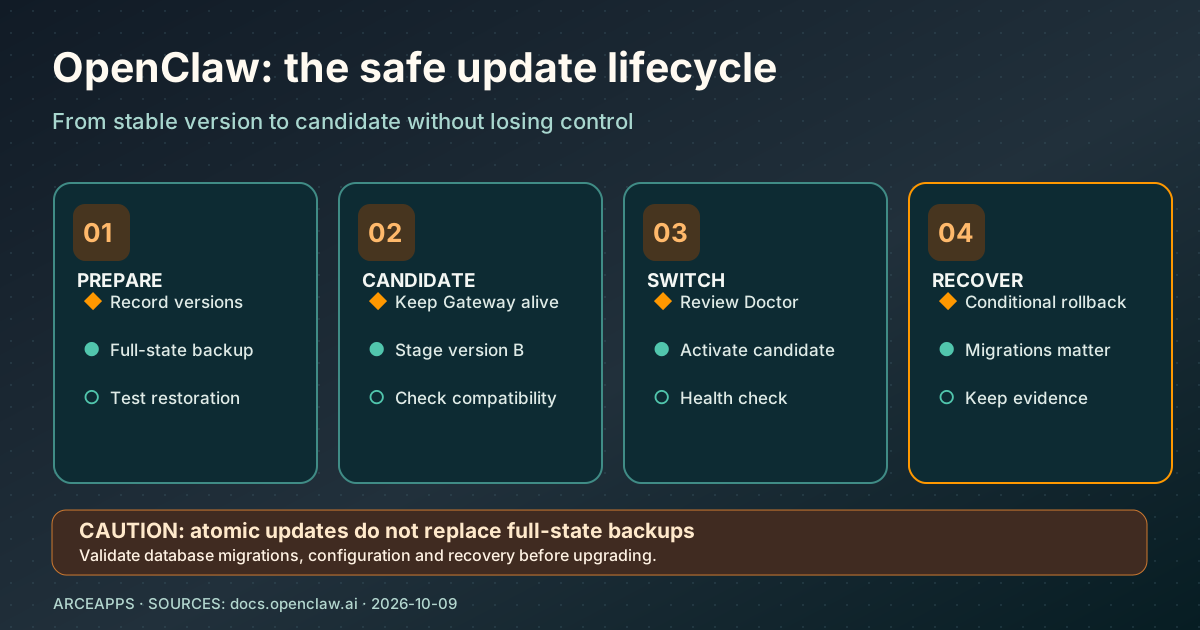
The new approach is commonly called atomic updates: preserve the current working Gateway while staging and validating the candidate, and recover the old version when compatibility and backup conditions permit. That is a strong design improvement. It is not a magic guarantee that every change to every database, plugin or external system can be reversed.
This article is about the less glamorous but essential side of running an agent. We will separate binaries from persistent state, explain conditional rollback, build a recovery checklist, and examine remote access through Tailscale. The goal is not to make your home server impressive. It is to make it boring enough to trust.
First, what do we mean by OpenClaw 2.0?
The public conversation often calls the September changes “2.0”, but that is not a substitute for a concrete release identifier. Official releases use date-based versions such as 2026.9.3, 2026.9.5, 2026.9.7 and 2026.9.8. Migration rules, compatible dependencies and individual plugin features are tied to shipped versions, not to the shorthand used in a blog headline.
The official release index documents a growing set of operational capabilities: stronger upgrade recovery, unified plugin management, compatible plugin hot reload, improved reconnections and better controls for persistent sessions. These are useful, but they should not be described as simultaneously available in every installation. A tutorial that assumes behavior introduced in one release may fail on a nearby older build.
It also helps to remember that OpenClaw is not merely a chat application. The Gateway manages connections, sessions, device identities, authentication boundaries, channels and agents. Tools and plugins can act on external systems. A model provider is another separate layer, as is the UI running on a phone or laptop.
That architecture means that “OpenClaw is broken” has several possible meanings. The package might not load. The service supervisor might point to an outdated executable. A database may require migration. An extension may fail during startup. A client may be unable to authenticate. Fixing the wrong layer makes troubleshooting longer and more dangerous.
Before touching anything, establish which component is actually unhealthy. Keep the process version, state directory, profile, installer and service owner in view. This inventory is the basis of every responsible update and recovery procedure.
A reliable installation has three distinct parts
For a self-hosted Linux mini PC, I think of the system as three layers. The first is the Gateway process, which hosts the agent runtime and listens for authorized connections. The second is persistent state: configuration, credentials, sessions, databases, memories and plugin records. The third is the client surface, where your browser, laptop application or Android device communicates with the running service.
Each layer can fail independently. Restarting the process might fix a transient startup issue without repairing corrupted state. Reinstalling the package does not necessarily change a broken reverse-proxy rule. A new phone refusing to pair is not proof that the model provider is unavailable. Keeping those distinctions clear avoids endless cycles of random settings changes.
OpenClaw’s Gateway configuration reference gives 18789 as the default port. This is merely a default listener address; it does not tell you whether a deployment is secure. The crucial questions are what interface the Gateway binds to, what authentication mode it requires and which network paths reach it.
I favor an explicit service supervisor for persistent hosts, with a UI that remains replaceable. A user-managed systemd unit can be reasonable on Linux when it owns the actual process, but it is not automatically the right approach for containers or installers that register their own service. In every case, document the owner, startup method and log location.
Reliability starts with operational clarity: one process owner, one known binary, one known profile, one deliberate network entry point. When those facts are uncertain, upgrades become experiments whether you intended them to or not.
Why the old update order was fragile
An unsophisticated upgrade sequence often looks like this: stop the existing service, replace packages, migrate the state, restart and hope. If the replacement fails because of a missing artifact, an incompatible plugin or an unexpected configuration field, the working agent is already gone. Users have to recover it manually, often without the context needed to reconstruct the failed operation.
The OpenClaw team’s published analysis emphasizes an ordering change. The existing installation remains live while a candidate is prepared and checked. The update is admitted only when the prerequisites are satisfied. On eligible failures, the system can restore the previous compatible setup instead of requiring the user to reverse a partly completed installation by hand.
Picture two versions: A is currently operating and B is the candidate. We want to stage B, validate its dependencies and its ability to consume the available state, then switch the active version. If B proves unusable before it introduces irreversible changes, keeping A available provides a powerful recovery path.
The difficult phrase is before irreversible changes. A plugin may have sent a message, deleted a remote record or written data through an external API. A database migration may have changed a schema that A cannot read. Neither of those operations necessarily becomes reversible because the updater can swap a directory tree.
Atomic replacement of program files and restoration of persistent state are different problems. Treating them as the same is one of the easiest ways to develop a false sense of safety. OpenClaw’s improvement is significant precisely because it moves many failures earlier in the process; it cannot eliminate every class of failure.
A verified backup is not just a ZIP file
The official updating guide explicitly distinguishes the configuration copy created during an update from a full, verified state backup. OpenClaw may store operational data across several databases, session histories, plugin locations and directories. A copied configuration file is useful, but it is not evidence that the whole agent can be reconstructed.
I would judge a backup by three properties. Completeness: it includes every state component required for the intended recovery. Consistency: databases and related files represent a coherent point in time. Recoverability: someone has tested or at least verified a supported restoration procedure, rather than merely trusting that the archive command returned success.
The current documentation adds nuanced rules about restoring databases after a failed upgrade. It may require that the captured state was taken while the service was stopped, that the new version never began writing to the databases, and that no later writes have gone unaccounted for. Those conditions are inconvenient, but they exist to avoid replacing live data with an incoherent historical snapshot.
There is also a product-level trade-off. Restoring last night’s archive discards today’s conversations and automation results. That may be acceptable for a disposable evaluation server; it can be very expensive for a long-running personal assistant. A recovery plan should say what point in time will be restored and which work may be lost.
If the agent matters, verify backups before risky upgrades and keep the recovery procedure accessible without the agent. An inaccessible how-to stored only inside the failed assistant is not a useful recovery plan.
Doctor is a migration and validation tool, not a magic incantation
The openclaw doctor command deserves a permanent place in an operator’s toolkit. It inspects configuration, state compatibility, some service readiness conditions, model authentication and plugin-related problems. With —fix, supported repairs and migrations may modify persistent data. That makes the command valuable, but also something to use deliberately.
The official documents on configuration migrations and state, sessions and plugin repairs explain why some installations need an intermediate release. Certain legacy formats fall outside the currently supported direct migration window. Doctor can preserve the source and instruct users to normalize it with an earlier version first.
Depending on the specific state, documentation names 2026.9.5 or 2026.9.7 as bridge releases. The exact choice depends on which files and fields still exist. It is not sound advice to pick one bridge version blindly for every old installation. Read the error, identify the affected source and follow the matching migration note.
One especially dangerous mistake is launching an older binary against a database that a newer version has already migrated. The previous executable may have no idea how to interpret the changed schema. Downgrading the package and restoring state are separate operations, and a safe procedure must preserve that distinction.
I prefer to run diagnostics first, read the report, secure the backup and then execute the minimum required repair. “Fix everything” is not an operating principle. Understanding what is being fixed is what makes the next incident easier.
The pre-update checklist that matters
A useful checklist starts with observation rather than intervention. Before changing the package, record the actual version, service owner, active profile and current Gateway health. Determine the location of state and the package manager that owns the executable. Also check for long-running tasks that could be interrupted and for remote clients that rely on the service.
The following are reasonable read-oriented diagnostics on installations that support them:
openclaw --version
openclaw gateway status --deep
openclaw doctor
In a systemd-based user service, systemctl —user status and journalctl —user can provide additional visibility. They are not universal instructions; a container, a macOS service or a manually launched process will have different ownership. The critical rule is to inspect the service that actually runs, not an unrelated copy installed elsewhere on the PATH.
Next, secure and verify a complete backup using the procedure appropriate to the installed version. Read the release notes for migration requirements and incompatible plugins. Document what you will do if the candidate fails before touching the package or service configuration.
Finally, resist the temptation to change multiple variables at once. Switching from npm to pnpm, moving the state directory and enabling a new reverse proxy during the same upgrade can leave several plausible causes for the next error. Keep the change focused enough that you can explain it afterward.
Updating means respecting the process owner
OpenClaw can be distributed through more than one package management approach. The official guide distinguishes a CLI-managed Gateway from installations whose service lifecycle is owned by another supervisor. That detail matters because the command that installs a new executable might not be the command that controls the running Gateway.
For a managed Gateway, documentation includes operations such as openclaw gateway stop, openclaw doctor —fix, openclaw gateway start and openclaw gateway status —deep in specific upgrade scenarios. These commands are examples of supported lifecycle actions, not a universal script that should be pasted without checking which installation type applies.
If a custom systemd service starts a binary in a user-specific package prefix, replacing a different global package achieves little. You may end up with two executable versions and confusing status output. The remedy is to identify the real executable path used by the service, rather than repeatedly reinstalling the package that happens to be first in an interactive shell.
Once the candidate is in place, verify that the service starts with the intended version and profile. Check Gateway health, essential plugins, authentication and one harmless end-to-end task. Then inspect the updater’s result and any retained recovery snapshots before cleaning anything up.
A successful package-manager exit code is necessary but not sufficient. The actual definition of success is that users can connect, state is intact, intended tools work and no security boundary has silently widened.
Plugin hot reload reduces downtime but changes the trust story
The 2026.9.5 release added compatible plugin hot reload. Supported extensions can be installed or reloaded without restarting the whole Gateway. That is particularly useful when an agent is handling longer sessions or when a full service restart would disrupt connected clients.
The qualification supported is important. Some extensions own sockets, workers, event handlers or persistent data. Replacing their code in a live process may require cleanup and compatibility guarantees that a particular plugin does not provide. It would be misleading to assume every third-party extension can be swapped without downtime.
The security implications are equally important. A plugin is executable code that can participate in the agent’s actions. Allowing live installation removes operational friction, but it does not remove the need to inspect the source, trust the author and understand the permissions. Fast installation is not an audit.
I would maintain a short inventory: plugin name, origin, version, required privileges and a test task demonstrating its value. Core plugins should be part of a known-good configuration. Experiments should be isolated where practical, and any extension that needs access to secrets or privileged shell commands deserves special scrutiny.
The goal is not to prohibit experimentation. It is to keep the experimental surface separate from the dependencies that make an always-on agent dependable.
Tailscale Serve: a private path to your Gateway
Hosting the Gateway on a Linux mini PC becomes much more useful when you can access it from a laptop or phone. That does not mean exposing port 18789 to the public Internet. The Tailscale integration guide describes Serve for private access through a tailnet and Funnel for public ingress under more demanding security requirements.
For personal use, the simplest design is often a Gateway bound to loopback, with OpenClaw-managed Tailscale Serve providing a secure entry point. The connection is authenticated within the tailnet, and the Gateway still applies its own client identity and authorization rules as appropriate. Being a member of the private network does not automatically confer unrestricted administrative power.
An important configuration distinction is that gateway.tailscale.mode and gateway.bind control different things. One describes managed Tailscale exposure; the other describes where the underlying Gateway listens. Changing the bind to a public interface is not a legitimate shortcut for resolving a pairing issue.
The operator should identify the specific secure HTTPS/WSS hostname for the host, check which devices belong to the tailnet, and maintain a revocation path. A private route helps reduce Internet exposure, but credentials and permissions still matter. A compromised endpoint inside the tailnet is not magically trustworthy.
I would also keep the Gateway’s direct port unreachable from the wider network whenever possible. That way, removing a device from the tailnet or adjusting Gateway authentication affects the intended path rather than leaving a forgotten port-forward as a bypass.
Managed Serve and external Serve are not equivalent
This is a subtle operational trap. OpenClaw can manage its own Tailscale Serve mode, but an operator can also configure Tailscale’s own routing independently, forwarding a HTTPS endpoint to the ordinary Gateway listener. The browser experience may look nearly identical, yet the Gateway has a different basis for trusting the incoming request.
The Tailscale documentation explains that externally managed Serve is treated as generic proxy ingress. The immediate proxy source must be tightly declared in gateway.trustedProxies, and the forwarded client address must meet the expected conditions. Otherwise protected operations can fail with proxy_attribution_required even when the TLS endpoint appears valid.
The wrong response is to trust every IP range or disable authentication until the error vanishes. Forwarded headers affect client attribution and may participate in authorization decisions under trusted-proxy modes. A reverse proxy should overwrite untrusted X-Forwarded-For data rather than accepting values supplied by an outside caller.
For a personal, single-user host, OpenClaw-managed Serve may avoid unnecessary complexity. If another application already owns the Tailscale routing configuration, externally managed Serve can still be appropriate, provided the operator documents the immediate proxy, forwarded address rules and normal token/password authentication.
In this arrangement, gateway.auth.allowTailscale does not automatically grant the managed Serve identity behavior. The project is explicit about that limitation. Two URLs ending in the same tailnet domain are not evidence that the security model is the same.
Mobile pairing: secure transport and device identity are separate
Mobile access adds several concepts that are easy to mix up: the advertised Gateway URL, the secure WebSocket transport, the device’s signing identity, the pairing operation and the permissions eventually granted. A QR code is not the same as an administrative token, and a client that should only chat does not need the same capabilities as a host with maintenance rights.
For remote tailnet access, an appropriately secured wss:// address is the expected direction. A public ws:// URL would expose traffic and potentially shared authentication material to on-path attackers. If pairing complains that the URL is insecure, it is better to inspect the advertised endpoint and Serve configuration than to disable connection safeguards.
A device may also fail pairing when the UI is using a local Gateway configuration that does not exist on the client machine, or when a reverse proxy is missing required forwarded client attributes. Those failures can look similar in the interface but require different fixes.
I would deliberately assign limited capabilities to devices that only need conversations and inspection. Administrative actions, package upgrades and host commands should be reserved for trusted operator contexts. Revocation and credential rotation belong in the runbook, particularly when a mobile device can be lost.
The user experience is supposed to be easy. That is an argument for clear enrollment instructions, not for broadening privileges until every connection succeeds.
Security: private networking is only one layer
The Gateway exposure runbook discourages direct public port-forwarding for good reason. An autonomous agent can have access to shell commands, files, external APIs and credentials. Exposing its control interfaces is more consequential than exposing a static personal website.
A proper inventory should answer: which channels accept incoming messages? Which agents can users invoke? What tools can each agent use? Is sandboxing active where required? What files and tokens can those tools reach? Without these facts, an apparently single-user host can become a broad remote execution surface.
The project also documents that certain shared-secret routes imply powerful operator rights. A token should not be treated as a harmless read-only API key unless the specific route and authentication mode guarantee such a restriction. For users with different trust levels, separate gateways or identity-aware authorization policies may be more appropriate than sharing one secret.
Reverse proxies introduce another boundary. The trusted-proxy auth mode is designed for proxies that actually authenticate identity and strip or overwrite untrusted headers. A plain TLS terminator that passes user-controlled headers is not sufficient. The trusted proxy guide specifically warns against enabling that mode in uncertain configurations.
I favor predictable defenses over clever shortcuts: private listener, carefully controlled entry point, explicit auth, minimal tools and a documented way to revoke access. The agent should be able to help with useful work without becoming an unnecessary public administration service.
Light observability is enough if it answers the right questions
A personal installation does not need an enterprise monitoring stack. It does need to distinguish a stopped process from an unhealthy Gateway, an authentication failure from a disconnected client, and a scheduled task that failed from one that never ran. Those are different conditions with different recovery steps.
A small maintenance routine could check service status, Gateway readiness, last successful update and the most important scheduled outputs. Before a significant upgrade, record current health and the state of relevant clients. Afterward, check exactly those conditions again. A before/after comparison is usually more useful than a dashboard filled with decorative graphs.
Avoid reflexive restarts whenever the UI slows down. A long-running task may still be active, and forcibly killing the process can make its recovery harder. Collect service logs and inspect the session before deciding whether to restart. If local health works but remote access fails, focus on Tailscale, proxy and client identity.
Alerts should lead to an action. “Gateway process stopped” is actionable. “Model request returned an authentication error” points toward provider credentials. “Android pairing denied due to URL” suggests a transport or advertised-endpoint problem. Those messages are much more useful than an undifferentiated notification saying “OpenClaw failed”.
A well-operated agent should explain its failures even when the agent model cannot be reached. That is an argument for ordinary system logs and health checks outside the chat interface.
Recovery runbook: preserve evidence before changing anything
When an upgrade fails, resist the instinct to reinstall immediately. Capture the exact versions involved, the failing command, the service logs and the location of the verified backup. Do not paste secrets, unredacted tokens or private conversations into a public issue. The first step in recovery should not destroy the best evidence you have.
Next, determine whether the candidate ever started and wrote persistent state. This is central to choosing a code-only rollback versus restoring databases. OpenClaw documents conditions where the automatic rollback cannot safely restore state, including incomplete backups and changes made after the snapshot.
Then follow the repair instructions for the actual installed version. If Doctor identifies a retired format and instructs you to use a bridge release, preserve the source and carry out that migration deliberately. Deleting the offending file simply to silence a warning may destroy information that can still be imported by an older supported migration tool.
Once the Gateway can start locally, test its health before investigating remote access. Then verify the proxy or Tailscale route and finally the clients. This sequence narrows the problem without mixing package failures with network failures.
At the end, document what happened, how it was fixed and what would have caught it earlier. That note may be worth more than another optional plugin. A useful runbook turns a one-time rescue into a process somebody can repeat.
A reproducible reliability experiment
To evaluate these improvements honestly, I would create a disposable Gateway with a frozen initial release, a small collection of harmless sessions and a few supported plugins. Keep all test credentials separate from production. Record the initial version, configuration, data directory and a verified snapshot of its state.
First, run a normal supported upgrade and test local Gateway health, client reconnection and session continuity. Next, in an isolated environment, introduce a deliberately invalid candidate without corrupting production data. Observe whether the old Gateway remains available, what error is reported and how much human intervention is necessary.
Finally, restore a full state backup into a separate location and verify that the expected sessions and settings appear. That exercise tests a more meaningful guarantee than simply receiving a “backup created” message. It also exposes differences between code replacement, config rollback and database restoration.
Acceptance criteria should be explicit: preserve all data up to the recovery point, do not expose the Gateway port publicly, reject unauthorized clients, retain enough diagnostics to explain failures and return to a usable service through documented steps. If manual intervention was required, count it.
This is a proposed test protocol, not a report of my own benchmark runs. I am deliberately not inventing times-to-recovery, success rates or claims that a particular release survived faults I did not actually inject. The value of this method is that it can later produce honest data.
When does an indie developer actually need OpenClaw?
A persistent agent earns its keep when it handles real tasks across devices and sessions. If you want to check a project from a phone, trigger a small automation or continue a conversation while your main laptop is off, a self-hosted Gateway may be useful. Centralized state and predictable access become part of the value.
The costs are easy to underestimate. Someone must maintain credentials, verify backups, review upgrades, inspect security advisories and debug the occasional proxy or plugin interaction. Those responsibilities do not disappear because the tool is marketed as autonomous. A hobby server still needs a real trust boundary.
If you only need AI while writing code, a terminal agent or IDE integration may be a simpler choice. If you need ongoing work accessible from Linux, Windows and Android, the additional operational layers may make sense. Choose based on completed tasks and maintenance time, not on a list of theoretical integrations.
Atomic updates are a welcome step toward reducing that maintenance. But I would not treat them as permission to abandon the runbook. A capable agent needs a reliable foundation precisely because it will be entrusted with more work as its usefulness grows.
The most productive configuration is often the smallest one that meets a real need, with every additional privilege and plugin justified by observable value.
Frequently asked questions
Do atomic updates guarantee zero downtime?
No. The design stages and validates candidates while preserving a working Gateway where possible, and it may recover a compatible prior installation after certain failures. Database migrations, plugins and external side effects can still defeat an automatic rollback. A verified full-state backup remains necessary.
Should I always install the latest release immediately?
Not blindly. Read security notices, release notes and migration prerequisites. Some old installations need intermediate versions such as 2026.9.5, followed by Doctor migrations, before jumping to a current release. Always match instructions to the actual package manager and service owner.
Does Tailscale replace OpenClaw pairing?
No. A private route may supply verified network identity in supported Serve modes, but OpenClaw retains its own authentication, device identity and capability policies. A paired phone may still need explicit approval and scoped permissions.
What does proxy_attribution_required mean?
The request reached a protected route through a proxy path whose source or forwarded client attribution did not satisfy Gateway security rules. With externally managed Serve, check the immediate proxy, gateway.trustedProxies and forwarded headers. Disabling authentication or trusting all networks is not the fix.
Conclusion: autonomous does not mean self-maintaining
OpenClaw’s most interesting improvement in September was not another catalog of AI tricks. It was addressing a mundane failure mode that matters to real users: an agent should not disappear because its own update failed. Staging a candidate, preserving the existing Gateway and recovering compatible installations are serious reliability features.
But careful boundaries still matter. Rolling back a program is not the same as restoring a database. Managed Tailscale Serve is not equivalent to an arbitrary externally configured reverse proxy. Allowing a phone to chat is not the same as granting it control over service upgrades or the host filesystem.
My next step with an important personal installation would not be to add more extensions. It would be to write down the state, verify that a backup can actually be restored, and test the update process away from the production Gateway.
A good assistant saves effort. A reliable way to operate it prevents that saving from turning into a permanent maintenance burden.
Bibliography and sources
- Shipping OpenClaw updates that don’t break — Jason Sy on upgrade failures, atomic updates and future plans.
- OpenClaw release notes — capabilities and version history.
- Updating OpenClaw — backup, bridge upgrades, package ownership and rollback.
- Configuration migration repairs — Doctor and migration constraints.
- State, session and plugin repairs — supported state repairs.
- OpenClaw Tailscale integration — managed Serve, external Serve and Funnel.
- Gateway configuration reference — listener, auth, trusted proxies and modes.
- Gateway exposure runbook — threat boundary and preflight checklist.
- Trusted proxy authentication — security requirements and limitations.
- Community discussion of v2026.9.5 — community experience, not independent verification.
- ArceApps: Hermes versus OpenClaw — earlier coverage.
Prepared on October 10, 2026, with an October 9 editorial series date. No benchmark outcomes or firsthand production measurements are invented or claimed.
You might also be interested in

DeepSeek Harness Desktop: A Practical Technical Review
Explore DeepSeek Harness Desktop, its plugin architecture, automation, installation, privacy controls and practical trade-offs for indie developers.
SDD + TDD: From Requirements to Verifiable Tests
Learn how to combine SDD and TDD with coding agents: lightweight specifications, acceptance criteria, Red-Green-Refactor and CI-backed evidence.
Jev: AI Built to Decide, Not to Write
Explore Jev and System One Models: installation, API, SDKs, Agent Skill, community CLI/MCP tools, and patterns for typed software decisions.