
GitHub Pages: Private Portfolio, Public Mirror
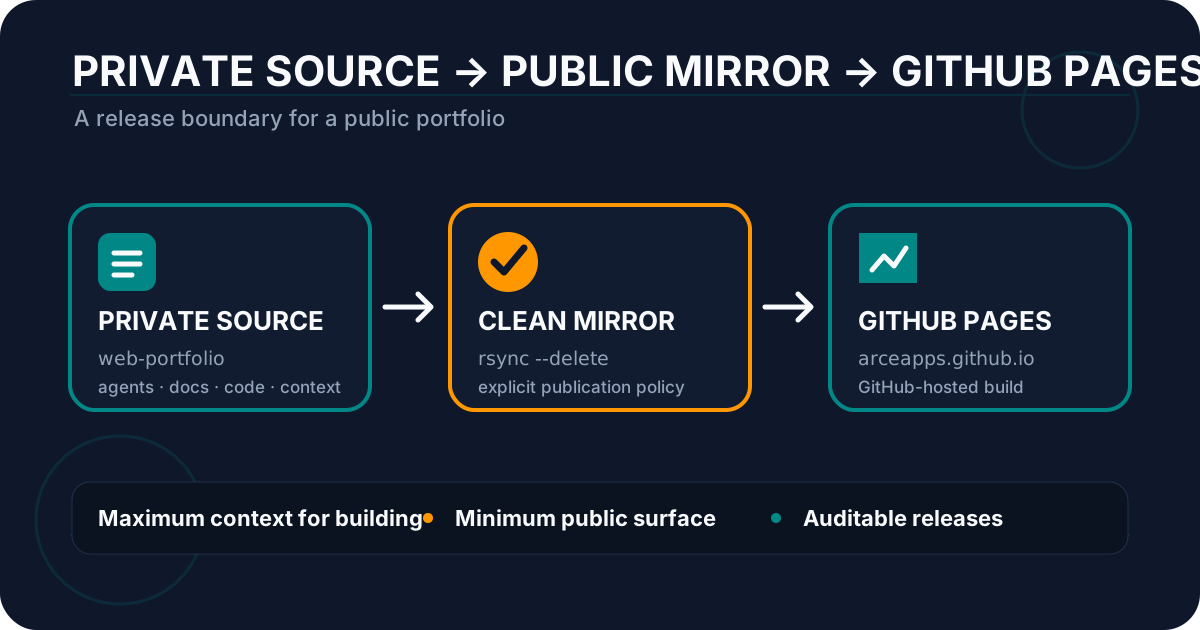
Table of Contents
Some time ago I published a general guide to GitHub Pages and Astro. That article explains how to build a static portfolio, configure a custom domain, and deploy it with GitHub Actions. My own portfolio eventually needed something slightly different: I wanted the code I publish to remain visible, auditable, and easy to deploy without turning my entire development workspace into a public repository.
The solution I use today is not a trick to hide a Pages repository. It is an architecture with two repositories and two responsibilities:
ArceApps/web-portfoliois the private source;ArceApps/arceapps.github.iois the public mirror;- a workflow in the private repository prepares a clean copy;
- a self-hosted runner executes that synchronization;
- the public repository builds the site on a GitHub-hosted runner;
- GitHub Pages publishes the resulting artifact.
In other words: I work privately, publish an explicit distribution, and keep public deployment separate from the environment that contains notes, specifications, prompts, agent configuration, and internal tooling.
That distinction matters. GitHub Pages can work with private repositories on eligible paid plans. So the reason for this design is not “working around a Pages limitation.” The point is to control exactly which part of a private development repository becomes public software.
This article documents the real architecture behind my portfolio, including the workflow, the filtering script, the security decisions, and the parts I would still harden.
The problem: a portfolio repository is more than browser-facing files
For a tiny website it is easy to imagine a repository that contains only this:
src/
public/
package.json
astro.config.mjs
A real development workspace tends to grow. Mine contains internal documentation, technical plans, logs, agent configuration, prompts, specifications, and files that help me build the site but do not need to become part of its public distribution.
The important distinction is:
development repository != artifact I want to publishI could keep everything in one public repository and rely on .gitignore, but .gitignore is not a publication boundary. It only prevents selected untracked files from being added to Git. If an internal file is already versioned, it is already public.
I could also keep a single private repository and deploy directly to Pages when the plan supports it. That solves source privacy, but removes a property I want: a separate public repository that represents exactly the publishable version of the site and can be inspected independently.
A filtered mirror gives me a third option:
private workspace
      │
      │ explicit policy
      ▼
public distribution
      │
      │ build
      ▼
GitHub Pages
The public repository is not my workspace. It is a release source.
The full architecture
The actual flow looks like this:
ArceApps/web-portfolio (private)
          │
          │ push to main
          ▼
GitHub Actions
runs-on: self-hosted
          │
          │ scripts/sync-mirror.sh
          │ removes internal content
          ▼
temporary clean copy
          │
          │ rsync --delete
          ▼
ArceApps/arceapps.github.io (public)
          │
          │ push to main
          ▼
GitHub Actions
runs-on: ubuntu-latest
          │
          │ pnpm build
          ▼
artifact ./dist
          │
          ▼
actions/deploy-pages
          │
          ▼
       arceapps.com
There are two pipelines connected by Git, not by a shared directory.
Each layer has a clear responsibility:
| Layer | Responsibility |
|---|---|
| Private repository | Development, content, automation, and internal material |
| Self-hosted runner | Produce and publish a clean source tree |
| Public repository | Contain only the source I intentionally expose |
| GitHub-hosted runner | Build the public website |
| GitHub Pages | Serve the static artifact |
This separation also limits privilege. The private runner needs access to the private source and permission to write to the mirror. The public runner does not need access to the private repository at all.
First piece: the workflow leaving the private repository
Inside web-portfolio I have a workflow named sync-to-public.yml. It runs whenever main changes and can also be triggered manually.
Its essential structure is:
name: Sync to public arceapps.github.io

on:
  push:
    branches:
      - main
  workflow_dispatch:

concurrency:
  group: sync-to-public
  cancel-in-progress: false

jobs:
  sync:
    if: github.repository == 'ArceApps/web-portfolio'
    runs-on: self-hosted
There are three small decisions here that I consider important.
1. It only runs in the private repository
The condition:
if: github.repository == 'ArceApps/web-portfolio'may look redundant because the workflow already lives there. It becomes useful once part of the repository is copied somewhere else.
If a maintenance workflow accidentally reaches the public mirror, this condition prevents it from behaving as if it were still running in the private source.
In my setup, the mirror script also excludes the synchronization workflow itself. That gives me defense in depth: the safety property does not depend on a single barrier.
2. I use a concurrency group
concurrency:
  group: sync-to-public
  cancel-in-progress: false
I do not want two synchronization jobs writing to the public main branch at the same time.
I could use cancel-in-progress: true, but for a publishing pipeline I prefer a job that has already started to finish and the next one to wait. It is a conservative choice: coherent release ordering matters more to me than saving a few minutes.
3. The runner is private infrastructure
runs-on: self-hostedThe runner that touches the private repository lives on infrastructure I control. That lets me control installed tools, caches, networking, and environment details.
But there is a security rule that matters much more than convenience: I do not want that machine to become a general-purpose executor for untrusted code coming from a public repository.
Traditional self-hosted runners are persistent. They are not automatically rebuilt from a clean image for every job in the way GitHub-hosted runners are. If a malicious workflow executes there, an attacker may try to persist on the machine, read host files, or capture credentials from future jobs.
That is why the architecture deliberately keeps the self-hosted runner on the private side and builds the public mirror on ubuntu-latest.
Two checkouts: private source and public destination
The workflow first checks out the source repository:
- name: Checkout private source
  uses: actions/checkout@v4
  with:
    fetch-depth: 0
Then it checks out the public repository into a separate directory:
- name: Checkout public repo destination
  uses: actions/checkout@v4
  with:
    repository: ArceApps/arceapps.github.io
    token: ${{ secrets.PUBLIC_RELEASE_TOKEN }}
    path: public-repo
    ref: main
Conceptually, the job workspace now looks like this:
$GITHUB_WORKSPACE/
├── .git/                 # web-portfolio history
├── src/
├── public/
├── scripts/
└── public-repo/
    ├── .git/             # independent mirror history
    ├── src/
    └── public/
This is a crucial detail: I am not using git push --mirror.
A real Git mirror replicates references and history. That would be exactly the wrong behavior when the source repository may contain commits, files, or historical context that I do not want to expose.
I mirror the filtered working tree, not the private Git history.
The public repository then creates its own sequence of release commits, for example:
chore: sync clean mirror from web-portfolioThat gives the public repository an independent publication history.
The heart of the system: creating a clean copy
The most important component is not GitHub Pages. It is scripts/sync-mirror.sh.
The current script begins very simply:
#!/usr/bin/env bash
set -euo pipefail

SOURCE_DIR="${1:-.}"
DEST_DIR="${2:-/tmp/public-mirror}"

rm -rf "$DEST_DIR"
mkdir -p "$DEST_DIR"
set -euo pipefail is close to mandatory for this kind of script:
-eaborts when a command fails;-uprevents undefined variables from silently becoming empty;pipefailmakes failures inside command pipelines visible.
Then comes the actual publication filter:
rsync -av --delete \
  --exclude='.git' \
  --exclude='.github/workflows/sync-to-public.yml' \
  --exclude='.opencode' \
  --exclude='agents' \
  --exclude='docs' \
  --exclude='openspec' \
  --exclude='AGENTS.md' \
  --exclude='BUGS.md' \
  --exclude='AUDIT_WEB_*.md' \
  --exclude='CONTEXT.md' \
  --exclude='design.md' \
  --exclude='test-results' \
  --exclude='.astro' \
  --exclude='dist' \
  --exclude='node_modules' \
  --exclude='public-repo' \
  "$SOURCE_DIR/" "$DEST_DIR/"
The script creates a fresh copy in a temporary directory.
It does not mutate my development repository. It does not delete internal directories from the source. It does not require a special branch full of cleanup commits.
That makes the process much easier to reason about:
source tree
   +
publication policy
   =
publishable tree
Why --delete matters more than it looks
A mirror cannot just copy new files.
Imagine that yesterday the source contained:
public/old-logo.svgToday I delete it. If synchronization only copies additions and modifications, the public mirror may keep old-logo.svg forever.
At that point the mirror no longer represents the current state of the source.
That is why I use --delete when creating the clean tree and again when applying it to the public checkout:
rsync -av --delete --exclude='.git' \
  "$RUNNER_TEMP/clean-mirror/" public-repo/
The semantic goal is:
destination = exact copy of allowed sourcenot:
destination = everything I have ever copiedFor a public distribution, obsolete files can be a form of information leakage too.
The critical exception: preserve the mirror’s .git
When I synchronize into public-repo/, I exclude .git:
--exclude='.git'Without that exclusion, I would destroy the identity of the destination repository.
I want to replace its working tree while preserving:
public-repo/.git/because that contains:
- the correct remote;
- the current branch;
- public commit history;
- the metadata needed to create the next release commit.
The remaining sequence is conventional:
cd public-repo

git config user.name "github-actions[bot]"
git config user.email "github-actions[bot]@users.noreply.github.com"

git add -A
I use git add -A rather than git add . because deletions are part of the public state and must be recorded.
Finally:
if git diff --staged --quiet; then
  echo "No changes to sync to public repo."
else
  git commit -m "chore: sync clean mirror from web-portfolio"
  git push ...
fi
I do not create empty commits. If the public projection has not changed, the release history remains untouched.
Denylist versus allowlist: the main trade-off
My current script uses a denylist:
publish everything
except these paths
That is convenient for a website because new components, styles, and images are published automatically.
The weakness is obvious: if I create a new internal folder tomorrow and forget to add a matching --exclude, it can reach the mirror.
For a personal portfolio I currently accept that trade-off because the repository structure is controlled and internal material is grouped into recognizable paths. If the confidentiality requirements increased, I would invert the model.
An allowlist says:
publish nothing
except these paths
For example:
mkdir -p "$DEST_DIR"

rsync -av \
  package.json \
  pnpm-lock.yaml \
  astro.config.mjs \
  tsconfig.json \
  "$DEST_DIR/"

rsync -av src/ "$DEST_DIR/src/"
rsync -av public/ "$DEST_DIR/public/"
rsync -av scripts/ "$DEST_DIR/scripts/"
It is less convenient because every new public top-level directory must be declared explicitly.
But it has a better security failure mode:
forgetting a path breaks a build instead of accidentally publishing private material.
Whenever confidentiality matters more than convenience, I prefer that kind of failure.
A filtered mirror is not a secrets manager
There is a dangerous temptation to think that if secrets.env is excluded from the mirror, then committing it to the private repository is harmless.
It is not.
The filter protects the public distribution. It does not transform Git into a secrets vault.
Credentials should still live in GitHub Secrets, a dedicated secret manager, or the runtime environment.
The mirror script is useful for separating:
- internal documentation;
- specifications;
- agent configuration;
- test output;
- local development directories.
It is not a second chance to hide credentials that should never have been committed.
The credential that writes to the public repository
The workflow checks out and pushes to the destination using:
token: ${{ secrets.PUBLIC_RELEASE_TOKEN }}That credential has a narrow job: allow the private publication pipeline to write to ArceApps/arceapps.github.io.
My rule here is least privilege:
- access only to the public destination repository;
- only Git permissions that are actually needed;
- no unrelated organization permissions;
- reasonable expiration and rotation.
A fine-grained personal access token is preferable to a classic token when the setup allows it. A GitHub App can be even better when short-lived installation credentials fit the workflow. If the only operation were Git over SSH, a write-enabled deploy key could also be an option.
There is one hardening detail I would change in the next revision of my own workflow. The current git push constructs a URL containing the token:
git push "https://x-access-token:${PUBLIC_RELEASE_TOKEN}@github.com/ArceApps/arceapps.github.io.git" mainIt works, but passing secrets as process arguments is not my favorite pattern on a persistent host. GitHub’s security documentation warns that command-line arguments can be visible to other processes or jobs on the same machine.
I would rather avoid exposing the token in the process command by reusing authentication configured by actions/checkout, using a temporary credential helper, a GitHub App, or another short-lived mechanism.
That does not invalidate the two-repository architecture. It is a good reminder that protecting a credential requires thinking about how it moves through the job, not just where it is stored.
The public mirror starts a second pipeline
At this point I have not deployed a website yet.
I have only published a clean source tree to:
ArceApps/arceapps.github.ioThat repository owns its own deploy.yml.
The first decision worth highlighting is:
jobs:
  build:
    if: github.repository == 'ArceApps/arceapps.github.io'
    runs-on: ubuntu-latest
The public build uses a GitHub-hosted runner instead of my self-hosted machine.
That is deliberate.
A public repository is, by definition, a more exposed surface. Even though I control who can write to main, I prefer its build process not to have default access to my private server.
The public pipeline recreates its tools:
- name: Install pnpm
  uses: pnpm/action-setup@v4
  with:
    version: 10

- name: Setup Node
  uses: actions/setup-node@v4
  with:
    node-version: '20'
    cache: 'pnpm'

- name: Install dependencies
  run: pnpm install --no-frozen-lockfile
It then refreshes data used by the portfolio:
- name: Update Google Play Data
  run: pnpm run apps:update
and builds the Astro site:
- name: Build
  run: pnpm run build
  env:
    CONTACT_FORM_KEY: ${{ secrets.CONTACT_FORM_KEY }}
Astro writes the static result to dist/.
Publishing to GitHub Pages with the official flow
The public repository then uses the Pages actions:
- name: Setup Pages
  uses: actions/configure-pages@v4

- name: Upload artifact
  uses: actions/upload-pages-artifact@v3
  with:
    path: ./dist
A separate job deploys that artifact:
deploy:
  if: github.repository == 'ArceApps/arceapps.github.io'
  needs: build
  runs-on: ubuntu-latest
  environment:
    name: github-pages
    url: ${{ steps.deployment.outputs.page_url }}
  steps:
    - name: Deploy to GitHub Pages
      id: deployment
      uses: actions/deploy-pages@v4
The workflow declares the permissions required by Pages:
permissions:
  contents: read
  pages: write
  id-token: write
I like the separation between build and deploy: deployment only exists if the previous build completed successfully.
If pnpm build fails, there is no valid artifact to publish, so the previous deployed site is not intentionally replaced by a broken build.
What exactly happens after git push
The architecture becomes easier to understand if I walk through the complete path.
Suppose I edit an article and run:
git push origin mainThen:
- GitHub receives the new commit in
web-portfolio. sync-to-public.ymlstarts.- The job is assigned to the self-hosted runner.
- The runner checks out the private repository.
- It checks out
arceapps.github.iounderpublic-repo/. - It executes
scripts/sync-mirror.sh. - The script creates an empty temporary directory.
rsynccopies everything except internal paths.- A second
rsync --deletereplaces the public repository working tree. public-repo/.gitis preserved.git add -Acomputes the public delta.- If nothing public changed, synchronization ends.
- If something changed, a publication commit is created.
- That commit is pushed to the public
mainbranch. - The push triggers
deploy.ymlin the mirror. - GitHub starts an
ubuntu-latestrunner. - It installs pnpm, Node, and dependencies.
- It refreshes data and runs
pnpm build. - It uploads
dist/as a Pages artifact. actions/deploy-pagespublishes the new site.
One development change can therefore create two different commits:
private development commit
            ↓
public distribution commit
That is not accidental duplication. They represent different concepts.
Why not deploy directly from the private repository?
That is a completely valid alternative, and for many projects it would be my first choice.
If GitHub Pages is available for the repository visibility and plan you use, the pipeline can simply be:
private repo → build → PagesIt is simpler.
So why keep the mirror?
1. Separation of responsibilities
The private repository is my workspace. The public one represents the publishable product.
2. Selective transparency
I can share the real site source without sharing agents, notes, plans, or auxiliary documentation.
3. Clean public history
Mirror commits describe website releases rather than every internal development decision.
4. Infrastructure decoupling
The public deployment can have its own secrets, Pages settings, permissions, and runner strategy.
5. An explicit publication boundary
Publishing stops meaning “everything in this repository” and becomes a transformation I can inspect and test.
The cost is extra complexity: two repositories, a write credential, and a synchronization stage.
I would not call this pattern universally better. It is useful because my private repository contains much more than runtime website code.
Self-hosted runner security: the part I would never hand-wave
Owning your runner is attractive. It also makes you responsible for the machine.
GitHub explicitly warns that self-hosted runners can be persistently compromised when they execute untrusted code.
A GitHub-hosted job starts in a clean environment. A traditional self-hosted job runs on a machine whose state can survive from one workflow to the next.
That leads me to a few rules.
I do not run arbitrary public pull requests on the private runner
A forked PR can modify build scripts. If that script executes on a personal server with credentials or access to an internal network, the threat is no longer limited to CI.
I keep the runner scoped to private work
I do not want every repository in an organization to be able to select the runner label by accident.
Runner groups can be used to restrict which repositories or workflows may use a machine.
I separate private publication from public builds
The mirror is the boundary:
private + self-hosted
        │
        ▼
mirror
        │
        ▼
public + GitHub-hosted
That dramatically reduces the number of paths through which public code could reach private infrastructure.
What I exclude and why
My current exclusion list falls into several categories.
Internal metadata and tooling
.opencode
agents
openspec
AGENTS.md
They help orchestrate and document development. They are not runtime requirements for the portfolio.
Documentation and specifications
docs
CONTEXT.md
design.md
AUDIT_WEB_*.md
BUGS.md
These may contain plans, drafts, or context that is useful during development but is not part of the website product.
Generated artifacts
.astro
dist
node_modules
test-results
I do not want reproducible build output, local caches, or installed dependencies versioned in the mirror.
Source-specific infrastructure
.github/workflows/sync-to-public.yml
public-repo
The public mirror should not carry the mechanism that generates itself.
I find it useful to classify exclusions by intent rather than maintain one unexplained flat list. When a new directory appears, it becomes easier to ask which class it belongs to.
How I would test the mirror like production code
The next improvement with the highest leverage is to stop treating sync-mirror.sh as a harmless utility and give it contract tests.
A test fixture could look like:
fixture/
├── src/index.ts
├── public/logo.svg
├── agents/private.md
├── docs/design.md
└── CONTEXT.md
Then run:
./scripts/sync-mirror.sh fixture outputand assert:
test -f output/src/index.ts
test -f output/public/logo.svg

test ! -e output/agents
test ! -e output/docs
test ! -e output/CONTEXT.md
I would also test deletion semantics:
- publish a file from the fixture;
- remove it from the source;
- synchronize again;
- assert that it disappears from the destination.
And I would add a reverse invariant:
no known internal path may exist in outputThat turns a publication policy into executable behavior rather than documentation.
Another improvement: a public distribution manifest
I like the idea of maintaining a small declarative manifest, for example:
include:
  - src/**
  - public/**
  - scripts/**
  - package.json
  - pnpm-lock.yaml
  - astro.config.mjs
  - tsconfig.json

exclude:
  - agents/**
  - docs/**
  - openspec/**
The mirror script could consume that manifest, and a test could fail when a new top-level directory appears without classification.
The goal is not to build a framework. It is to make an implicit question visible:
does this directory belong to the public product or the private workspace?
The more explicit that decision becomes, the smaller the chance of accidental publication.
Partial failures: treat the system as two transactions
The pipeline can fail in several places:
A) filtering fails
B) push to mirror fails
C) public build fails
D) Pages deployment fails
Each failure means something different.
Failure before the public push
The mirror does not change. Production does not change.
Mirror commit succeeds but public build fails
The public source now contains a commit that did not reach production.
That is not necessarily a problem. GitHub Actions exposes the failed run and the previous Pages deployment remains the last working version.
Two changes arrive close together
The private concurrency group serializes synchronization. On the public side I would also consider an explicit concurrency policy if the publication rate increased.
The important property is that production never depends on someone manually copying files from one folder into another.
The public repository is also an audit tool
This is a benefit I did not value enough when I started.
I can inspect:
ArceApps/arceapps.github.iothe same way any visitor would and ask:
- did a directory cross the boundary that should not have?
- are generated files being published unnecessarily?
- does the public diff for this change make sense?
- does the release contain only what is required?
A diff between two mirror commits becomes an audit of public surface area.
A private PR may mix source changes, internal documentation, automation, and notes. The mirror commit strips away that internal noise and shows only what actually crossed the publication boundary.
Not everything internal has to be secret
There is another distinction worth making.
agents/ is excluded from my mirror, but that does not imply every line in it is confidential.
The same applies to docs/.
The architecture should not turn into a reflex to hide all implementation details. Its value is deciding what belongs to the published product.
Tomorrow I may decide that an internal guide is useful to other developers. If so, I can move it into public content or update the publication policy.
Privacy here is an architectural property, not a judgment about whether a file is inherently sensitive.
Alternatives I would consider
There are several reasonable ways to solve the same problem.
Option A: deploy a private repository directly to Pages
private repo → PagesThe simplest model when you do not need a separate public source repository.
Option B: build privately and publish only dist
private repo → build → public repository with generated HTMLThis reduces public surface even further because it does not expose the Astro source.
The trade-off is that the mirror becomes less useful as an open source reference.
Option C: orphan deployment branch
A gh-pages branch can have completely independent history.
It works, but I prefer a separate repository when private/public separation is an important architectural concept rather than just a deployment implementation detail.
Option D: another static hosting provider
Cloudflare Pages, Netlify, or Vercel can build from private repositories directly.
They are excellent options. I stay with GitHub Pages because the whole workflow already lives in GitHub and the site is fully static.
Generalizing the pattern
The same design works for more than a portfolio.
For example:
private monorepo
├── product
├── internal docs
├── scripts
└── publishable examples
can produce:
public SDK repositoryor:
public documentation repositoryThe abstract pattern is:
source
  ↓
policy
  ↓
public projection
  ↓
build/deploy
The important component is policy.
In my current implementation that policy is expressed through rsync --exclude. It could just as well be a TypeScript script, a manifest, an include list, or a build step that generates a package.
The mirror does not have to look exactly like the source.
A minimal reusable example
If I wanted to demonstrate the pattern without anything specific to my portfolio, I would start with something like:
name: Publish public mirror

on:
  push:
    branches: [main]

jobs:
  mirror:
    runs-on: self-hosted
    steps:
      - uses: actions/checkout@v4

      - uses: actions/checkout@v4
        with:
          repository: my-org/public-site
          token: ${{ secrets.PUBLIC_REPO_TOKEN }}
          path: public-repo

      - name: Build clean source tree
        run: |
          rm -rf "$RUNNER_TEMP/release"
          mkdir -p "$RUNNER_TEMP/release"

          rsync -av --delete \
            --exclude='.git' \
            --exclude='internal' \
            --exclude='docs/private' \
            ./ "$RUNNER_TEMP/release/"

      - name: Publish
        run: |
          rsync -av --delete --exclude='.git' \
            "$RUNNER_TEMP/release/" public-repo/

          cd public-repo
          git add -A

          if git diff --staged --quiet; then
            exit 0
          fi

          git commit -m "chore: publish source mirror"
          git push origin main
I would not copy this unchanged into production without adapting authentication and permissions. But it contains the essential properties:
- two checkouts;
- a clean temporary directory;
- an explicit publication filter;
- preservation of
.git; - deletion of stale files;
- no empty commits.
What I would improve in version 2
If I redesigned the system today, my list would look like this.
1. Move toward an allowlist
At least for top-level directories.
2. Add automated mirror tests
The pipeline should fail if a known internal path appears in the output.
3. Reduce credential scope and lifetime
Preferably through a GitHub App or another repository-specific credential.
4. Keep the token out of process arguments
Authentication should not need to appear in the visible git push command.
5. Pin sensitive actions to commit SHAs
Tags such as @v4 are convenient. In workflows where an action can read secrets or publish code, pinning an exact revision reduces supply-chain ambiguity.
6. Declare private-workflow permissions explicitly
Do not rely on broad defaults when the synchronization job only needs a narrow permission set.
7. Produce a publication report
Even a tiny summary such as:
files published: 742
files excluded: 61
top-level dirs: src, public, scripts
would make each synchronization easier to audit.
An interesting consequence for AI-assisted development
There is another reason this architecture fits the way I build software today.
The private repository can contain rich context for agents:
agents/
docs/
specs/
prompts/
logs/
That context can improve an agent’s work without becoming part of the shipped product.
Without a publication boundary, you eventually start shaping the workspace around what you are afraid to expose publicly.
With the mirror I can optimize both sides independently:
workspace → optimized for building
release   → optimized for publishing
I think this distinction becomes increasingly useful in AI-assisted projects. Agents benefit from more context. Releases benefit from less surface area.
Those goals do not require the same file tree.
Lessons learned
After using this system, there are a few ideas I would generalize.
Publishing is a transformation
I no longer think of the private repository as “the thing that gets deployed.” It is the input to a process that creates a distribution.
Git history is information too
Filtering files while replicating the entire private history would defeat the goal. The public mirror therefore owns its own history.
A self-hosted runner is infrastructure, not a checkbox
As soon as workflows execute on your own machine, you need to think about isolation, persistence, credentials, and untrusted code.
Fail closed when confidentiality matters
An allowlist breaks the build when you forget something. A denylist may publish something when you forget something. Failure mode is part of security design.
A clean public repository is valuable on its own
It is not merely an intermediate step on the way to Pages. It is an auditable representation of the public product.
Conclusion
My portfolio could be deployed with fewer moving parts. I could build directly from the private repository or move everything into the public one.
Neither option matches how I want to work.
I want a private workspace where I can keep technical context, agents, specifications, notes, and tooling without constantly thinking about public exposure. At the same time, I want a public repository that shows the real source code that builds the website.
That led me to this flow:
web-portfolio
   private
      │
      │ self-hosted runner
      │ reproducible filter
      ▼
arceapps.github.io
   public
      │
      │ GitHub-hosted runner
      ▼
GitHub Pages
      │
      ▼
arceapps.com
The most useful part is not rsync, Astro, or even GitHub Pages.
It is the boundary.
Once the development repository and the public distribution stop being the same thing, each can be designed for its own purpose: maximum context for building, minimum surface for publishing.
For an indie project that keeps accumulating automation, that separation is more valuable to me than any clever CI trick.
Bibliography and references
- GitHub Docs — Using custom workflows with GitHub Pages
- GitHub Docs — About self-hosted runners
- GitHub Docs — Adding self-hosted runners
- GitHub Docs — Secure use reference for GitHub Actions
- GitHub Docs — Managing access to self-hosted runners using groups
- GitHub Docs — Compromised runners
- GitHub Docs — Configuring a publishing source for GitHub Pages
- ArceApps — GitHub Pages for Android Devs: a professional portfolio
You might also be interested in
GitHub Agentic Workflows: Automation With ...
CI/CD already automates builds and deploys, but we still spend hours on triage, CI failures, and stale documentation. GitHub Agentic Workflows pushes automation one step further: agents operating inside defined guardrails to handle that repetitive work with judgement.

Semantic Versioning in CI/CD
Master semantic versioning in CI/CD pipelines. Learn to calculate versions automatically and ensure traceability in your Android deployments.

GitHub Pages for Android Devs
Learn how to deploy this very blog, library documentation, or app landing pages using GitHub Pages and Astro, completely free.