
Spec Kitty: Spec-Driven Development for AI Coding Agents
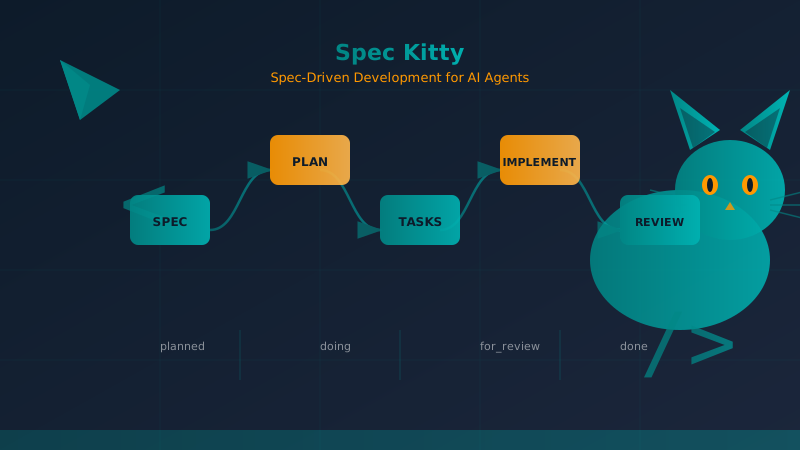
Table of Contents
Related reads: Spec-Driven Development with Agentic AI · Git Worktrees for Parallel Development · AI Agents in Android Development
When a mobile development team works with one AI coding agent, the workflow feels manageable. You describe what you want, the agent writes code, you review it, and the feature lands in your codebase. But when you add a second agent — maybe one handling backend logic while another builds the UI — the cracks appear: which agent is working on what, where did requirements get lost, how do you merge two separate implementations without conflicts?
Spec Kitty addresses this by treating the repository as the single source of truth for everything AI agents need to stay aligned. It is an open-source CLI (Python, Python 3.11+) that structures work around missions — self-contained units of functionality with their own lifecycle, work packages, and kanban lane state. The core workflow follows seven phases:
spec -> plan -> tasks -> next -> review -> accept -> mergeWhat makes Spec Kitty distinctive is its philosophy: the code is the source of truth, not the specification. Spec Kitty specs are change requests — deltas describing what you want to add, modify, or remove — rather than comprehensive documentation. The agent always reads the actual code to understand the current state before generating new implementation. After a merge, the spec becomes historical context; the code is what matters.
This article is a comprehensive, fact-based walkthrough of every major feature in Spec Kitty, drawn directly from the project repository at github.com/Priivacy-ai/spec-kitty.
What Problem Spec Kitty Solves
AI coding sessions frequently lose requirements, decisions, or acceptance criteria. An agent starts implementing a feature, the developer answers some questions, but three weeks later nobody remembers why a particular architectural decision was made or what the original scope was. Spec Kitty solves this by storing every artifact — specs, plans, task breakdowns, review comments, and merge state — directly in the repository under kitty-specs/.
The tool is designed for teams that:
- Run AI coding sessions where requirements drift mid-implementation
- Have multiple agents or developers needing clear work package boundaries
- Want everything version-controlled with full audit history
- Need a local workflow first, with optional hosted tracker integrations later
It is probably overkill for one-off edits, tiny scripts, or teams that do not use Git.
The Core Data Model: Missions, Work Packages, and Lanes
Missions
A mission is Spec Kitty’s term for a unit of functionality. Each mission lives in its own directory under kitty-specs/ and carries everything the team needs to understand, plan, implement, and review that functionality:
kitty-specs/
└── 001-auth-system/
    ├── spec.md           # What to build (the delta/change request)
    ├── plan.md           # How to build it (technical approach)
    ├── research.md       # Investigation findings (optional)
    ├── data-model.md     # Domain entities and relationships
    ├── contracts/        # API specifications
    ├── tasks.md          # Master task checklist
    └── tasks/            # Individual work package prompts (flat structure)
        ├── WP01-deps.md
        ├── WP02-storage.md
        ├── WP03-biometric.md
        └── WP04-integration.md
Each mission has a slug (kebab-case, e.g., 001-auth-system) that serves as its human-readable identifier, and a ULID-based canonical identity (mission_id) assigned at mission creation time. The three-digit numeric prefix is display-only and assigned at merge time — this eliminates the collision problem where two missions could share the same NNN- prefix and confuse selectors, branches, and dashboards.
The branch and worktree naming convention uses the ULID prefix (mid8) to guarantee uniqueness:
- Branch:
kitty/mission-<human-slug>-<mid8>-lane-<id>(e.g.,kitty/mission-my-feature-01J6XW9K-lane-a) - Worktree:
.worktrees/<human-slug>-<mid8>-lane-<id>
Work Packages
A mission is broken into work packages (WPs) — individual prompts an agent can execute in isolation. Each work package is a flat file in tasks/ with YAML frontmatter encoding its lane state:
---
work_package_id: "WP01"
title: "Database Schema"
lane: "in_progress"
assignee: "claude"
agent: "claude"
shell_pid: "12345"
review_status: ""
review_feedback: ""
---
The frontmatter lane field is retained for backward compatibility with pre-3.0 features, but as of Spec Kitty 3.0, the canonical status model uses an append-only event log at status.events.jsonl. Every lane transition is an immutable StatusEvent:
{"actor":"claude","at":"2026-02-08T12:00:00+00:00","event_id":"01HXYZ...","evidence":null,"execution_mode":"worktree","feature_slug":"034-feature","force":false,"from_lane":"planned","reason":null,"review_ref":null,"to_lane":"claimed","wp_id":"WP01"}The reduce() function replays all events to produce a StatusSnapshot (materialized as status.json). This means the same events always produce the same snapshot — a deterministic, auditable state machine.
The 9-Lane State Machine
Work packages move through nine lanes during their lifecycle:
planned -> claimed -> in_progress -> for_review -> in_review -> approved -> done
       + blocked (reachable from planned, claimed, in_progress, for_review, in_review, approved)
       + canceled (reachable from all non-terminal lanes)
The state machine enforces exactly 27 legal transitions. Any transition not in this list is rejected unless --force is used (which requires actor + reason for audit). The done and canceled lanes are terminal — leaving them requires --force.
The canonical event log tracks every transition. This enables:
- Immutability: No event is ever modified or deleted
- Deterministic replay: Same events always produce the same snapshot
- Debugging: Full history of who did what, when, and why
- Metrics: Calculate time-in-lane, cycle time, throughput from the event stream
- Coordination: Multiple agents can see what others are doing
Git Worktrees: Parallel Development Without Branch Switching
Spec Kitty uses git worktrees to isolate mission implementation. When you run /spec-kitty.specify, the CLI:
- Creates a semantic branch:
kitty/mission-<slug>-<mid8>-lane-a - Creates a worktree at
.worktrees/<slug>-<mid8>-lane-a/ - Changes your agent to that isolated checkout
This matters because:
- No branch-switching overhead: Work in the mission worktree, make commits, keep main clean. No
git stash/git checkoutcycles when you need to verify something on main quickly. - True parallel development: If you’re building two features simultaneously, have two worktrees with different agents working independently. Each worktree has its own working directory, own branch, no interference.
- Clean transfer: When a mission is complete, the worktree merges cleanly and disappears. No orphaned branches.
For mobile development in Kotlin and Android, the worktree model aligns well with how Gradle modules work. A feature might involve changes to the app module, a new library module for a biometric wrapper, and test modules — all isolated in the worktree without touching main.
The dashboard shows which worktrees are active, what lane each work package is in, and which agent is working on what task. You can filter by agent, see activity history, and identify blockers at a glance.
The Dashboard: Real-Time Kanban Visibility
Spec Kitty includes a local kanban dashboard that runs as a background process:
spec-kitty dashboard        # Start the dashboard
spec-kitty dashboard --open  # Start and open in browser immediately
spec-kitty dashboard --port 8080  # Custom port
spec-kitty dashboard --kill # Stop the background process
The dashboard URL is stored in .kittify/.dashboard. If the browser does not open automatically, read that file to get the URL.
Dashboard Views
Kanban Board: Mirrors the lane workflow (planned -> claimed -> in_progress -> for_review -> in_review -> approved -> done) with live WebSocket updates — no manual page reload needed.
Feature Overview: Summarizes feature progress, artifacts, and worktrees across the entire project.
Dashboard API Endpoints
The dashboard exposes REST endpoints for custom monitoring and automation:
GET /api/features— List all features and their work packagesGET /api/feature/{slug}— Get specific feature details
You can build custom alerts when tasks spend more than 4 hours in the doing lane, or export metrics for daily stand-up reports.
Using the Dashboard in Daily Workflow
In a dashboard-driven development workflow, the team uses the dashboard as the single source of truth:
- Morning alignment: Everyone opens the dashboard, PM reviews lane counts per feature and flags work packages stuck in “doing” more than 24 hours
- Assign work: Tech lead runs
.kittify/scripts/bash/tasks-list-lanes.sh FEATURE-SLUGto spot idle prompts, agents claim them viaspec-kitty agent action implement WP01 - Midday review: Designer checks prompts in
for_reviewlane, adds feedback as markdown comments, moves back toplannedor forward todone - Evening recap: PM takes dashboard screenshot for stakeholders, tech lead queries the API for metrics
Even for solo developers, the dashboard provides visual progress, context recovery after interruptions, and a motivation boost watching tasks move from planned to done.
The Charter: Immutable Principles, Not Comprehensive Documentation
Spec Kitty does not use a constitution (as Spec Kit does) or comprehensive project documentation. Instead, it uses a charter — a small set of immutable principles stored at .kittify/memory/charter.md that guide agent behavior without attempting to document the current system state.
The charter defines principles like:
- Test-first imperative: No implementation code shall be written before unit tests are written and confirmed to fail
- Library-first architecture: Each functionality starts as an independent module
- Simplicity constraints: Prefer simple solutions over complex ones
This is fundamentally different from Spec Kit’s constitution model. A constitution attempts to document all architectural decisions, coding standards, technology choices, and constraints. A charter defines principles that guide behavior regardless of how the system currently looks.
The charter lives at .kittify/memory/charter.md and applies to all missions in the project, enforced automatically by Spec Kitty commands. When running /spec-kitty.specify, /spec-kitty.plan, or /spec-kitty.tasks, the charter influences what goes into the artifacts — security requirements, performance targets, and testing obligations are baked in automatically rather than rediscovered for each feature.
For Android and Kotlin projects, you might add charter articles like:
- AndroidX library version constraints
- Compose testing requirements
- Minimum SDK requirements enforced at spec level
- Hilt module conventions
The charter can be updated via /spec-kitty.charter, which creates a new version. Existing missions accepted under an older charter version are grandfathered — they do not need to meet new requirements until updated.
Multi-Agent Orchestration
Spec Kitty supports multi-agent workflows where multiple AI coding agents work simultaneously on the same mission or different missions. The tool is designed for agents like Claude, Codex, Cursor, Gemini, Copilot, OpenCode, Qwen, Windsurf, Kiro, Vibe, Pi, and Letta.
Execution Lanes for Parallel Work Within a Mission
Within a single mission, Spec Kitty supports execution lanes — parallel work packages that can run concurrently. The system tracks dependencies and ensures that upstream work packages complete before dependent ones start.
Agent Specialization Patterns
A common pattern is agent specialization:
- Claude: Discovery, planning, review (heavy narrative tasks)
- Gemini: Data modeling, research, API design (technical depth)
- Cursor: Implementation (IDE integration, rapid iteration)
For a feature like biometric authentication, the orchestration looks like this:
- Lead (Claude) runs
/spec-kitty.specifyto create the mission structure - Lead switches to worktree:
cd .worktrees/001-auth-biometrica - Gemini runs research:
/spec-kitty.researchinvestigates biometric security implications - Claude runs plan:
/spec-kitty.plangenerates the implementation approach - Claude runs tasks:
/spec-kitty.taskscreates work packages - Cursor implements:
spec-kitty agent action implement WP03while Claude handles review - Lead accepts and merges: After all WPs complete
The flat tasks/ directory with lane-based frontmatter makes this coordination robust. Each agent works on their assigned WP without stepping on others’ work. The dashboard shows lane positions in real time so nobody duplicates effort.
CLI Status Command
The spec-kitty agent tasks status command displays a 5-column kanban board in the terminal:
Feature: 012-user-authentication
Kanban Board
  Planned       Doing         For Review    In Review     Approved      Done
  WP04-tests    WP03-front..  WP02-api      WP06-auth     WP05-docs     WP01-database
                (stale: 15m)

  1 WPs         1 WPs         1 WPs         1 WPs         1 WPs         1 WPs
Progress: 1/6 (16.7%)
The display maps the 9 internal lanes to 6 board columns. blocked and canceled WPs appear in separate sections below the board when present.
Missions Beyond Software Development
Research Missions
Spec Kitty supports a Deep Research mission template for systematic investigations:
cd my-research-project
spec-kitty mission switch research  # Activate Deep Research Kitty
Research missions create different artifacts:
research.md— Findings and analysisevidence-log.csv— Source tracking with confidence ratingscomparison-matrix.md— Side-by-side comparisonssynthesis-notes.md— Integration insights
The workflow:
- Define research question via
/spec-kitty.specify - Create methodology via
/spec-kitty.plan - Collect evidence via
/spec-kitty.research - Generate tasks via
/spec-kitty.tasks - Execute research via
/spec-kitty.implement - Synthesize findings via
/spec-kitty.review - Finalize via
/spec-kitty.accept
After research completes, switch back to software development mode via spec-kitty mission switch software-dev and use findings to inform implementation missions.
Solo Developer Workflow
Even for individual developers, Spec Kitty provides structure that improves outcomes:
- Install and initialize:
pipx install spec-kitty-cli && spec-kitty init my-app --ai claude - Create charter:
/spec-kitty.charterdefines your principles (code quality, testing, security) - Specify:
/spec-kitty.specifydescribes what to build - Plan:
/spec-kitty.plandefines the technical approach - Research (optional):
/spec-kitty.researchfor technical investigations - Tasks:
/spec-kitty.tasksgenerates work packages, visible in the dashboard - Implement:
/spec-kitty.implementmoves a WP todoingand shows implementation instructions - Review:
/spec-kitty.reviewchecks the work against the spec - Accept and merge:
/spec-kitty.accept && /spec-kitty.merge --push
Time estimates for a simple feature: roughly 1 hour total (10 min charter, 5-10 min specify, 5-10 min plan, 2 min tasks, 30-60 min implement, 5-10 min review, 2 min accept/merge).
The 7-Phase Workflow in Detail
Phase 1: Specify
/spec-kitty.specify creates a mission from product intent. The CLI enters discovery mode, asking clarifications about scope, edge cases, and acceptance criteria. The result is kitty-specs/<slug>/spec.md — a structured change request document, not comprehensive documentation.
Phase 2: Plan
/spec-kitty.plan generates plan.md with the technical approach: which libraries to use, module structure, architectural decisions with rationale, additions to build.gradle.kts.
Phase 3: Tasks
/spec-kitty.tasks generates tasks.md and individual work package files in tasks/. Each WP has a prompt bundle with context from spec.md and plan.md, specific implementation instructions, acceptance criteria for self-verification, and lane transition commands.
Phase 4: Next (Runtime)
spec-kitty next --agent claude --mission <slug> asks Spec Kitty what the agent should do next. The runtime chooses the next action based on WP state, dependencies, and agent availability.
Phase 5: Review
/spec-kitty.review auto-detects the first WP with for_review lane, moves it to in_review, and shows review instructions. The reviewer approves (→ approved → done) or requests changes (→ planned with feedback).
Phase 6: Accept
/spec-kitty.accept validates all WPs are complete, metadata is correct, tasks checklist is fully checked. It registers acceptance metadata in meta.json.
Phase 7: Merge
/spec-kitty.merge --push merges the mission branch to main and cleans up the worktree. The system has merge preflight validation, conflict forecasting, and spec-kitty merge --resume / spec-kitty merge --abort for interrupted merges.
Comparing Spec Kitty to Alternatives
Spec Kitty vs Spec Kit (GitHub)
Spec Kit uses a constitution as the primary context artifact — comprehensive documentation of all architectural decisions. It works for greenfield projects with stable architecture but breaks for brownfield projects where decisions are scattered through the codebase.
Spec Kitty eliminates the constitution in favor of a charter (immutable principles) plus code-as-truth. The agent always reads actual code, not documentation. This is more robust as the system evolves.
Spec Kitty vs OpenSpec
OpenSpec treats each modification as a formal change proposal with retroactive spec building — specs accumulate in main/specs/ as changes are archived. It provides excellent traceability at the change level.
Spec Kitty organizes around missions (outcomes) rather than changes (modifications). A mission can span multiple systems. The charter-based governance provides constraints that OpenSpec lacks.
Key Differentiators
| Aspect | Spec Kitty | Spec Kit | OpenSpec |
|---|---|---|---|
| Primary artifact | Mission with WPs | Constitution | Change proposal |
| Context source | Charter + code | Constitution + code | Canonical specs built retroactively |
| Spec scope | Delta (change request) | Comprehensive | Delta or comprehensive |
| Human gates | 7 phases | 4 phases | Proposal + validate |
| Parallel development | Git worktrees (native) | Branches (manual) | Branches (manual) |
| Brownfield friendliness | High | Medium | High |
| CLI | Python (spec-kitty) | Node.js (@github/spec-kit) | Node.js (openspec) |
Getting Started
Install the CLI:
pipx install spec-kitty-cliCreate or initialize a project:
spec-kitty init my-project --ai claude
cd my-project
spec-kitty verify-setup
Open your AI coding agent and run the core workflow:
/spec-kitty.charter
/spec-kitty.specify Build a user authentication system with email/password and biometric fallback.
/spec-kitty.plan
/spec-kitty.tasks
Let the runtime choose next actions:
spec-kitty next --agent claude --mission <mission-slug>Review, accept, merge:
/spec-kitty.review
/spec-kitty.accept
/spec-kitty.merge --push
Open the dashboard any time:
spec-kitty dashboard --openConclusion
Spec Kitty provides a structured approach to AI-augmented development that scales from solo developers to multi-agent teams. Its core philosophy — code is truth, specs are deltas — prevents the documentation drift that plagues traditional spec-driven approaches. The 9-lane state machine with append-only event logging gives you a deterministic, auditable record of every decision. Git worktrees enable true parallel development without branch-switching overhead. The dashboard provides real-time visibility that keeps everyone aligned.
For mobile development teams using Kotlin and Android, Spec Kitty’s charter system can encode platform-specific constraints (AndroidX versions, Compose testing requirements, Hilt conventions) and its worktree model fits naturally with Gradle’s module-based architecture.
The project is actively maintained — the v3.x series introduced the canonical event-log status model, ULID mission identities, and shared package boundary cutover. Watch the repository for hosted sync, teamspace authentication, and enhanced dashboard visualizations coming in future releases.
References
You might also be interested in
OpenSpec for Mobile Development: Spec-Driven Development in Android and Kotlin
How to apply OpenSpec in Android and Kotlin projects to keep AI agents aligned with architecture, with practical examples of change proposals, task validation, and living files.
The Socratic Agent Series (Part 2): Spec-Driven Development & Defeating the Yes-Man AI
How AI's desire to please you is destroying your codebase. We explore Spec-Driven Development frameworks and how to implement Socratic verification gates in your Android CI pipeline.
Lean Task-First Development: Beads, LeanSpec, and Taskmaster in Practice
A deep dive into three tools that solve context rot and keep AI coding agents focused: Beads (git-native DAG issue tracker), LeanSpec (minimal spec-driven workflow), and Taskmaster (PRD-to-task orchestration). Real commands, real workflows, real indie dev perspective.