
OpenSpec for Mobile Development: Spec-Driven Development in Android and Kotlin
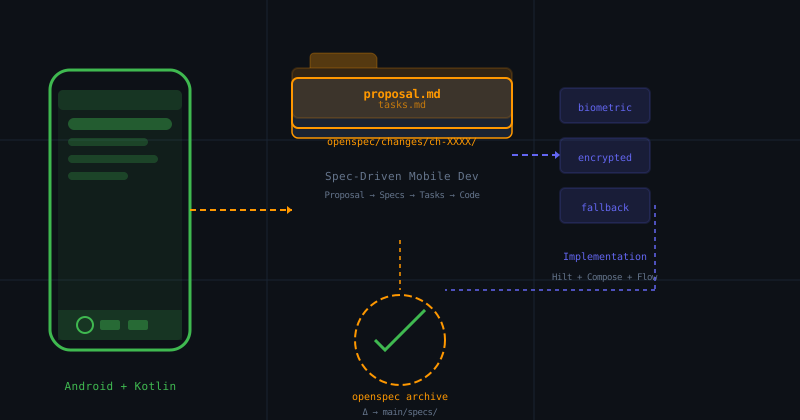
Table of Contents
Related readings: Deep Analysis of SDD Frameworks: Spec Kit, OpenSpec and BMAD · Spec-Driven Development with Agentic AI · Complete Guide: Stack Recommended for Building AI Agents in 2026
Mobile development has a particular discipline that web development doesn’t share: the fragmentation of technical contexts. Each mobile platform — Android with Kotlin, iOS with Swift — has its own release cycles, hardware constraints, native APIs, and architectural patterns. When you introduce AI agents into this ecosystem, the risk of misalignment multiplies: the agent might suggest a deprecated Android API, use an inadequate concurrency pattern for Kotlin, or implement a feature ignoring Material Design guidelines.
OpenSpec was designed with this reality in mind. Its change proposal model and retroactive specification building fits naturally with the mobile development cycle: small iterations, each with a clear and verifiable purpose.
Why SDD Is Particularly Important in Mobile Development
Context Amnesia in Mobile Sessions
When you work with an AI agent on an Android project, each session starts without context of the current project state. The agent doesn’t know that:
- Three months ago you banned the use of
LiveDatain favor ofFlowbecause the team adopted unidirectional data architecture. - There’s a rule that all network calls must go through a repository with in-memory cache.
- The login screen has a specific security requirement: never store tokens in
SharedPreferences, always in Jetpack Security’s encrypted shared preferences.
These decisions aren’t in the code. They’re in the developer’s head or scattered across documents the agent never reads. The result: code that violates established architectural decisions.
The Relationship Between Specification and Mobile Pipeline
In mobile development, the specification isn’t an optional document — it’s part of the quality pipeline. Google Play Console and App Store Connect have review requirements that include app behavior, performance, and security. A precise specification acts as the contract you verify before each release.
OpenSpec allows this contract to be readable by machines and humans, and to evolve with the project through its delta archive mechanism.
The Anatomy of OpenSpec in an Android Project
Directory Structure
An Android project with OpenSpec integrated has this structure:
my-android-project/
├── app/
│   └── src/main/
│       ├── java/com/myapp/
│       └── res/
├── openspec/
│   ├── main/
│   │   └── specs/                 # Canonical project specs
│   │       ├── architecture.md
│   │       ├── concurrency.md
│   │       └── security.md
│   └── changes/
│       └── ch-0042-refactor-login/  # Each change lives here
│           ├── proposal.md
│           ├── specs/
│           │   └── login-security-spec.md
│           ├── tasks.md
│           └── design.md
└── build.gradle.kts
The openspec/main/specs/ folder is the Source of Truth for the project. It contains the specifications that AI agents must consult before generating any code.
OpenSpec Workflow for Android
The flow follows a clear cycle:
Proposal → Spec Delta → Tasks → Implementation → Archive
     ↓            ↓          ↓           ↓            ↓
  Human       human+AI     AI         AI+Tests    Merge to main/
  writes      validates   generates   verify       specs
Each phase has an explicit checkpoint. The agent cannot advance to the next without the previous one being validated.
Change Proposal: The Central Artifact
Anatomy of a proposal.md for Android
The proposal defines the why of the change. In a mobile context, this includes platform-specific considerations:
# Proposal: Refactor authentication system to use BiometricPrompt

## Context

The current system uses PIN authentication stored in SharedPreferences.
Google Play Console identified this as a security issue in the audit.
The security team issued a requirement to migrate to BiometricPrompt.

## Scope

### In scope
- Replace SharedPreferences with EncryptedSharedPreferences
- Integrate BiometricPrompt API for biometric authentication
- Maintain PIN fallback for devices without biometric sensor
- Update login and settings flows

### Out of scope
- Changes to backend logic
- Modifications to server session management system
- Local database updates

## Detected Technical Constraints

1. **MinSdk 23 (Android 6.0)**: BiometricPrompt requires API 23+
2. **Jetpack Security**: Use `androidx.security:security-crypto`
3. **Compose**: Authentication UI uses Jetpack Compose
4. **Testing**: Authentication module has unit tests with Mockk

## Success Criteria

- [ ] Biometric authentication functional on compatible devices
- [ ] PIN fallback works when biometric is unavailable
- [ ] Existing unit tests continue to pass
- [ ] No regression in new user registration flows
Why Specific Scope Matters in Mobile
In mobile development, changes often touch platform-specific APIs. Defining in/out of scope prevents the agent from proposing changes to the backend or unrelated components — a common mistake when the agent lacks context about mobile system boundaries.
Specs Delta: The Verifiable Contract
Structure of a Delta for Android
The spec delta contains requirements verifiable by machine:
# Delta: Biometric Authentication — Android

## MODIFIED: BiometricAuthentication

### Requirements

1. **SHALL** use `BiometricPrompt` from `androidx.biometric` for authentication
2. **SHALL** use `EncryptedSharedPreferences` to store credentials
3. **MUST** maintain backward compatibility with devices without biometric sensor
4. **SHALL** show specific error message when biometrics are unavailable

### Observable Behavior

| Scenario | Input | Expected Output |
|-----------|-------|-----------------|
| Device with sensor | User taps "Login with fingerprint" | `BiometricPrompt` is shown |
| Biometrics unavailable | Login intent | Automatic PIN fallback |
| Successful authentication | Valid credentials | Navigate to `HomeScreen` |
| Failed authentication | Invalid credentials | Show error "Invalid credentials" |

### Test Scenarios
GIVEN the user has devices with biometric sensor configured WHEN selects fingerprint authentication THEN the system shows BiometricPrompt AND upon successful authentication navigates to HomeScreen
GIVEN the user is on a device without biometric sensor WHEN attempts to authenticate THEN the system shows PIN screen AND proceeding normally
### The Importance of SHALL/MUST in Mobile

SHALL and MUST keywords aren't rhetorical — they're **executable instructions**. When an AI agent like Cursor or Claude Code has access to these specs, it can verify its implementation against the contract before marking a task as completed. This drastically reduces the need for manual reviews.

---

## Tasks: The Verifiable Checklist

### tasks.md Format for Android

```markdown
# Tasks: Refactor authentication system

## Phase 1: Dependencies

- [ ] T001: Add dependency `androidx.biometric:biometric:1.1.0` in build.gradle.kts
- [ ] T002: Add dependency `androidx.security:security-crypto:1.1.0-alpha06`
- [ ] T003: Verify EncryptedSharedPreferences is available on minSdk 23

## Phase 2: Secure Storage

- [ ] T004: Create `SecureTokenStorage` wrapper over EncryptedSharedPreferences
- [ ] T005: Migrate stored PIN from SharedPreferences to EncryptedSharedPreferences
- [ ] T006: Implement token read/write with CryptoSheet

## Phase 3: BiometricPrompt

- [ ] T007: Create `BiometricAuthenticator` with BiometricPrompt
- [ ] T008: Implement `authenticationCallback` with error handling
- [ ] T009: Add PIN fallback when `BiometricManager.canAuthenticate()` returns false
- [ ] T010: Integrate BiometricAuthenticator in `LoginViewModel`

## Phase 4: UI and Flow

- [ ] T011: Modify `LoginScreen` to add "Login with fingerprint" button
- [ ] T012: Implement fallback logic in `LoginViewModel`
- [ ] T013: Update navigation to go to HomeScreen after successful auth

## Phase 5: Testing and Validation

- [ ] T014: Verify existing tests in `AuthRepositoryTest` continue to pass
- [ ] T015: Add unit tests for BiometricAuthenticator
- [ ] T016: Run `lintDebug` and `testDebugUnitTest` without errors
Atomic Verifiability
Each task has a verifiable result. T004 creates a specific file. T005 modifies known behavior. T014 verifies that existing tests continue to pass. The agent can mark [x] each task when it verifies it, without ambiguity.
Design: Architectural Decisions for Android
The design.md File
# Design: Authentication Refactoring

## Decision 1: BiometricPrompt over FingerprintManager (deprecated)

**Choice**: Use `BiometricPrompt` (API 28+) with `BiometricManager` (API 23+)

**Reasoning**: `FingerprintManager` was deprecated in API 28.
`BiometricPrompt` provides consistent UI and unified callbacks.
Backward compatible using `BiometricManager.canAuthenticate()`.

## Decision 2: EncryptedSharedPreferences over Direct Keystore

**Choice**: Use `EncryptedSharedPreferences` instead of direct `KeyStore`

**Reasoning**: `EncryptedSharedPreferences` abstracts the complexity of:
- Key generation with `MasterKey`
- AES-256 GCM encryption
- Automatic primitive type serialization

The security cost vs. direct Keystore usage doesn't justify the complexity.

## Decision 3: Synchronous PIN Fallback

**Choice**: PIN fallback is immediate, without delay or additional confirmation

**Reasoning**: The user flow expects that if biometrics fail or are unavailable,
the system immediately shows the alternative. An additional delay breaks the UX.

## Decision 4: Compose UI for Login

**Choice**: Keep existing UI in Jetpack Compose

**Reasoning**: The project already uses Compose. There's no reason to introduce XML
into a screen that already has Compose. The only change is adding a button and modifying
the ViewModel to handle the new flow.
Why Design Is Living
The design.md file isn’t documentation at the end — it’s context the agent consumes before implementing. When the agent knows that FingerprintManager is deprecated and that BiometricPrompt is the alternative, it doesn’t propose solutions using deprecated APIs.
The Archive Cycle: Building Specs Retroactively
The openspec archive Command
When a change is completed and verified:
npx openspec archive --change ch-0042-refactor-loginThe system:
- Validates: Confirms all tasks in
tasks.mdare marked[x] - Merges: Integrates spec deltas from
specs/intoopenspec/main/specs/ - Archives: Moves the change folder to
openspec/changes/archive/YYYY-MM-DD-refactor-login/ - Registers: Updates the spec index with the new versions
Retroactive Spec Building
This is the most valuable feature for existing mobile projects. If you’ve been building an Android app for two years without formal specs, OpenSpec lets you build one incrementally:
- Change 1: You add biometric authentication → Write the delta
- Archive: The delta merges into
openspec/main/specs/security.md - Change 2: You add image caching → Write the delta
- Archive: The delta merges into
openspec/main/specs/performance.md
After 10 changes, you have a specs document as complete as if you’d written it from scratch — but without the upfront documentation effort you’d never use.
Integration with the Android Ecosystem
OpenSpec with Jetpack Compose
Integration with Compose is natural because Compose follows declarative principles that map well to specs:
// The spec says: SHALL show error when credentials are invalid
@Composable
fun LoginScreen(
    state: LoginState,
    onLoginClick: () -> Unit,
    onBiometricClick: () -> Unit
) {
    // Implementation follows the spec, not the other way around
    Column {
        // ...
        if (state.error != null) {
            Text(
                text = state.error,
                color = MaterialTheme.colorScheme.error
            )
        }
    }
}
The spec defines the behavior. The code implements it. The test verifies it.
OpenSpec with Hilt and Dagger
Specs can document dependency injection decisions:
## MODIFIED: Dependency Injection

### Requirements

1. **SHALL** use Hilt for dependency injection
2. **SHALL** make all repositories `@Singleton`
3. **MUST NOT** use `ApplicationComponent` (deprecated)
This prevents an agent from proposing to refactor to Koin when the team has invested in Hilt.
OpenSpec with Coroutines and Flow
Since Kotlin uses asynchronous flows intensively, concurrency specs are critical:
## MODIFIED: Concurrency Model

### Requirements

1. **SHALL** use `viewModelScope` for all operations in ViewModels
2. **SHALL** use `Dispatchers.IO` for network and database operations
3. **MUST** cancel coroutines in `onCleared()`
4. **SHALL** expose state as `StateFlow<T>`, not `LiveData<T>`
Automated Validation with Mobile CI
Quality Gates in GitHub Actions
The tasks.md file can integrate with the project CI:
# .github/workflows/android-verify.yml
name: Verify Spec Alignment

on:
  pull_request:
    branches: [main]

jobs:
  spec-validation:
    runs-on: ubuntu-latest
    steps:
      - uses: actions/checkout@v4

      - name: Validate OpenSpec tasks
        run: |
          npx openspec validate --change ${{ github.event.inputs.change }}

      - name: Run unit tests
        run: ./gradlew testDebugUnitTest

      - name: Run lint
        run: ./gradlew lintDebug
The agent cannot merge if tasks aren’t completed or if tests fail.
Comparison: OpenSpec vs Spec Kit on Mobile
| Aspect | OpenSpec | Spec Kit |
|---|---|---|
| Model | Change-by-change | Constitution + features |
| Entry curve | Low — starts empty | High — requires writing constitution |
| Existing specs | Retroactive building | Needs full spec upfront |
| Brownfield | Ideal | Problematic |
| Gates | Task validation | Four blocked phases |
| Android/Compose | Agnostic — works with any | Copilot integration |
| Maturity | Newer | More mature (GitHub) |
When to Choose Each One
Use OpenSpec if:
- You have an existing Android project without formal specs
- You want to introduce rigor incrementally
- The team makes frequent, small changes
- You need traceability per specific change
Use Spec Kit if:
- The project starts from scratch with defined architecture
- You want deep Copilot integration
- The team already uses GitHub Copilot Workspace
- Phase ceremony is a feature, not a bug
Practical Guide: Getting Started with OpenSpec on Android
Step 1: Initialization
# Install OpenSpec CLI
npm install -g openspec

# In the Android project root
npx openspec init

# Create the main specs directory
mkdir -p openspec/main/specs
Step 2: Write Your First Architecture Spec
# openspec/main/specs/architecture.md

## Intent

This document establishes the fundamental architectural decisions of the project.
All AI agents must consult this document before generating code.

## Technology Stack

- **Language**: Kotlin 1.9+
- **MinSdk**: 24 (Android 7.0)
- **TargetSdk**: 34 (Android 14)
- **UI**: Jetpack Compose (no XML)
- **DI**: Hilt
- **Concurrency**: Coroutines + Flow (no LiveData)
- **Network**: Retrofit + OkHttp + Moshi
- **Persistence**: Room + DataStore

## Architectural Patterns

1. **Unidirectional Data Flow (UDF)**
   - State flows to UI as StateFlow
   - UI emits events to ViewModel
   - ViewModel processes events and updates state

2. **Clean Architecture Layers**
   - `ui/` — Composables and ViewModels
   - `domain/` — Use cases and domain models
   - `data/` — Repositories, data sources, DTOs
Step 3: Create Your First Change Proposal
npx openspec new-change "add-bearer-authentication"This creates the skeleton openspec/changes/ch-0001-add-bearer-authentication/ with necessary files.
Step 4: Validate Before Implementing
npx openspec validate --change ch-0001-add-bearer-authenticationThe validator confirms each task traces back to a requirement and that there are no orphan tasks.
Step 5: Archive When Complete
npx openspec archive --change ch-0001-add-bearer-authenticationDeltas merge into openspec/main/specs/ and the change moves to archive.
The Long-Term Value
OpenSpec isn’t just a documentation system — it’s a knowledge governance framework for mobile projects. When every architectural decision is documented and accessible to AI agents, the project becomes:
- Auditable: You can answer “why does this code exist?” by consulting the change history
- Transferable: A new developer can understand the architecture by reading the specs, not the code
- Resistant to degradation: AI agents stay aligned because specs are the contract
- Evolutionary: Specs grow with the project without requiring upfront effort
For mobile teams building complex applications with AI agents, OpenSpec is the layer of rigor that sits between rapid prototyping and sustainable production.
References and Resources
You might also be interested in
Socratic Method Prompts: Breaking AI Sycophancy in Kotlin & Android Development
Learn how to stop LLMs from being compliant assistants and turn them into ruthless evaluators. Discover the mathematical anatomy of Socratic prompts for Android architecture, Kotlin Coroutines, and strict Spec-Driven Development.
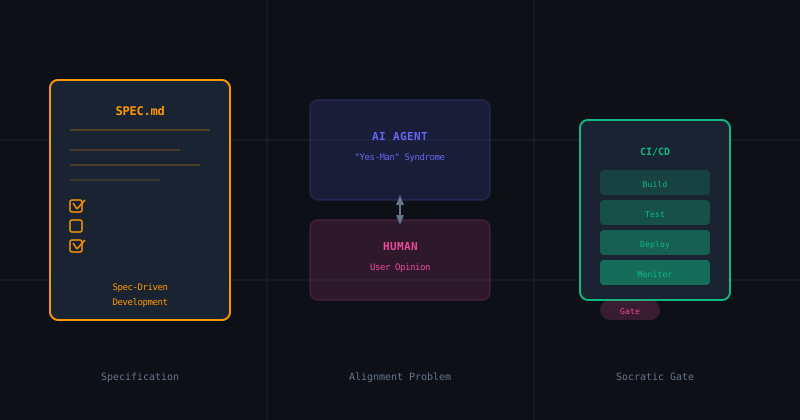
The Socratic Agent Series (Part 2): Spec-Driven Development & Defeating the Yes-Man AI
How AI's desire to please you is destroying your codebase. We explore Spec-Driven Development frameworks and how to implement Socratic verification gates in your Android CI pipeline.
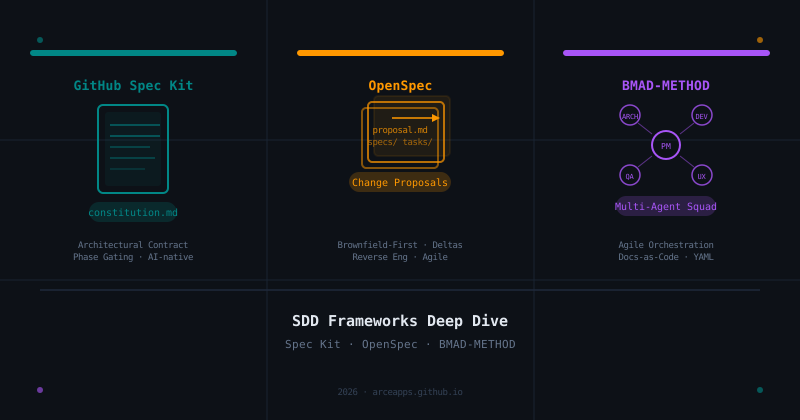
SDD Frameworks Deep Dive: GitHub Spec Kit, OpenSpec, and BMAD-METHOD Compared
A thorough analysis of the three leading Spec-Driven Development frameworks: the architectural contracts of GitHub Spec Kit, the change-proposal agility of OpenSpec, and the multi-agent orchestration of BMAD-METHOD.