
Spec-Driven Development with Agentic AI: Methodologies, Frameworks, and Real-World Implementation
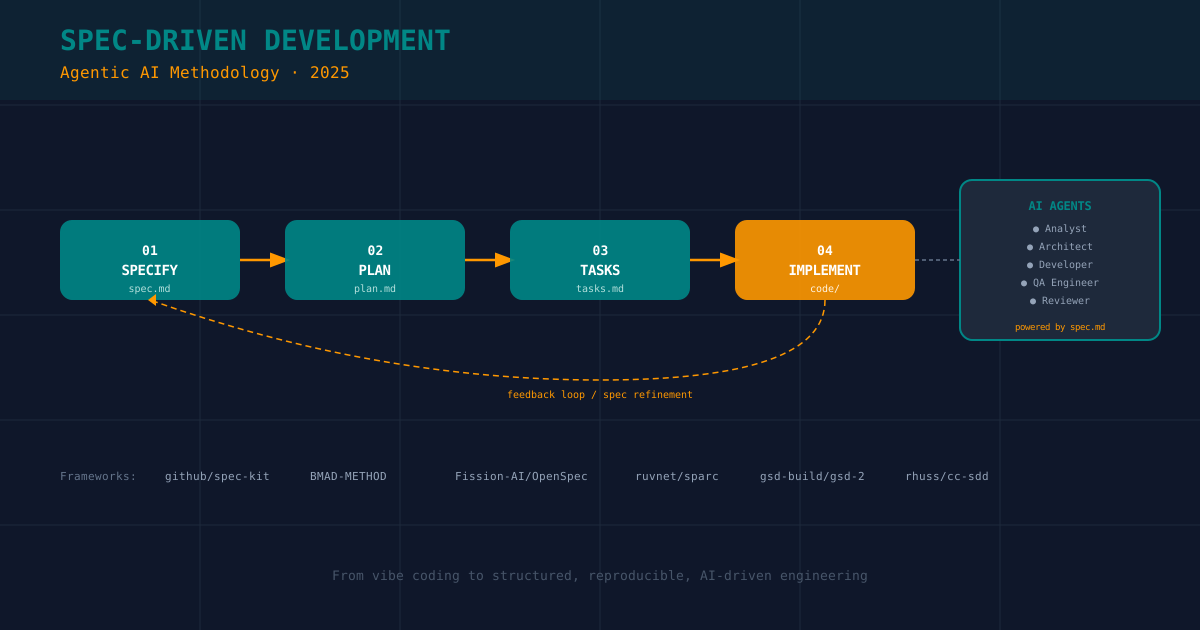
Table of Contents
Related reading: Building AI Agent Skills for Development · Configuring AI Agents for Your Workflow · AI Code Reviews: Automated Quality Gates
🧠 The Crisis of Vibe Coding
For the past couple of years, “vibe coding” has become the unofficial name for a prevalent pattern: open a chat window, describe a feature in loose natural language, hope the AI understands, copy-paste the output, and repeat until something more or less works. It is fast, fun, and completely unsustainable at scale.
The fundamental problem is not the AI’s capability — modern large language models (LLMs) are genuinely impressive at code generation. The problem is context degradation: without a stable, structured source of truth, every message to an AI agent is a fresh negotiation with a system that has no durable memory of your architecture, constraints, past decisions, or quality standards.
The result is code that accumulates technical debt at the same speed it was generated. Spec-Driven Development (SDD) is the engineering discipline that changes this equation.
📐 What Is Spec-Driven Development?
Spec-Driven Development is a methodology that elevates the formal specification document to the central, authoritative artifact in the software development lifecycle. The spec — not the code, not the ticket, not the conversation — is the single source of truth.
In traditional TDD, you write tests before code. In SDD, you write specifications before tests and code. The specification captures:
- Intent: Why this feature exists, what business problem it solves.
- Contracts: Precise definitions of data models, API surfaces, and UI states.
- Constraints: Non-functional requirements — performance, security, accessibility, library choices.
- Edge cases: Every scenario the happy path ignores.
- Acceptance criteria: Machine-verifiable conditions for completeness.
The critical insight for the agentic AI era is that a well-written spec is not documentation that humans write and forget. It is structured context that AI agents consume, verify against, and use to drive implementation. A spec is a program that programs the programmer — human or artificial.
┌──────────────────────────────────────────────────────────┐
│                     SDD LIFECYCLE                        │
│                                                          │
│  ┌─────────┐   ┌─────────┐   ┌─────────┐   ┌─────────┐ │
│  │ SPECIFY │──▶│  PLAN   │──▶│  TASKS  │──▶│  CODE   │ │
│  │ spec.md │   │ plan.md │   │tasks.md │   │  impl/  │ │
│  └─────────┘   └─────────┘   └─────────┘   └─────────┘ │
│       ▲                                          │       │
│       └──────────── feedback / refinement ───────┘       │
│                                                          │
│   Human checkpoints: Specify → Plan approval             │
│   AI autonomy: Tasks → Implementation                    │
└──────────────────────────────────────────────────────────┘
🌐 The Landscape: Key SDD Frameworks in 2025
The SDD ecosystem has matured significantly. Here is an expert overview of the most influential frameworks.
1. GitHub Spec Kit (github/spec-kit)
Released in September 2025 as an open-source MIT-licensed toolkit, GitHub Spec Kit codifies the four-phase workflow that the GitHub engineering team developed internally while building Copilot features.
The Four Phases:
| Phase | Artifact | Owner | Gate |
|---|---|---|---|
| Specify | specs/feature.md | Human + AI | Human approval |
| Plan | plan/architecture.md | AI + Human review | Human approval |
| Tasks | tasks.md (auto-generated) | AI | CI validation |
| Implement | src/ (code) | AI agent | Tests pass |
Workflow example using CLI:
# Initialize a new spec-driven project
uv tool install specify-cli --from git+https://github.com/github/spec-kit.git
specify init my-feature

# AI generates a detailed spec from your description
# → specs/my-feature.md

# Validate spec completeness
specify check

# AI generates the plan, tasks, and implementation sequentially
# With Copilot agent: @copilot /specify plan
# @copilot /specify tasks
# @copilot /specify implement
The genius of Spec Kit is its phase gating: an AI agent cannot skip to implementation without a human-approved plan. This creates a natural audit trail and prevents the runaway code generation that vibe coding enables.
Best for: Small to medium teams, open-source projects, GitHub-native workflows.
2. BMAD Method (bmad-code-org/BMAD-METHOD)
BMAD (Build More, Architect Dreams) is the most architecturally ambitious SDD framework available. Where Spec Kit is a four-step checklist, BMAD is a complete agentic organization chart.
It ships with over 20 specialized AI agents, each filling a role in a multi-agent pipeline:
┌─────────────────────────────────────────────────────────┐
│                   BMAD AGENT PIPELINE                   │
│                                                         │
│  Analyst ──▶ Product Manager ──▶ Architect              │
│                                      │                  │
│              Scrum Master ◀──────────┘                  │
│                   │                                     │
│         ┌─────────┼─────────┐                           │
│         ▼         ▼         ▼                           │
│    Developer   Developer  Developer                     │
│         │         │         │                           │
│         └─────────┼─────────┘                           │
│                   ▼                                     │
│              QA Engineer ──▶ Reviewer                   │
└─────────────────────────────────────────────────────────┘
BMAD enforces a tripartite spec structure:
specs/
├── api/           # OpenAPI / Swagger contracts
│   └── users.yaml
├── data/          # JSON Schema entity definitions
│   └── user.schema.json
└── behavior/      # Gherkin feature files
    └── user-auth.feature
This separation is architecturally elegant: the API spec defines the contract between services, the data spec defines entity structure and validation, and the behavior spec defines what the system must do from the user’s perspective — all three are machine-readable and testable.
# specs/behavior/user-auth.feature
Feature: User Authentication
  As a user
  I want to log in with my email and password
  So that I can access my personalized content

  Scenario: Successful login
    Given I am on the login screen
    When I enter valid credentials
    Then I should be redirected to the home screen
    And my session token should be persisted to EncryptedSharedPreferences

  Scenario: Invalid credentials
    Given I am on the login screen
    When I enter an incorrect password
    Then I should see an "Invalid credentials" error
    And the password field should show a shake animation
Best for: Enterprise projects, multi-agent coordination, teams that need audit trails and onboarding clarity.
3. OpenSpec (Fission-AI/OpenSpec)
OpenSpec takes a deliberately lightweight philosophy. It views specifications as living folders that travel alongside your code, not separate documentation silos.
Each proposed change generates a new folder:
.openspec/
└── proposals/
    └── 2025-login-redesign/
        ├── proposal.md       # Why: motivation and scope
        ├── spec.md           # What: detailed technical spec
        ├── design.md         # How: architecture and data model
        └── tasks.md          # Atomic implementation tasks
The key insight of OpenSpec is reviewer ergonomics: any developer (or agent) reviewing a PR can read the proposal folder to understand why the code changed, not just what changed. This dramatically reduces onboarding time and code review friction.
OpenSpec works natively with more than 20 AI tools including Claude, GitHub Copilot, Cursor, Amazon Q Developer, and Gemini. Its setup is a single command:
npx openspec initBest for: Individual developers, small teams, projects where adoption speed matters more than orchestration depth.
4. SPARC Framework (ruvnet/sparc)
SPARC (Specification, Pseudocode, Architecture, Refinement, Completion) is a cognitive scaffold for structuring interactions with AI agents on complex problems. It predates the modern SDD wave but its structured phase model influenced many successors.
S - Specification:    Define the problem and constraints precisely
P - Pseudocode:       Express the solution in language-agnostic logic
A - Architecture:     Design the component and data structure layout
R - Refinement:       Iterative review cycles with the AI
C - Completion:       Final integration, testing, and documentation
SPARC is less of a project-level framework and more of a prompt engineering discipline. Its value is in teaching developers to stop treating AI as a genie and start treating it as a pair programmer that needs structured context at every stage.
5. GSD-2 (gsd-build/gsd-2) and Forge Framework (scottfeltham/forge-framework)
GSD-2 (Get Stuff Done) focuses on the operational side of SDD: it provides templates and CLI tooling to generate standardized task definitions that agents can pick up and execute reliably. Its philosophy is that the spec is valuable only if it translates into concrete, atomic, independently-verifiable tasks.
Forge Framework approaches SDD from a contract-first perspective: before a single line of code is written, every public interface, API endpoint, and data contract must be formally specified. Forge agents will refuse to implement a component whose interface contract is incomplete.
6. CC-SDD (rhuss/cc-sdd) and Traycer
CC-SDD (Claude Code SDD) is a practitioner’s toolkit built specifically for Claude Code. It ships with a set of custom commands and specification templates optimized for Claude’s context window management, making it particularly effective for projects with large codebases.
Traycer (docs.traycer.ai) takes a different angle: it reverse-engineers specs from existing codebases, giving teams a way to retroactively apply SDD principles to legacy projects. This is increasingly important as many teams have months of “vibe-coded” output that needs to be structured and documented.
🔬 Deep Dive: The Anatomy of a Production-Grade Spec
A vague spec produces vague code. Here is what a production-grade spec looks like for a real feature — a “User Favorites” system in an Android application:
# Feature Specification: User Favorites

**Version**: 1.2
**Status**: Approved
**Author**: Engineering Team
**Last Updated**: 2026-03-24

---

## 1. Overview

### 1.1 Problem Statement
Users cannot save items of interest for later. This creates friction in the user journey
and increases bounce rate on item detail screens.

### 1.2 Success Metrics
- 30% reduction in bounce rate on item detail screens (90-day window)
- < 200ms toggle response time (P95)
- Zero data loss on network failure

---

## 2. User Stories

| ID  | As a...      | I want to...                    | So that...                         |
|-----|-------------|--------------------------------|------------------------------------|
| US1 | logged user | toggle favorite on any item    | I can save it for later            |
| US2 | logged user | view my favorites list offline | I can browse without connectivity  |
| US3 | logged user | sync favorites across devices  | my list is always consistent       |

---

## 3. Data Model

```kotlin
// Domain Layer
data class FavoriteItem(
    val itemId: String,
    val addedAt: Instant,
    val syncStatus: SyncStatus  // SYNCED | PENDING | FAILED
)

enum class SyncStatus { SYNCED, PENDING, FAILED }
-- Database (Room)
CREATE TABLE favorites (
item_id TEXT PRIMARY KEY NOT NULL,
added_at INTEGER NOT NULL, -- Unix epoch millis
sync_status TEXT NOT NULL DEFAULT 'PENDING',
FOREIGN KEY (item_id) REFERENCES items(id) ON DELETE CASCADE
);
CREATE INDEX idx_favorites_sync_status ON favorites(sync_status);4. API Contract
# Remote API
POST /api/v2/favorites/{itemId}:
  responses:
    201: { description: "Favorite added" }
    409: { description: "Already favorited" }
    404: { description: "Item not found" }

DELETE /api/v2/favorites/{itemId}:
  responses:
    204: { description: "Favorite removed" }
    404: { description: "Favorite not found" }

GET /api/v2/favorites:
  parameters:
    - page: integer
    - pageSize: integer (default: 20, max: 100)
  responses:
    200: { schema: { items: FavoriteItem[], total: integer } }
5. Architecture
UI Layer (Compose)
  └── FavoritesScreen.kt        # Stateless composable
  └── FavoritesViewModel.kt     # Holds FavoritesUiState

Domain Layer
  └── ToggleFavoriteUseCase.kt  # Optimistic UI + sync
  └── GetFavoritesUseCase.kt    # Returns Flow<List<FavoriteItem>>

Data Layer
  └── FavoritesRepository.kt   # Coordinates local + remote
  └── FavoritesLocalSource.kt  # Room DAO operations
  └── FavoritesRemoteSource.kt # Retrofit API calls
6. Edge Cases and Error Handling
| Scenario | Expected Behavior |
|---|---|
| Toggle while offline | Update local DB immediately; queue sync job |
| API returns 409 | Treat as success (idempotent) |
| API returns 5xx | Retry 3 times with exponential backoff (1s, 2s, 4s) |
| Item deleted server-side | Remove from local DB on next sync |
| User logs out | Clear all favorites from local DB |
| Concurrent toggle (double-tap) | Debounce 300ms, last state wins |
7. Non-Functional Requirements
- Performance: Toggle must complete local update in < 50ms
- Offline First: All reads must work without network
- Security: Favorites are user-scoped; never expose cross-user data
- Testing: Minimum 80% unit test coverage on UseCase and Repository layers
With this level of specification, an AI agent — whether GitHub Copilot, Claude Code, or Gemini — can implement the entire feature with near-zero ambiguity. More importantly, the implementation is *verifiable*: every line of code can be checked against the spec.

---

## 🤖 SDD and the Multi-Agent Future

The real power of SDD emerges in multi-agent architectures. When you have multiple AI agents collaborating — an analyst, an architect, a developer, a QA engineer — the spec becomes the **shared memory** that prevents them from working at cross-purposes.

Consider this workflow using BMAD's agent pipeline:
-
Analyst Agent reads product requirements → Produces: user_stories.md, acceptance_criteria.md
-
Architect Agent reads user_stories.md → Produces: system_design.md, api_spec.yaml, data_schema.json
-
Developer Agent reads system_design.md + api_spec.yaml → Produces: implementation code, strictly typed to spec
-
QA Agent reads acceptance_criteria.md + implementation → Produces: test suite, spec compliance report
-
Reviewer Agent reads spec + code + test results → Approves or requests spec revision
At no point does any agent "improvise". Every agent operates within the bounds established by the spec. This is fundamentally different from giving a single AI agent a vague prompt and trusting that it will figure things out.

The spec also solves the **context window problem**: no individual agent needs to hold the entire project history in memory. Each agent reads the relevant spec artifacts for its role and proceeds. The spec is an external, persistent memory system for the entire agentic team.

---

## ⚙️ Choosing the Right Framework

| Framework | Philosophy | Team Size | Setup Complexity | AI Tool Support |
|-----------|------------|-----------|-----------------|-----------------|
| **GitHub Spec Kit** | Phase-gated workflow | 1–20 | Low | Copilot, Claude, Gemini |
| **BMAD Method** | Full agent organization | 5–50+ | High | Cursor, Claude, Copilot |
| **OpenSpec** | Lightweight, iterative | 1–10 | Very Low | 20+ tools |
| **SPARC** | Prompt discipline | 1–5 | None | Any LLM |
| **GSD-2** | Operational atomicity | 1–15 | Low-Medium | Various |
| **Forge Framework** | Contract-first | 3–20 | Medium | Various |
| **CC-SDD** | Claude-optimized | 1–10 | Low | Claude Code |

**Decision guide for indie/solo developers:**

- Just starting with SDD → **OpenSpec** or **SPARC**
- GitHub-native workflow → **GitHub Spec Kit**
- Complex multi-feature project → **BMAD Method**
- Working primarily with Claude Code → **CC-SDD**

---

## 🛡️ Integrating SDD with CI/CD

SDD's value compounds when integrated with continuous integration. Consider this GitHub Actions workflow that enforces spec compliance:

```yaml
# .github/workflows/spec-check.yml
name: Spec Compliance Check

on: [pull_request]

jobs:
  spec-validate:
    runs-on: ubuntu-latest
    steps:
      - uses: actions/checkout@v4

      - name: Validate spec completeness
        run: specify check --strict
        # Fails if spec.md is missing required sections

      - name: Check implementation coverage
        run: |
          # Verify all spec requirements have corresponding tests
          python scripts/spec_coverage.py --spec specs/ --tests tests/
          # Fails if coverage < 80%

      - name: AI spec review
        uses: actions/ai-review@v1
        with:
          prompt: |
            Review this PR against the specification in specs/.
            Flag any implementation that contradicts the spec.
            Fail if critical deviations are found.
This pipeline ensures that no code merges without being traceable to a spec — a level of engineering discipline that is nearly impossible to maintain with ad-hoc AI coding.
📚 Best Practices from the Field
After working with SDD across several personal projects, here are the practices that deliver the most value:
1. Spec Before Prompt, Always. Even for a “quick” feature, spend 10 minutes writing a spec. The AI generates dramatically better code, and you think through edge cases you would have discovered as bugs later.
2. Version Your Specs. Specs should live in your repository and go through code review, just like code. A spec that changes without review is a spec that lies.
3. Separate Behavior from Implementation. The spec describes what the system does, not how it does it. Resist the urge to prescribe implementation details in the spec — that is the agent’s job.
4. Use Schemas Aggressively. JSON Schema, OpenAPI, and Gherkin are force multipliers. A machine-readable schema is both documentation and a validation tool. Any AI agent can verify its output against a JSON Schema.
5. Treat the Spec as a Retrospective Artifact. After each sprint, review whether the spec matched the reality of what was built. If not, update the spec — or investigate why the implementation drifted.
6. Start Small. Don’t try to spec an entire application on day one. Pick one component, spec it meticulously, implement it with an AI agent, and observe the quality improvement. Build the habit before building the system.
🎯 Conclusion: Engineering Discipline for the Agentic Era
The transition from vibe coding to spec-driven development is not about adding bureaucracy. It is about recognizing that AI agents are powerful precisely because they follow instructions precisely — and that vague instructions produce vague results regardless of the model.
Frameworks like GitHub Spec Kit, BMAD Method, and OpenSpec provide battle-tested structures for the new reality of software development: teams of human engineers collaborating with AI agents, where the specification is the common language everyone speaks.
For the indie developer and solo builder, this methodology is especially valuable. Without a team to catch architectural drift, the spec becomes your architectural memory — a document that ensures the version of you working on the project in three months knows exactly why the version of you today made every decision.
The investment in a well-written spec is always recovered — usually in the first debugging session you don’t have to do.
📖 References and Resources
- Spec-driven development with AI — GitHub Blog
- GitHub Spec Kit — Official Repository
- BMAD Method — Official Repository
- OpenSpec by Fission-AI
- SPARC Framework by ruvnet
- GSD-2 Framework
- Forge Framework
- CC-SDD by rhuss
- In-Depth SDD Comparison: BMAD vs Spec Kit vs OpenSpec vs PromptX
- EPAM Insights: Inside Spec-Driven Development
- Traycer Documentation
You might also be interested in
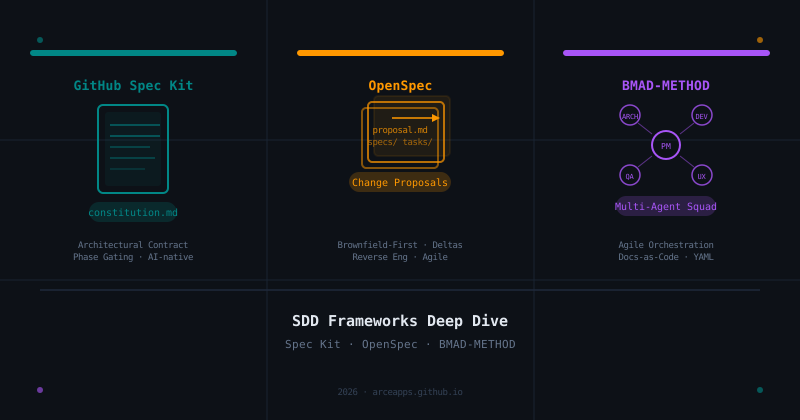
SDD Frameworks Deep Dive: GitHub Spec Kit, OpenSpec, and BMAD-METHOD Compared
A thorough analysis of the three leading Spec-Driven Development frameworks: the architectural contracts of GitHub Spec Kit, the change-proposal agility of OpenSpec, and the multi-agent orchestration of BMAD-METHOD.
Lean Task-First Development: Beads, LeanSpec, and Taskmaster in Practice
A deep dive into three tools that solve context rot and keep AI coding agents focused: Beads (git-native DAG issue tracker), LeanSpec (minimal spec-driven workflow), and Taskmaster (PRD-to-task orchestration). Real commands, real workflows, real indie dev perspective.

Agents.md Standard: Blueprint for AI-Ready Projects
Introducing the Agents.md standard. A file convention to context-load AI agents with project architecture, coding rules, and domain knowledge.