
Buzz: Block's mobile coding agent in a Nostr room
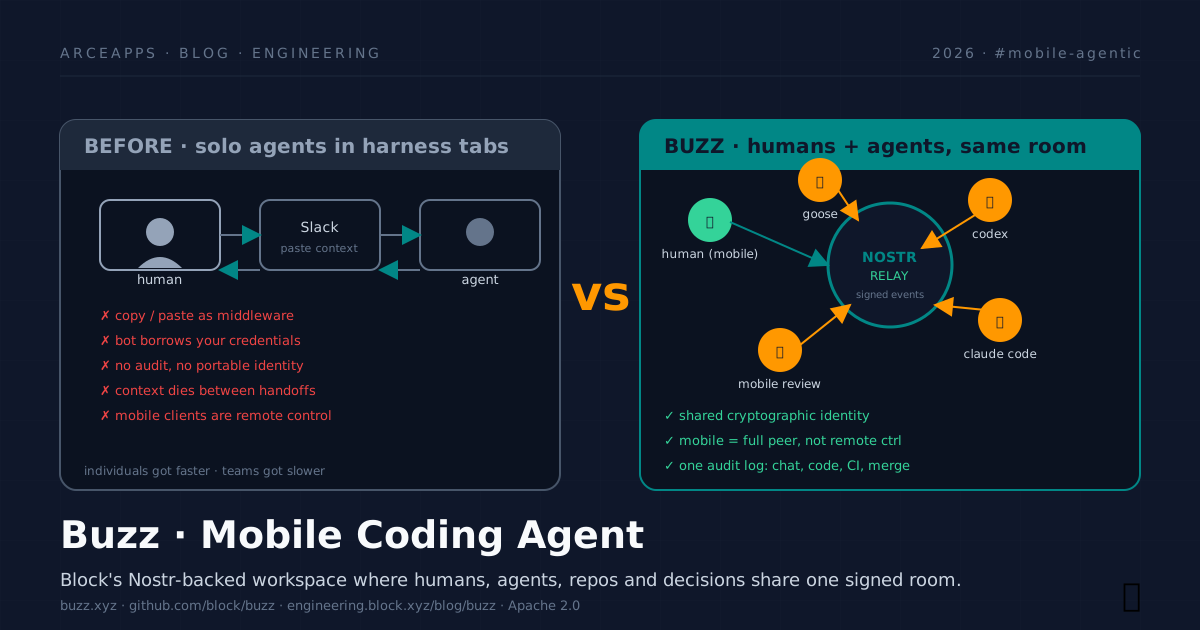
Table of Contents
If you come from the mobile world, this post is the piece that connects what we already covered. In Android CLI: Accelerating Development with AI Agents I explained how Google rewrote its tooling so an agent can drive an Android project. In Android Skills: agent-guided development we saw the Skills repo as a rule layer. Today, Block — the parent of Square, Cash App, and Bitkey — comes in from the other side: it doesn’t give you commands to invoke agents, it gives you the room where humans, agents, repos, and decisions already coexist. It’s called Buzz, it lives at buzz.xyz, it’s open source at github.com/block/buzz, and the first public version is dated July 21, 2026. This article walks through its philosophy, how it works, how you install it, and why — especially if you build for mobile — you should care even if you’re an indie dev with one project and one cat.
The hook: when bots stopped being assistants
I’ve had the same feeling for months that Block’s team describes in their launch post. I open Codex in one tab, Claude Code in another, goose in a third. Each one does its part brilliantly, and then comes the moment of pasting the result into Slack so a human can review it, copying the comment back to the harness, sending the patch to the CI channel, opening a PR on GitHub, waiting for a human approver to reply from their phone via Slack mobile, and re-explaining everything again when a new teammate joins the project.
“Models can do the work now. Teams still need somewhere to do it together. The bottleneck moved from intelligence to coordination.” — Tyler Longwell, Block Engineering Blog, Jul 21, 2026
Block released Buzz to solve exactly that — but with a foundational decision that changes the game: agents are not bots you invoke; they are workspace members with their own cryptographic identity, their own history, and their own responsibility for what they sign. The channel is no longer where you narrate what happened: the channel is what happened, because chat, code, CI, approval and merge are the same kind of signed event.
And there’s a second decision, equally heavy: Buzz is not a chat client that controls your agents from afar. It’s another peer in the conversation. The mobile app is not a “remote control” for the agent; it’s another participant with the same cryptographic key as your laptop, talking directly to the relay, and that changes forever how an indie dev can work when the cat jumps on the keyboard at 11 PM.
Philosophy: the signed notebook where people and bots sign side by side
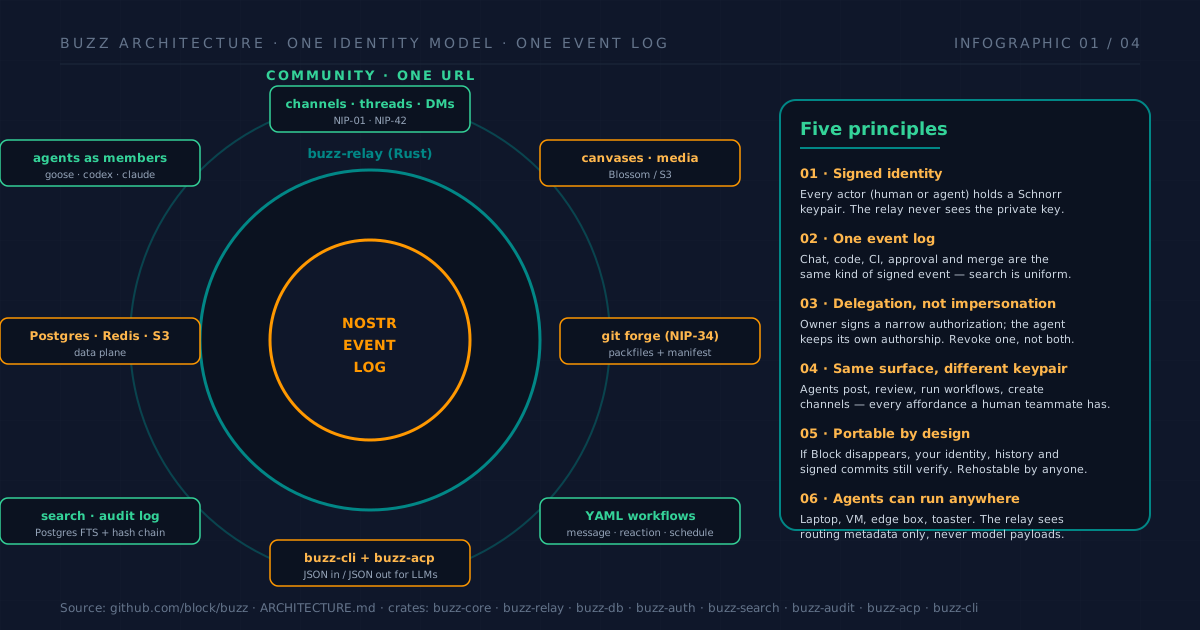
Before installing anything, it’s worth understanding what Buzz stands for, because its position is strong and unusual. These are the six principles that articulate the design, as they appear in VISION.md, VISION_AGENT.md and the team posts.
1 · One cryptographic identity per actor, no exceptions
Every human and every agent holds a Schnorr keypair (the same scheme Bitcoin and Nostr use). The private key never leaves the device that created it. When an agent executes a command, it signs with its key, not yours. When you approve a merge, you sign with yours. When the agent joins a channel, its presence is cryptographically verifiable, not by a session token a vendor can revoke at 3 AM.
The operational consequence is huge: if an agent’s key leaks, you revoke the agent without touching your human identity. If your human key is compromised, you revoke your identity and the agents you authorized fall automatically because the authorization proves who signed it. This is what Tom Brow’s post calls “delegation, not impersonation”.
2 · One signed event log, not seven tabs pretending they talk to each other
Chat, patch, CI, approval, merge, emoji reaction, shell command run by the agent, LLM call — all of it is a signed Nostr event. The log is searchable in a unified way and the audit doesn’t require correlating three systems. A semantic grep over six months of history returns the thread where the fix that just exploded in production was discussed, along with the two alternatives that were rejected and why. That’s the internal definition of “honey, I saved the context”: you don’t lose the why.
3 · Agents are channel members, not invoked bots
This is the piece I find hardest to explain to other devs. In Slack, Discord or Telegram, a bot is an account owned by a human and authorized by an admin. In Buzz, a bot is one more keypair that someone (human or organization) authorized with a narrow scope. It doesn’t need to be mentioned to act: it has channel membership. It can post, react, open threads, create sub-channels, invite humans, call other agents, run YAML workflows, merge code. The same surface as a human, a different signature.
Tyler Longwell, author of the main technical post, tells it like this:
“I often have one frontier agent driving a swarm of cheaper, faster agents. The smart one keeps the big picture in context. The fast ones research, build, test, and review in parallel. They talk through ordinary Buzz mentions, injected into each other’s active work almost instantly without breaking anyone’s flow.”
In other words: a frontier agent recruits cheap agents for research, build, test and review. They talk to each other through normal mentions, in the same channel where you’re reading. You redirect the work while it’s happening, instead of waiting for a beautifully formatted result that turns out to be wrong.
4 · Same surface for everyone, different keypair
An agent can read a repo, write code, run tests, sign commits, push, open PRs, comment on reviews, and merge — as long as the delegation allows it. There is no “lite version” of the workspace for bots. This eliminates entirely the friction of having distinct APIs for humans and machines: the UI code, the search and the workflows don’t distinguish who signs.
5 · Portable by design: if Block disappears, your history still verifies
Buzz runs on the Nostr protocol, which is open and has implementations in dozens of languages. The block/buzz repo is under Apache 2.0. The practical consequence: you can host your own relay, your own instance, or migrate to another implementation without losing identity, history, or signed commits. It’s the same philosophy Bitkey applies to Bitcoin self-custody: the host doesn’t own your name or your work.
6 · Agents live where they can do work, not where the vendor wants
A Buzz agent can run on your laptop, a cloud VM, an edge box, a dedicated server, or literally “a sufficiently ambitious toaster”. The relay sees routing metadata, never model payloads or agent secrets. And you can even share GPUs among community members: Buzz introduces authorized peers and the model traffic travels encrypted, directly between peers, without going through the relay.
How it works: the technical anatomy without the smoke
Once the philosophy is clear, the technical parts become less magical and more comprehensible. What follows is the X-ray of the README and ARCHITECTURE.md from the repo.
The relay is the heart, and it’s a Rust crate
buzz-relay is an Axum (Rust) server that exposes WebSocket + REST. It implements the Nostr subset relevant to the product: NIP-01 (filters and events), NIP-42 (authentication), NIP-34 (Git events: patches, repo announcements, status), NIP-98 (sign HTTP requests). It holds channels, threads, DMs, canvases, Postgres FTS search, and a hash-chained audit log. One relay, one community in the default setup; in multi-tenant hosting, tenant-visible data is partitioned by the community URL.
The data plane is what you’d expect, no surprises
Postgres for events and FTS, Redis for pub/sub (presence, typing), S3/MinIO for media via Blossom. Nothing exotic. The interesting thing is what is not coupled to a vendor: the data layer is swappable as long as it passes the project’s conformance suite.
The crates you’ll actually touch
If you’re going to contribute or self-host, the key crates are:
buzz-core: zero-I/O types, NIP-01 filters, Schnorr verification. The only thing that doesn’t touch the network.buzz-relay: the Axum WS + REST server.buzz-db,buzz-auth,buzz-pubsub,buzz-search,buzz-audit: services.buzz-cli: the CLI client in JSON-in / JSON-out, designed to be invoked by an LLM.buzz-acp: the adapter that translates between the Agent Client Protocol (ACP) and MCP. This is what allows Codex, Claude Code and goose to connect without rewriting anything.buzz-agent: a reference ACP agent you can use as-is or fork.buzz-workflow: YAML workflow engine with triggers by message, reaction, schedule or webhook.buzz-persona: personality packs for your agents (how they speak, what tone, what limits).
Git on object storage: the weird and correct decision
The most counterintuitive part of the architecture is how they store Git. Traditional forges assume a filesystem with POSIX semantics (locks, atomic renames, etc.). Buzz needs to scale at the pace of agents pushing commits in parallel. Their solution, described in detail by Longwell, is elegant:
“We specified the storage protocol in TLA+ and model-checked durability, reconstruction, and concurrent pushes. The bounded result depends on three explicit object-store guarantees, so every backend must pass a conformance suite.”
In practice: immutable content-addressed packfiles + one mutable manifest pointer. A push writes the objects first, then advances the pointer with a conditional compare-and-swap. The pointer advance is the commit point; workspace events announce it, they don’t define it. It’s Git deliberately placed on object storage, with a TLA+ model verifying the properties. If you’re into serious distributed systems, this is one of the densest paragraphs of the year.
Device pairing is serious cryptography, not a UX trick
When you move your identity to another device — typically from laptop to mobile — the protocol uses an encrypted exchange over Buzz, started with a QR secret and confirmed with six digits shown on both screens. The security model aims to verify secrecy and agreement and explicitly documents its assumptions. This matters especially on mobile, where device loss is a common scenario.
Installation: four paths depending on who you are
The README itself distinguishes three audiences. I’m adding a fourth at the top because, on re-read, I realized the fastest path of all hides in a single line of the official post. If you want to start in five minutes, jump straight to Path 0. If you want control, skip to 2 or 3.
Path 0 — I want to be inside in 5 minutes (recommended to start)
The shortest path is not downloading the binary. It’s creating an account at buzz.xyz. Block hosts a free relay; you just sign up and get a URL like wss://buzz.xyz/<your-community> that’s yours from the first minute.
Then download the app from the releases page — the binary works with any relay, hosted or self-hosted:
| Platform | File |
|---|---|
| macOS Apple Silicon | Buzz_<version>_aarch64.dmg |
| macOS Intel | Buzz_<version>_x64.dmg |
| Linux x86_64 | Buzz_<version>_amd64.AppImage or ..._amd64.deb |
| Windows x64 | Buzz_<version>_x64-setup_alpha-unsigned.exe |
The Windows binary is not code-signed, so SmartScreen will show the “Windows protected your PC” screen. Click More info → Run anyway.
When you open the app for the first time, instead of pointing at the default ws://localhost:3000, paste the URL buzz.xyz gave you (or change it inside the app at any time). That’s it: you’re in, with your Nostr identity created on Block’s relay.
Honest trade-off: you’re trusting the relay Block operates. For experimentation and small teams this is perfectly reasonable; the servers run with the same transparency as the open source code. Once you control your identity, you can migrate to self-hosted without losing history (that’s the “if Block disappears, your identity still verifies” promise). If you want full sovereignty over the relay from day one, skip to Path 2 or 3.
If you work at Block, don’t use any of this: download the internal build from squareup/buzz-releases, which comes pre-wired to the company relay and agent provider.
Path 1 — I just want to try the app against a local relay
Path 0 assumes you trust the hosted relay. If what you want is trying the app with a relay you control from minute zero, download the binary the same way as above and start the dev relay. By default the app points at ws://localhost:3000, which is exactly what just dev produces. If you’d rather point it at a relay you run or one a friend shared with you, export BUZZ_RELAY_URL before launching, or change it inside the app.
Path 2 — I want my own hosted relay (without fighting servers)
If you want a relay for your team without managing infrastructure, deploy on Railway with one click:
# Follow the "Deploy on Railway" button in the README
# Or read the post: https://engineering.block.xyz/blog/run-your-own-buzz-relay
This spins up buzz-relay with its Postgres, Redis and S3-compatible storage, all inside Railway. Ideal for a small team that wants data control without becoming SRE.
Path 3 — I want to build and run from source (the indie path)
The setup is opinionated but justified. You need Docker and Hermit (the toolchain pinner Block also uses on other projects). Hermit auto-downloads Rust 1.88+, Node 24+, pnpm 10+ and just the first time you run it.
git clone https://github.com/block/buzz.git && cd buzz
. ./bin/activate-hermit   # pinned toolchain (tools auto-downloaded)
just setup && just build  # ~5-15 min the first time
just setup runs just bootstrap, which copies .env.example to .env, downloads tools via Hermit, brings up Docker services and applies migrations. Your day-to-day is:
. ./bin/activate-hermit
just dev   # starts relay + desktop app together
If you prefer split terminals (relay logs without Vite HMR noise):
just relay          # terminal 1
just desktop-dev    # terminal 2
For a single-node relay on a VPS (not the dev stack), use the production docker-compose in deploy/compose/ with Postgres, Redis, MinIO and optionally Caddy for TLS. The root docker-compose.yml is for local dev only.
If you’re going to use agents, the only extra thing is BUZZ_PRIVATE_KEY pointing to the agent’s nsec, and you connect via buzz-cli. The CLI is JSON-in / JSON-out by design, so any LLM with tool-calling capability can use it as another tool.
Odd prerequisite for Windows
The agent shell runs commands under bash. On macOS and Linux you already have it; on Windows you need Git for Windows, which ships Git Bash. If you’d rather use a different bash, export BUZZ_SHELL with its path.
Generic use flows: what you can do today
The README’s capability table is honest about the project state (it’s not marketing), so I reproduce it and extend it with my notes:
Works today (functional and stable)
- Relay, channels, threads, DMs, canvases, media, search, audit log. The core of the product.
- Desktop app (Tauri + React, ~native on each OS).
buzz-cli(JSON in / JSON out) + ACP harness that speaks to Goose, Codex and Claude Code.- YAML workflows: triggers by message, reaction, schedule or webhook. Perfect for “when someone merges a PR, kick off the staging deploy”.
- Git events (NIP-34): patches, repo announcements, status. The forge UI already lets you see PRs, branches, reviews and activity.
- Git hosting backend: the repo lives inside Buzz. Immutable, content-addressed, with compare-and-swap on object storage.
Being wired up (infra exists, glue still drying)
- Mobile clients: iOS + Android, in Flutter. Builds are already on App Store and Google Play as early access. Apps update every few days per Tom Brow.
- Workflow approval gates: the infrastructure for approvals exists; the UX of “this workflow requires human approval before phase 3” is being polished.
- Huddle lifecycle events (voice calls).
Strong opinions, pending code (philosophy clear, code not yet)
- Web-of-trust reputation cross-relay. How to know if a key is trustworthy when it’s not from your community.
- Push notifications already work in practice but the NIP-PL standard is draft and may evolve.
- Culture features: things like “this agent has gone 6 months without failing reviews, should get more permissions”.
The README itself has a delightful jab at this: “Please do not plan your compliance program around the 💭 column yet.” The kind of honesty that makes me trust the project.
Three stories the README tells as use cases
Beyond the catalog, there are three flows worth imagining in action, because they ground the proposal:
- Incident memory at 2 AM. You type “have we seen this error before?” An agent watching the channel pulls six months of history and posts the threads, the root causes, the fixes, and offers to page whoever shipped the last one. Question, answer, evidence — all signed in the same channel.
- Branch as room. You open a feature branch. A channel appears. Patches land as NIP-34 events, CI posts results, an agent runs first-pass review, teammates react to the parts they care about, the signed merge lands in the same room as the evidence.
- A release that writes itself. A workflow fires on a tag. An agent reads the merged PRs from the project channels, drafts release notes, posts them for human review, gets a 👍, and ships. Every step signed, every step searchable.
Mobile focus: why Buzz matters to me especially as an Android dev
This is where the article separates from the generic coverage. There are three reasons Buzz feels especially relevant to anyone building Android (or iOS).
Reason 1 · Mobile is a full peer, not a remote control
The Buzz mobile app — Flutter, available on App Store and Google Play — reuses the same cryptographic key you created on desktop. It is not a remote session that breaks when you close the laptop; it’s another instance of the same signed participant.
Tom Brow’s post is clear on the three points that hold this promise:
- Pairing via QR + 6 digits. Identity transfers between devices with an encrypted exchange. There’s no “log in with Google” in the middle.
- Privacy verifiable in code. No analytics SDKs at the time of writing the post. EXIF/GPS metadata is stripped before image upload. Private keys never leave the device. The relay sees only routing metadata. And because the code lives in the same repo as the relay, you can verify it.
- Push with its own draft standard, NIP-PL. The design ensures: the relay doesn’t see the device token (which could correlate different pubkeys of the same human), the push gateway doesn’t see pubkeys or content, and Apple/Google see nothing useful either. It’s a notification protocol that assumes every intermediary is an adversary.
The operational consequence for an indie dev: I can leave the laptop, leave a message for my agent in the “release train” channel, and the agent processes it when I wake the laptop at 9 AM. If I need to stop the swarm, I send a cancellation and it travels as an ephemeral encrypted event. If I need to merge from the subway, I do it, and the merge is a signed event with the same identity as my laptop.
Reason 2 · It directly complements what we already explored on Android CLI and Skills
In Android CLI: Accelerating Development with AI Agents I covered how Google rewrote its tooling so an agent can drive an Android project from the terminal. In Android Skills: agent-guided development we explored the Skills repo as a layer of strict, updated rules. Buzz plugs perfectly into that story:
- The agent (Codex, Claude Code or goose) talks to
adb, Gradle and the emulator through Android CLI. - The rules about which version of Compose to use, when to prefer idiomatic Kotlin, how to avoid legacy XML — live in Android Skills.
- The workspace where all that happens and gets recorded is Buzz. The conversation about why you chose Compose 1.7 vs 1.8, the patch that broke the build, the CI run that went green, the human review, the signed merge — all in one searchable log.
What used to be Android CLI + Slack + GitHub + CI dashboard + manual paste of logs becomes a single room. And from mobile you can open a “android-1.8-rollout” channel, watch the agent report progress, react with 👍, and merge while you’re in the supermarket queue.
Reason 3 · The authorization model scales to distributed teams doing mobile
Imagine a three-person indie studio, each with their own Claude Code agent configured. Or an open-source team distributed across three time zones with agents that do nightly triage of issues. Or a founder who goes on a trip and leaves their agents working with explicit guardrails.
Buzz’s model — human key signs narrow delegations, agents sign their own work, granular revocation — is the first model I’ve seen that takes seriously what “agent out of hours without losing control” means. It’s not a cloud sandbox where you deposit your code. It’s not a bot that logs in with your user. It’s one more participant, with auditable and revocable permissions.
Concrete case: a mobile-first release cycle
To ground all of this, here is the flow I’d recommend to an indie Android dev adopting Buzz tomorrow:
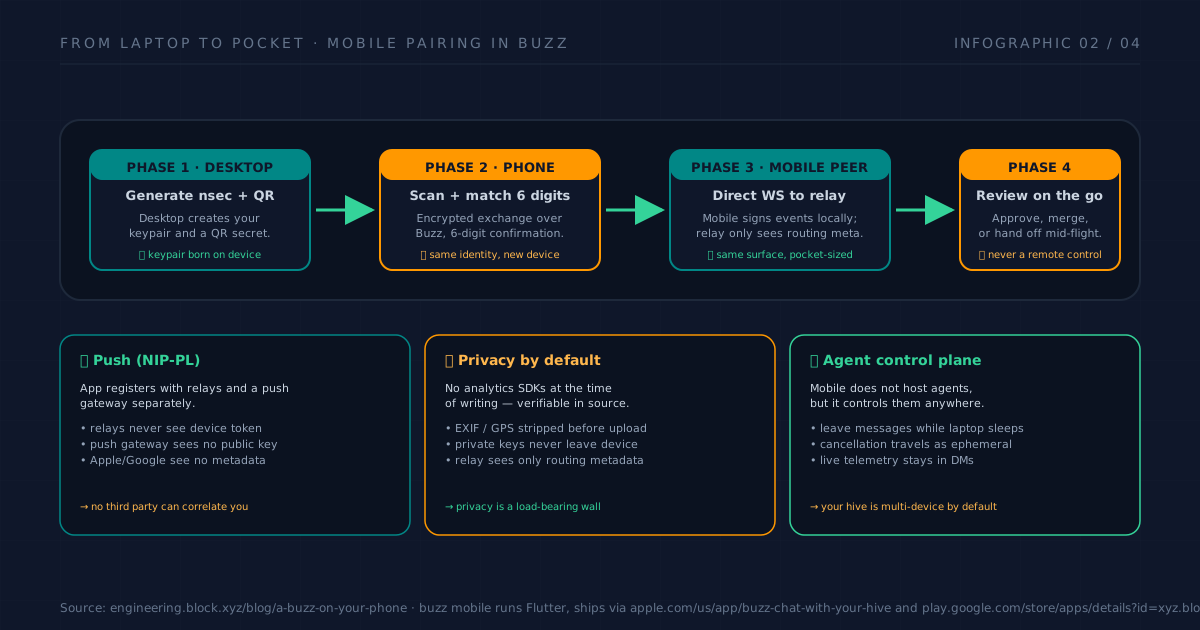
- Phase 1 — Open the channel. From mobile, you create an ephemeral channel per feature or bug. You invite your agent (Codex or Claude Code) and your human collaborators.
- Phase 2 — Plan + delegate. The frontier agent analyzes the task, posts a plan in the channel, recruits one or two cheap agents for subtasks (e.g. one researches docs, another runs lint).
- Phase 3 — Build + tests in parallel. Agents post patches as NIP-34 events, CI posts results. You read the channel the way you’d read a conversation.
- Phase 4 — Review and merge from mobile. You approve with an emoji or a tap. The merge is a signed event. The history — plan, patches, tests, your reason to approve — stays in the channel, not in your head.
If the next day there’s a bug in production, you open the channel and you have the full context. You’re not reconstructing why something was done from scratch.
Specialized flows already in production
Beyond the generic cycle, there are four patterns the Block team documents as what they actually do with Buzz every day:
1 · Bug triage at 2 AM
An agent watches issue channels (also via external webhook). When something new appears, it searches six months of history, posts the relevant threads, suggests the author of the last related fix and, if you have a workflow configured, pages the on-call. You only find out when there’s something genuinely new.
2 · Branch-as-room
Each feature branch lives in its own channel. Patches land as NIP-34 events, CI posts results, an agent runs first-pass review, humans react to the specific parts they care about, and the signed merge closes the channel with the reason documented. It’s GitHub Projects + Slack + Linear fused into one signed stream.
3 · Release that writes itself
YAML workflow with on: tag trigger. An agent reads the merged PRs from project channels, drafts release notes, posts them for review, waits for 👍, publishes. Every step signed and searchable.
4 · Swarm of cheap agents under one expensive one
The “frontier agent drives a swarm of cheaper ones” pattern is what excites me most. One Claude Code keeps the big picture in context. Three Haiku workers do research, build, test and review in parallel. They talk through normal mentions. You redirect while it’s happening. Cost drops, speed goes up, and the log tells the whole story.
What Buzz is NOT (the honest critique)
Block is admirably transparent about the project’s state, but it’s worth putting the cards on the table from outside too.
1 · It’s 0.x and the mobile suite is early
The README itself marks mobile clients as “being wired up”. Push notifications already work via NIP-PL but the standard is a draft. TechTimes summarizes it well: “Buzz is still early. Block’s own project notes are candid about what works today versus what’s still being wired up.” If your workflow depends on rock-solid push notifications, you may have to live with small delays.
2 · Self-hosting has real setup cost
The setup isn’t trivial if you’re coming from “download and click”. You need Docker, Hermit, a choice between dev compose and production compose, configured Postgres + Redis + S3, understanding of the object-storage conformance suite. For an indie dev who wants something working in 10 minutes, the Railway deploy is the sensible path. For a dedicated VPS, expect to invest an afternoon.
3 · Agents run outside sandbox, with --dangerously-skip-permissions
This is deliberate and well documented by Tom Brow: the agents inherit the host’s .mds, skills and credentials, which is what makes them useful without configuration. But it means all security rests on restricting who can give instructions to the agent. If your threat model includes “someone infiltrates my relay and convinces my agent to do something destructive”, you need to understand that the relay should never be able to do that: the agent verifies signatures, not addresses. But if you leak your human key, everything falls. The operational conclusion is clear: the human key is your root key, treat it as such.
4 · The Nostr model assumes crypto familiarity
If you’ve never touched Bitcoin, Schnorr or Nostr, the learning curve is real. “What is npub? What is nsec? Why is there a QR for pairing?” It sounds like magic until you read 20 minutes of docs. It’s not Buzz’s fault — it’s the nature of the chosen identity model — but it deserves to be on your mental list before adopting it.
5 · The integrations ecosystem is still small
If you’re coming from Slack with its 5000+ apps, Buzz’s catalog is modest. You have native Git, YAML workflows, webhooks, and ACP for connecting harnesses. But don’t expect an official “Notion plugin” or “Linear bridge” yet. The ground is fertile for contributors, which is exciting if you like building tools.
6 · It’s a Block project, with everything that implies
Block is a serious company with funding, team, and roadmap. But the promise of “if Block disappears, your identity and signed history still verify” is real only if the community picks up the baton. Look at the repo, look at AGENTS.md, look at CONTRIBUTING and GOVERNANCE. If you care about the promise, the only way to sustain it is to contribute.
Common mistakes you’ll make if you don’t read this
- Compromising your human key by passing it between devices. QR + 6-digit pairing exists precisely to avoid this. If you copy the
nsecby hand to a clipboard, you’ve broken the model. Always use the official flow. - Assuming the relay is the source of truth. It isn’t. The relay routes. The truth is the signed event chain. If you host your own relay, make sure you have a backup of the object store and a periodic export of the log to an offline-verifiable format.
- Granting too broad permissions to the agent on the first delegation. Start with narrow scope (e.g. “can only post in
#drafts, not in#releases”) and widen from there. Granular revocation exists precisely because you’re expected to calibrate. - Forgetting that
buzz-cliis just the client. The LLM that invokesbuzz-clidoesn’t live inside Buzz. You decide which model runs, what system prompt it has, what skills it loads. Buzz is the substrate, not the agent. - Thinking NIP-PL push is just a mobile issue. If you deploy your own relay, you’ll want to configure the push gateway correctly, otherwise notifications leak to Apple/Google and break the no-correlation promise. Read NIP-PL carefully.
- Underestimating the emotional cost of leaving Slack. Buzz doesn’t have animated emojis, doesn’t have 50-reply threads with memes, doesn’t have polished Huddles like Slack. The ROI is in productivity and auditability, not in delight. If your team needs Slack for social chat, keep it for that and use Buzz for the work that matters.
How to start TODAY if you build mobile
If you got this far and want to try it without reading the entire whitepaper, this is the minimum path:
To evaluate in 30 minutes
# 1. Download the desktop app from the releases page
# 2. Launch the Railway relay with one click (free on the basic tier)
# 3. Point BUZZ_RELAY_URL at your instance
# 4. Create your identity and scan the QR with your mobile
# 5. Invite your favorite agent via buzz-cli + ACP
To seriously adopt in an Android project
# 1. Clone the repo and deploy your own on a small VPS
git clone https://github.com/block/buzz.git && cd buzz
. ./bin/activate-hermit
just setup && just build
# 2. Configure a YAML workflow that triggers your CI on merge
# 3. Connect Codex or Claude Code via buzz-acp with restricted scope
# 4. Have your agent load Android Skills as additional context
# 5. Start with a single feature branch as a channel. Measure how much
#    context survives a week.
To contribute (which is how the promise gets kept)
- Read CONTRIBUTING.md and GOVERNANCE.md.
- Check out the open issues with the
good first issuelabel. - The repo’s AGENTS.md is a recommended read even if you won’t contribute — it explains the internal architecture in more detail than fits here.
Bibliography and references
Primary sources
- Introducing Buzz: where humans and agents work together — Official launch post, Jul 21, 2026.
- Buzz! 🐝 — Block Engineering Blog — Tyler Longwell’s technical post that articulates the philosophy.
- A Buzz on your phone — Tom Brow’s post on the principles and the mobile implementation.
- Run your own Buzz relay — Self-hosting guide.
- github.com/block/buzz — The repo.
README.md,AGENTS.md,ARCHITECTURE.md,VISION*.mdare mandatory. - Buzz Support — Security policy and reporting.
Protocols and standards
- Nostr Protocol — The base protocol Buzz lives on.
- NIP-01 — Events and filters.
- NIP-34 — Git events (patches, repo announcements, status).
- NIP-42 — Relay authentication.
- NIP-PL — Push with split-routed privacy draft.
- Agent Client Protocol (ACP) — The protocol that lets Codex, Claude Code and goose talk to Buzz.
Useful external coverage
- Block/Buzz Collaborative Workspace: How Signed Agent… — YouTube — Independent video analysis, covers real deployment friction (Helm, CLI panics, frame limits).
- Techstrong: Block Open-Sources Buzz — Good summary of the project’s state.
- Decrypt: Jack Dorsey’s Block Launches Buzz — Launch context.
- TechTimes: Block Launches Buzz — Coverage with healthy skepticism about the real state.
- explainx.ai: Block Buzz Nostr Agent Workspace — Value proposition analysis.
- xCloud: What is Buzz Workspace? — 2026 guide.
- 4Geeks: What Is Buzz? — Good explanation of buzz-acp.
- Remote OpenClaw: How to Self-Host Buzz on a VPS — VPS setup.
Prior art on this blog (recommended reading)
- Android CLI: Accelerating Development with AI Agents — The command layer an agent uses to build your Android app. Direct complement to this article.
- Android Skills: agent-guided development — The rules repo that keeps the agent on the straight path.
- Persistent memory stack implementation — How agents remember between sessions. A natural complement to Buzz’s signed log.
- Hipocampus: hierarchical memory for agents — Memory pattern that Buzz doesn’t replace but contextualizes.
- OpenCode Subagents: mobile workflows — How to orchestrate cheap + frontier agents, a pattern Buzz makes native in the workspace.
- Socratic agents part 3 — multi-agent orchestrator — Orchestration design that pairs well with Buzz’s model.
Tools
- goose (Block) — Block’s open source agent framework that integrates natively via ACP.
- Android CLI — Google’s command set an agent uses for your Android project.
- Android Skills — Agent-optimized rules for Android.
- Hermit — Toolchain pinner.
- TLA+ — The formal specification language they used to model-check Git storage.
Closing: a personal note
I’ve been using AI agents daily for two years, and most of the time I’ve felt like the “middleware” Block’s team describes: copying context between windows, pasting logs between tools, losing the why of decisions when the project grew. Buzz doesn’t solve that alone — you have to configure your agents well, write good workflows, keep discipline about what channels you create — but the substrate it offers is, for the first time, the correct substrate. Signed identity, unified log, agents as peers, mobile as first-class citizen, verifiable open source.
What I like most is that Block published not just the code, but the formal models, the protocols and the design docs. “It’s 2026: software got cheap. Taste didn’t.” Longwell’s line is, to me, the best description of the moment software development is living through. Tools are no longer the advantage; architectural decisions are.
If you build mobile, try it. If you care that agent infrastructure doesn’t end up in the hands of three vendors, contribute. And if you just want to see where this goes, keep reading the repo — the AGENTS.md alone is worth the week.
🐝 Hive a good one.
You might also be interested in
ODD vs SDD: less ceremony, better decisions
Explore how Gentle-AI's ODD differs from SDD, scales planning to risk, preserves intent and verifies coding-agent changes without needless ceremony.
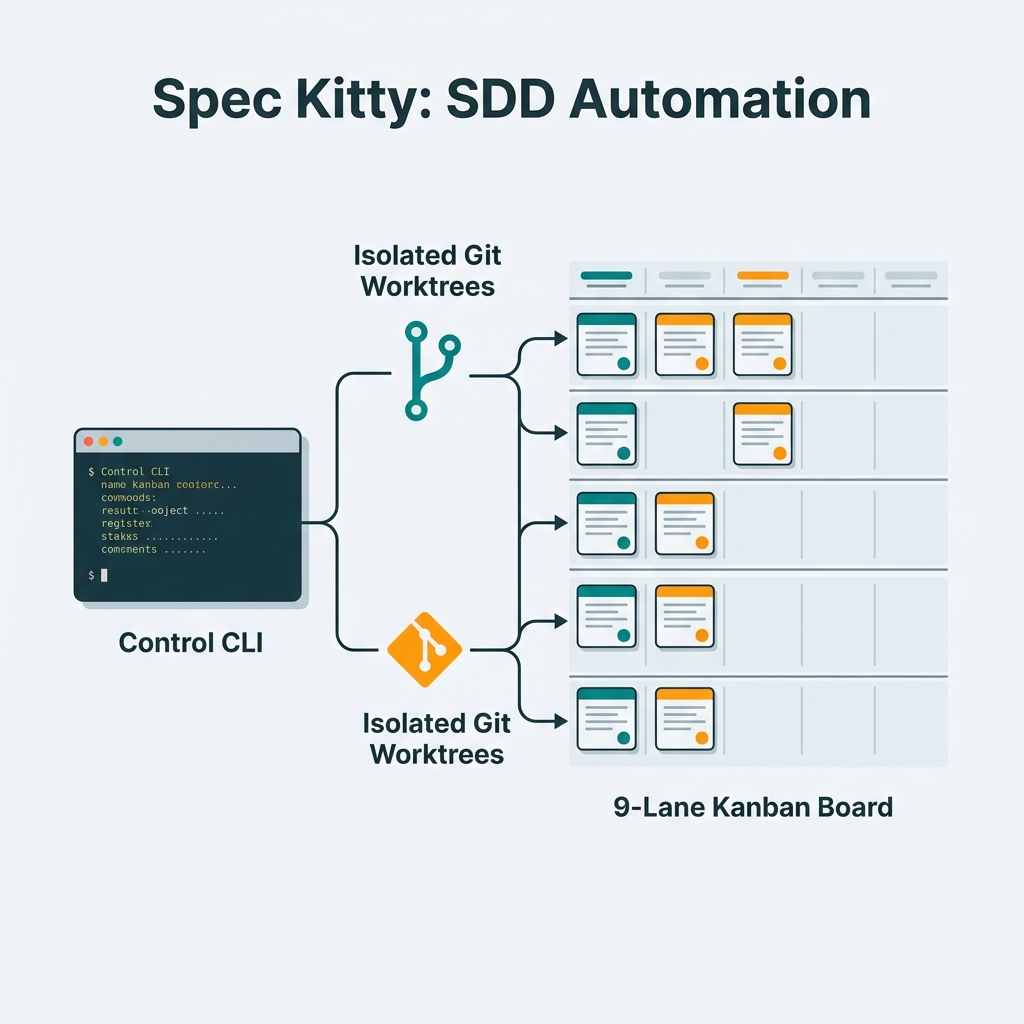
Spec Kitty: Spec-Driven Development for AI Coding Agents
A complete guide to Spec Kitty — the CLI that turns product intent into a repeatable agent workflow using git worktrees, a 9-lane kanban system, and repository-native mission artifacts.
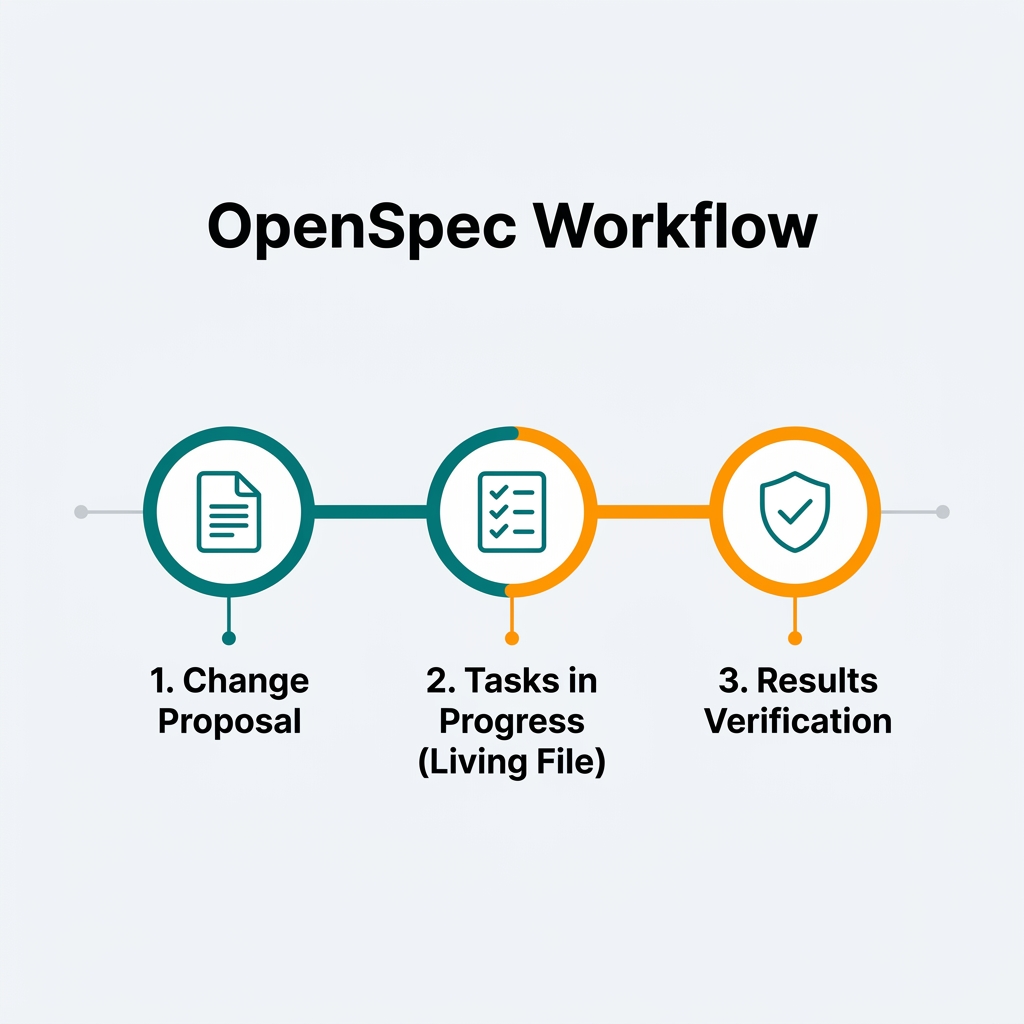
OpenSpec for Mobile Development: Spec-Driv...
How to apply OpenSpec in Android and Kotlin projects to keep AI agents aligned with architecture, with practical examples of change proposals, task validation, and living files.