
Table of Contents
🤖 What is an AI Agent?
An AI Agent is more than just a chatbot. It’s a system capable of perceiving its environment, reasoning about it, and taking actions to achieve a goal. In the context of Android, an agent can be:
- Assistant: Helps the user perform tasks (e.g., booking a ride).
- Automation: Executes background workflows based on triggers.
- Enhanced UI: Dynamically adapts the interface based on user intent.
Key Characteristics
- Autonomy: Operates without constant human intervention.
- Reactivity: Responds to changes in the environment (app state, sensors).
- Proactivity: Takes initiative to fulfill goals.
- Social Ability: Interacts with other agents or humans.
🧠 The Brain: Large Language Models (LLMs)
LLMs (like GPT-4, Gemini, Claude) serve as the cognitive engine for modern agents. They provide the reasoning capabilities:
- Planning: Breaking down complex tasks into steps.
- Decision Making: Choosing the best tool or action.
- Context Awareness: Understanding user history and preferences.
On-Device vs. Cloud LLMs
- Cloud (API): Powerful, huge context window, but requires internet and has latency. Ideal for complex reasoning.
- On-Device (Gemini Nano): Private, offline, fast, but limited capability. Perfect for simple tasks and privacy-sensitive data.
🏗️ Architecture of an Android AI Agent
1. Perception Layer
How the agent “sees” the world.
- Input: Text, Voice, Image.
- Context: User location, App usage stats, Calendar events.
2. Cognitive Layer (The LLM)
Where the magic happens. The prompt engineering lives here.
- System Prompt: Defines the persona and constraints.
- Memory: Short-term (conversation history) and Long-term (Vector DB).
3. Action Layer (Tools)
The agent needs “hands” to effect change.
- Tools: Functions the LLM can call (e.g.,
sendEmail(),toggleFlashlight()). - Android Intents: Deep linking into other apps.
// Example Tool Definition for an Agent
interface AgentTools {
    @Tool("Turn on the flashlight")
    fun turnOnFlashlight()

    @Tool("Search for a contact")
    fun searchContact(name: String): Contact?
}
🚀 Challenges in Mobile
- Battery & Heat: Running inference is expensive.
- Latency: Users expect instant feedback.
- Privacy: Sending PII to the cloud is risky.
- Context Limitations: Mobile screens have limited real estate for output.
🔮 Future Trends
- Multi-Modal Agents: Agents that see (Camera) and hear (Mic) natively.
- App-less Interactions: Agents performing tasks across apps without opening them.
- Personalized Models: Fine-tuned small models for individual users.
🏁 Conclusion
AI Agents represent the next paradigm shift in mobile computing. Moving from “App-Centric” to “Intent-Centric” interaction. As developers, our job is to build the bridges (Tools and Context) that allow these agents to interact safely and effectively with our apps.
You might also be interested in
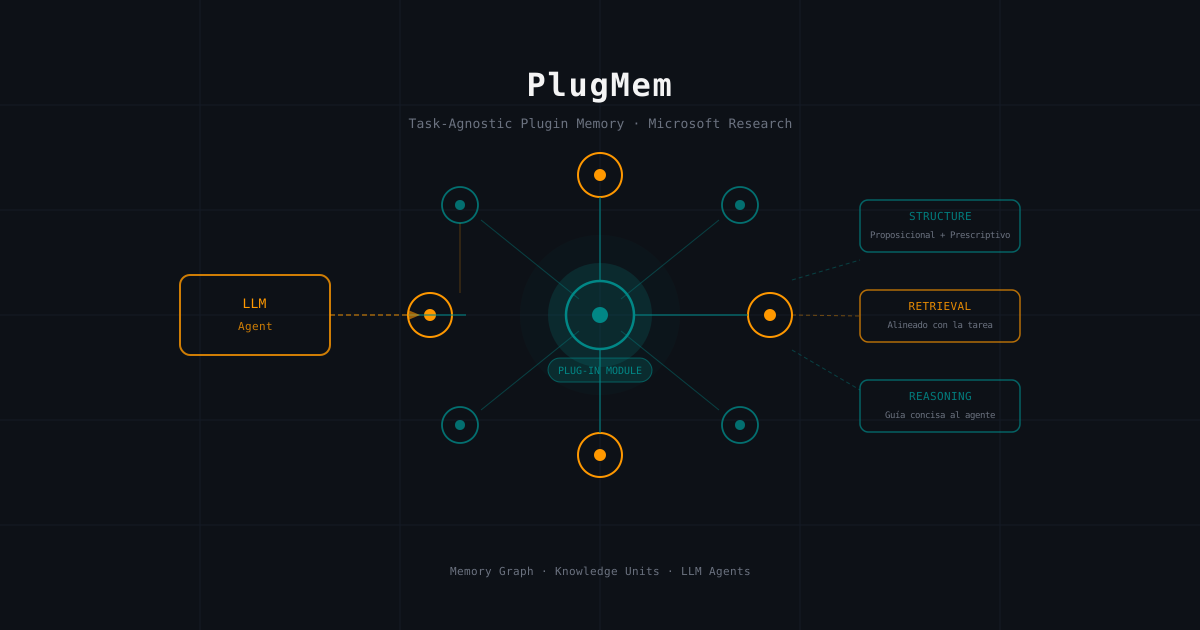
PlugMem: Microsoft Research's Task-Agnostic Memory Module That Every LLM Agent Needs
A technical deep-dive into PlugMem, Microsoft Research's plugin memory system that transforms raw LLM agent interactions into reusable structured knowledge. How its three-component architecture (Structure, Retrieval, and Reasoning) outperforms task-specific memory designs.
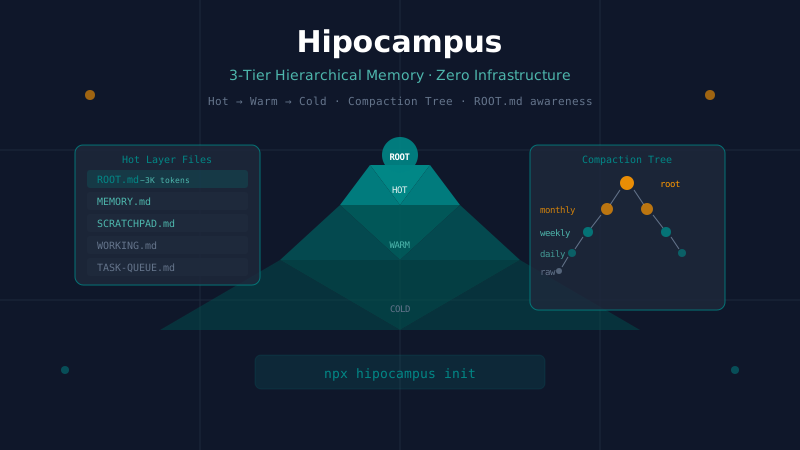
Hipocampus: Zero-Infrastructure Hierarchical Memory for AI Agents
A technical deep-dive into Hipocampus, a drop-in memory harness for AI agents that uses a 3-tier Hot/Warm/Cold architecture and a 5-level compaction tree. How ROOT.md enables constant-cost memory awareness and how it compares to hmem, Mem0, and Letta.
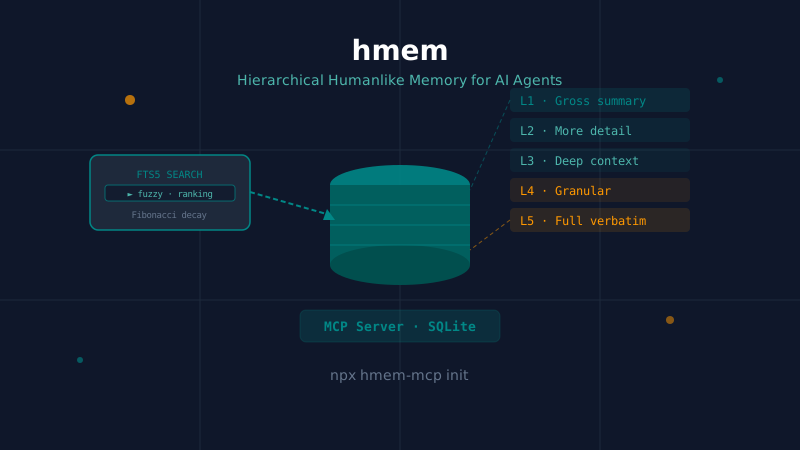
hmem: Hierarchical SQLite Memory for AI Agents That Actually Persists
A technical deep-dive into hmem (Humanlike Memory), an MCP server that models human memory in five lazy-loaded levels backed by SQLite + FTS5. How Fibonacci decay, logarithmic aging, and a curator agent solve the context window problem across sessions and machines.