
Semantic Versioning in CI/CD: The Science of Continuous Delivery

Table of Contents
📐 Theory: The Social Contract of Versioning
Semantic Versioning (SemVer) is not just a naming convention (X.Y.Z); it is a social contract between the developer and the consumer of the software (whether another developer or the end user).
In the format MAJOR.MINOR.PATCH:
- MAJOR: Incompatible changes (Breaking Changes). The contract is broken.
- MINOR: New backwards-compatible functionality. The contract expands.
- PATCH: Backwards-compatible bug fixes. The contract is maintained.
The Challenge in CI/CD (Continuous Delivery)
In a CD environment, humans should not decide versions. If a human decides “this is version 2.0”, it introduces subjectivity and error. The version must be a deterministic function of the change history.
Version(t) = Version(t-1) + Impact(Commit_t)
🔄 The Version Feedback Loop
A modern CI/CD pipeline for Android must follow this loop strictly:
- Code Change: Developer commits following Conventional Commits.
- Analysis: CI analyzes the commit. Is it
feat? Is itfix? Is itBREAKING CHANGE? - Calculation: CI calculates the new version based on the last tag and the impact of the change.
- Release: CI generates the artifact (APK/AAB) with that version.
- Tagging: CI tags the commit with the new version, closing the loop.
🛠️ Practical Implementation in GitHub Actions
Let’s build a pipeline that implements this theory using semantic-release or equivalents.
Step 1: Commit Analysis (The Parser)
We need a tool that understands Conventional Commits. We’ll use PaulHatch/semantic-version.
      - name: Calculate Semantic Version
        id: semver
        uses: PaulHatch/semantic-version@v5.3.0
        with:
          # Define the source root to ignore changes in docs/readme
          change_path: "app/src"
          # Map commit types to version increments
          major_pattern: "(MAJOR|BREAKING CHANGE)"
          minor_pattern: "feat:"
          # Output format
          version_format: "${major}.${minor}.${patch}"
Step 2: VersionCode Calculation (Android Specific)
As we saw in Automated Versioning, Android needs an integer. Here we apply set theory: the versionCode must be an injective projection of the versionName.
      - name: Compute Android Version Code
        id: compute_code
        run: |
          # Extract semantic components
          MAJOR=$(echo ${{ steps.semver.outputs.version }} | cut -d. -f1)
          MINOR=$(echo ${{ steps.semver.outputs.version }} | cut -d. -f2)
          PATCH=$(echo ${{ steps.semver.outputs.version }} | cut -d. -f3)

          # Decimal Positioning Algorithm
          # Allows: 21 Major, 99 Minor, 99 Patch -> 219999
          CODE=$((MAJOR * 10000 + MINOR * 100 + PATCH))

          echo "android_code=$CODE" >> $GITHUB_OUTPUT
Step 3: Artifact Immutability
A golden rule in DevOps is: Build once, deploy everywhere. The APK tested in QA must be bit-for-bit identical to the one that goes to Production.
This means the version is injected at build time, and that artifact “travels” through the environments. We do not rebuild for production.
      - name: Build Once
        run: ./gradlew bundleRelease -PversionName=${{ steps.semver.outputs.version }} -PversionCode=${{ steps.compute_code.outputs.android_code }}

      - name: Upload Artifact
        uses: actions/upload-artifact@v4
        with:
          name: app-release
          path: app/build/outputs/bundle/release/*.aab
⚠️ Handling Pre-Releases (Alpha/Beta)
Semantic versioning also covers unstable lifecycles.
1.0.0-alpha.1: First alpha.1.0.0-beta.1: Feature freeze.1.0.0-rc.1: Release Candidate.
Branch Strategy
feature/*-> Generates alpha versions (1.1.0-alpha.x).develop-> Generates beta versions (1.1.0-beta.x).main-> Generates final versions (1.1.0).
Action configuration to handle prereleases:
      - name: Determine Prerelease Label
        id: prerelease
        run: |
          if [[ $GITHUB_REF == *"feature/"* ]]; then
            echo "label=alpha" >> $GITHUB_OUTPUT
          elif [[ $GITHUB_REF == *"develop"* ]]; then
            echo "label=beta" >> $GITHUB_OUTPUT
          else
            echo "label=" >> $GITHUB_OUTPUT
          fi
📉 Common Mistakes and How to Avoid Them
1. The “Manual Tag”
Developer runs git tag v1.0.0 manually.
Problem: Breaks the single source of truth. If CI tries to generate v1.0.0 later, it will fail.
Solution: Block manual tag creation on GitHub for everyone except the CI bot.
2. “Dirty” Commits
Messages like “wip”, “fix bug”, “changes”. Problem: The semantic parser doesn’t know what to do (defaults to PATCH or ignores). Solution: Use a commit-msg hook or a lint action that enforces Conventional Commits format.
      - name: Lint Commit Messages
        uses: wagoid/commitlint-github-action@v5
3. VersionCode Explosion
If you use timestamps or build numbers directly (GITHUB_RUN_NUMBER).
Problem: If you switch CI providers (from GitHub to GitLab), the counter resets and Google Play rejects updates (Error: Version code 1 < 500).
Solution: Always use the calculation derived from SemVer (Major*10000...). It is CI-platform agnostic.
🎯 Conclusion
Implementing Semantic Versioning in your CI/CD is not bureaucracy; it’s reliability engineering. You transform the subjective and dangerous act of “versioning” into a mathematical, deterministic, and fully automated process.
When a manager asks “What’s in version 2.1.0?”, you don’t need to search emails. The system tells you exactly: “It contains all feat since 2.0.0 and is backwards compatible”. That is power.
You might also be interested in

Automated Deployment to Google Play Store with GitHub Actions
Learn how to configure a robust Continuous Deployment pipeline that automatically compiles, signs, and publishes your Android App to Google Play Store.

Automated Versioning in Android with CI/CD
Stop manually bumping `versionCode`. Use GitHub Actions and SemVer to automate your Android app versioning strategy.
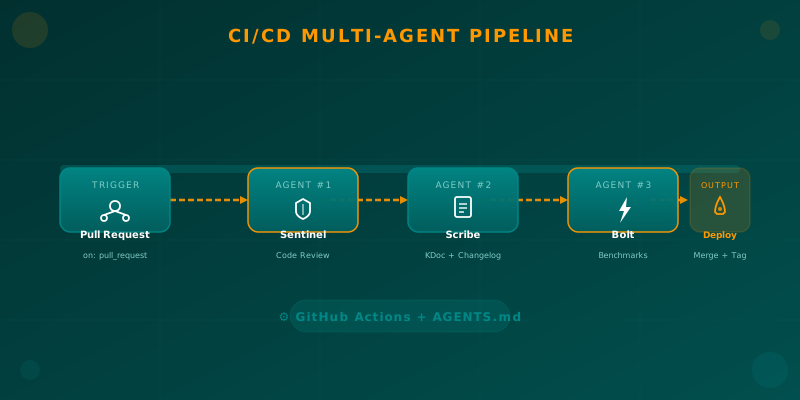
Orchestrating AI Agents in Your Android CI/CD Pipeline
Learn how to integrate specialized AI agents (code review, documentation, benchmarks) into your Android CI/CD pipeline using GitHub Actions and AGENTS.md.